We have recently completed a single-channel test program, and the method of use is as follows:
Download the firmware update tool to JetsonNano:
b0267_channel_test.tar.gz (23.2 KB)
Perform the following steps to update the firmware:
tar xzvf b0267_channel_test.tar.gz
cd b0267_channel_test/
sudo ./firmware_update -h # show help.

# example:
sudo ./firmware_update -i 7 -m B0267_ov9281_four_in_one_single_channel_firmware
After the firmware update is complete, please completely power off the Jetson Nano and Camera HAT and then power on again. (Sometimes there will be an error if the power goes on)
Next we can start testing:
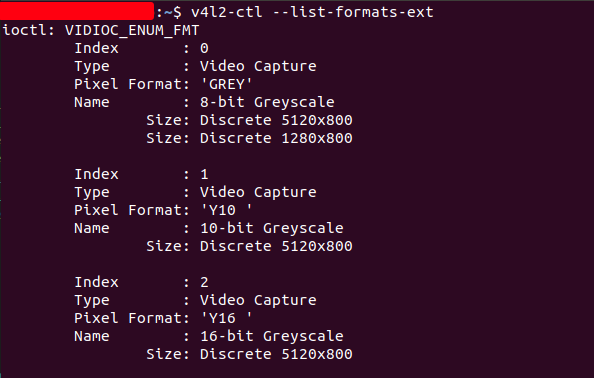
- View supported resolutions and formats
v4l2-ctl --list-formats-ext
-
Choose the resolution with the smallest width (1280x800 in this example)
-
Download and run the test program
git clone https://github.com/ArduCAM/MIPI_Camera.git
cd MIPI_Camera/Jetson/Jetvariety/example/
python3 arducam_displayer.py -f GREY --width 1280 --height 800 --channel 0
–width Used to specify the image width (please specify the minimum resolution here)
–height Used to specify image height
-f Used to specify the image format
Please refer to the output of the v4l2-ctl --list-formats-ext command to set the above three parameters
–channel Used to specify the channel (0~3)
Under normal circumstances, the preview should be displayed (note: please execute export DISPLAY=:0 when logging in with ssh)
If you can’t preview normally, and the following error occurs, it means that there is a problem with this channel.
select timeout
VIDIOC_DQBUF: Resource temporarily unavailable
Traceback (most recent call last):
  File "arducam_displayer.py", line 121, in <module>
    display(cap, arducam_utils, args.fps)
  File "arducam_displayer.py", line 35, in display
    frame = resize(frame, 1280.0)
  File "arducam_displayer.py", line 13, in resize
    width = frame.shape[1]
AttributeError: 'NoneType' object has no attribute 'shape'