Hi everyone, I’m trying to get an IMX477 camera working on a Raspberry Pi and I keep hitting an error. Here’s a screenshot of what I’m seeing:
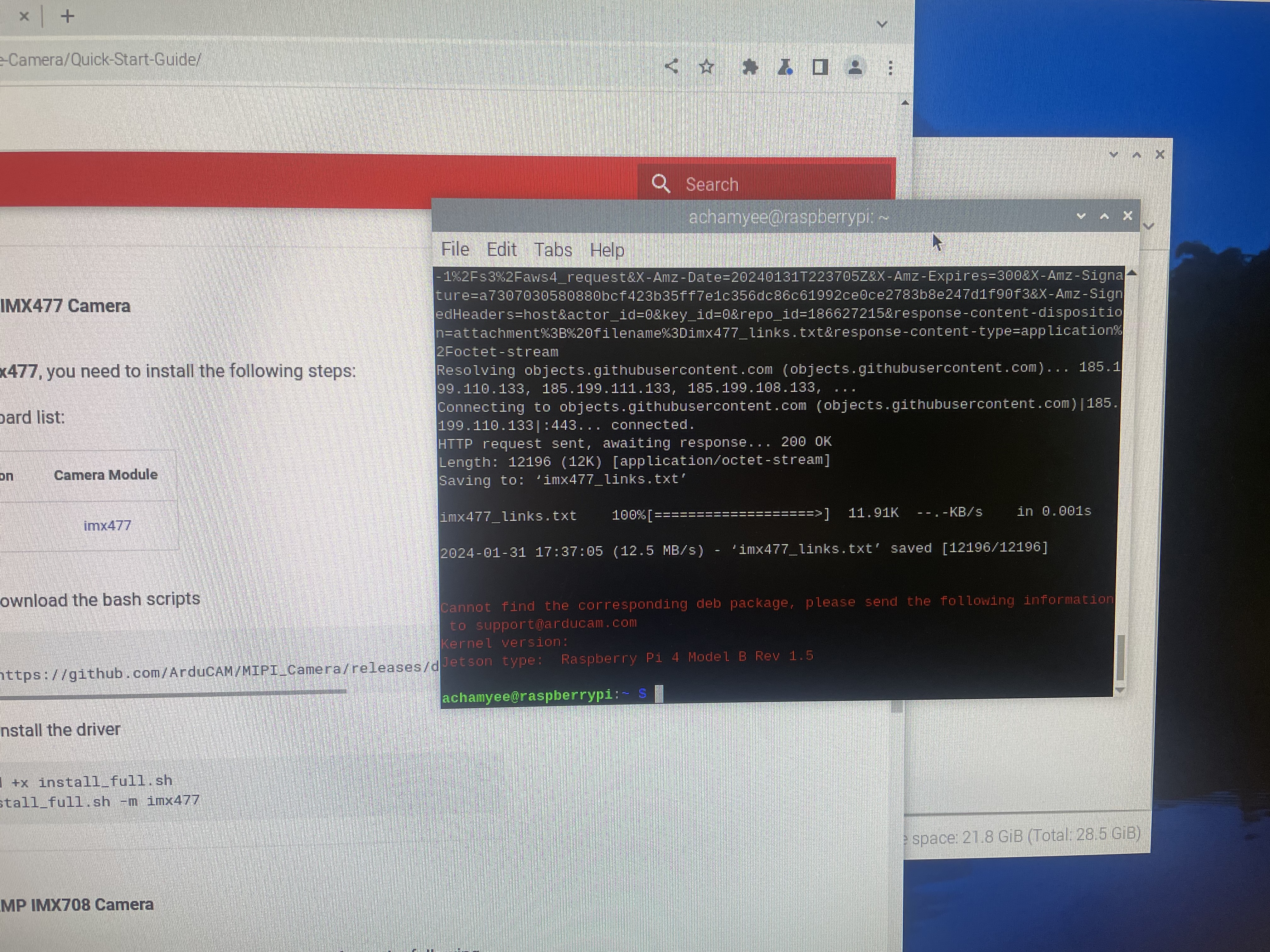
Not sure if this is a wiring problem or something in software. Any ideas?
Hi everyone, I’m trying to get an IMX477 camera working on a Raspberry Pi and I keep hitting an error. Here’s a screenshot of what I’m seeing:
Not sure if this is a wiring problem or something in software. Any ideas?
That screenshot is helpful. Can you confirm which Raspberry Pi model and OS you’re using? Also, which guide or documentation are you following, and have you tried any troubleshooting steps or config changes so far?
It’s a Raspberry Pi running Raspberry Pi OS. I’ve been following an IMX477 setup guide I found online. I didn’t change much in the config, just plugged the camera in and ran the command from that guide, and it fails with the error in the screenshot.
Looking at that screenshot, the camera isn’t being detected at all. I think I see the problem - the guide you’ve been following looks like it’s written for the Jetson platform, not the Raspberry Pi. On a Pi, the IMX477 sensor won’t work until its driver overlay is enabled, so if that step is missing you get exactly this kind of failure.
To fix it: open the config file with sudo nano /boot/config.txt, add dtoverlay=imx477 under the [all] section, save, and reboot your Pi. After rebooting, run libcamera-still -t 0 to check whether the camera opens. The official Pi camera docs cover this too: https://www.raspberrypi.com/documentation/computers/camera_software.html
Ah, that makes sense - the guide I had was indeed for Jetson. I’ve added dtoverlay=imx477 under [all] in /boot/config.txt and rebooted. So the correct way to test on the Pi is with libcamera-still -t 0? Let me try that now.
Yep, that’s the right test on a Pi. The key thing is to follow the platform-specific documentation - the Raspberry Pi needs dtoverlay=imx477 in /boot/config.txt, whereas the Jetson setup takes a completely different approach. Once that overlay is in place, use libcamera-still -t 0 to confirm the camera is detected. Let us know how it goes.