Hey everyone, I’m having trouble getting the advertised framerate out of my Pivariety 21MP IMX230 camera on a Raspberry Pi 4. I’m following the official quick start guide exactly.
My setup:
Raspberry Pi 4
Pivariety 21MP IMX230 camera
arm_boost=1 set in /boot/config.txt
gpu_mem=256 set in /boot/config.txt
Expected: 2656x2004 at 30 fps
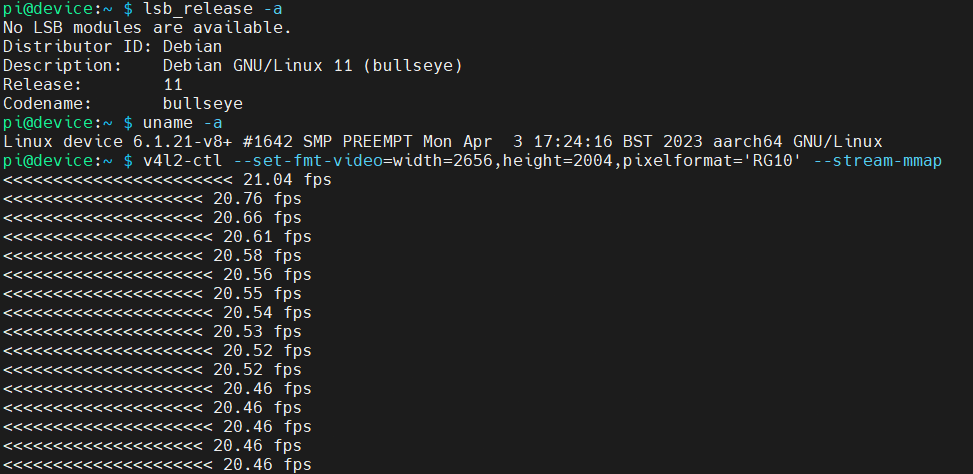
Actual: around 20.5 fps
What’s weird is the CPU sits at 75-85% load but the clock speed never goes above 600 MHz. It should be scaling up to 1800 MHz but it just won’t budge, even with arm_boost=1.
Hi there, thanks for the detailed report. Let me try to replicate this on my end with the same hardware. I’ve got a Pi 4 and the Pivariety IMX230 camera here. I’ll run the exact same command on Bullseye and see what I get.
Just to clarify — what OS are you running? Bullseye or Bookworm?
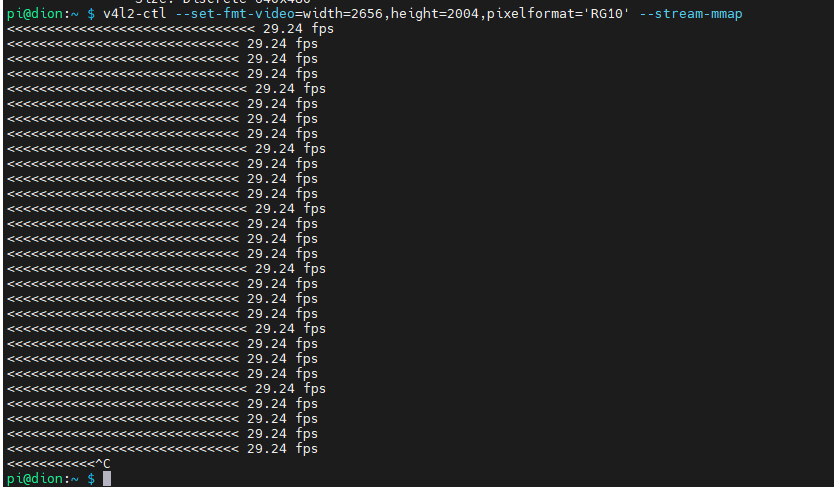
Okay, I’ve just tested this on my side. Same hardware — Raspberry Pi 4 with the Pivariety IMX230 camera, same command, Bullseye OS.
The result: framerate starts at 29.24 fps and stays rock solid. I’m not seeing any drop at all.
Here’s a screenshot of what I’m getting:
So the camera hardware is definitely capable of ~30 fps at 2656x2004 on a Pi 4. The issue you’re seeing — particularly the CPU being stuck at 600 MHz despite arm_boost=1 — points toward an OS-level problem.
Given that I can’t reproduce it on Bullseye, and your CPU scaling seems broken, my suspicion is that something in the Bookworm kernel or its power management is interfering. Could you double-check which OS you’re actually on? Sometimes SD cards get mixed up. Run:
So if you’re also on Bullseye and getting 29.24 fps while I’m stuck at ~20 fps on the same OS with the same hardware… that’s pretty confusing.
I’m going to try the opposite approach — I’ll flash Bookworm onto a fresh SD card and see if that changes anything. Maybe my Bullseye install has something weird going on.
That’s a good troubleshooting step. A fresh install on a new card will rule out any OS corruption or config drift on your current setup. Let us know how it goes. If the problem follows you to Bookworm, then we might be looking at something hardware-related.
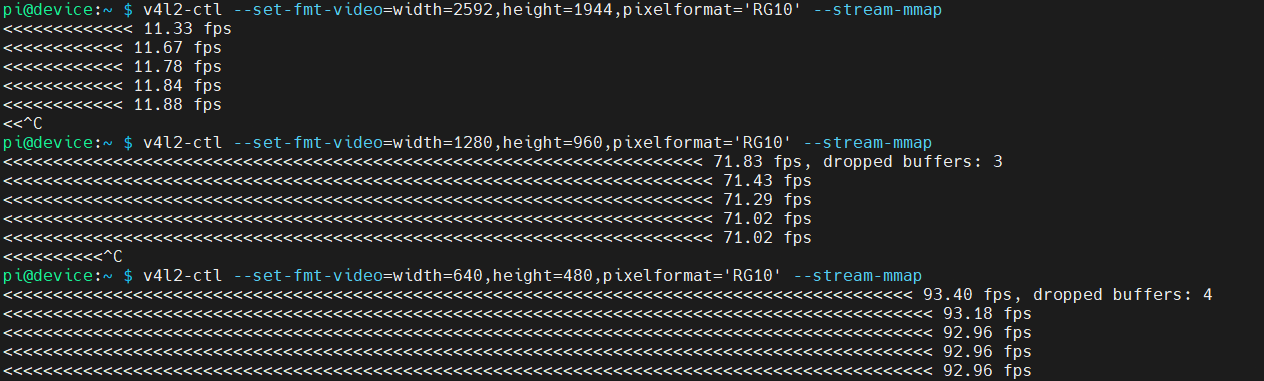
Alright, so I did a completely fresh install of Bookworm on a brand new SD card. Unfortunately the results are exactly the same as Bullseye — no improvement at all.
I went through and tested all the supported resolutions. The only one that hits 29.24 fps is 1920x1080. Every other resolution comes in lower than advertised.
Here are my results:
Bookworm framerate:
Resolution comparison:
At this point I’m starting to suspect a hardware issue — either the camera module itself or maybe the ribbon cable / connection is faulty. The fact that you can’t reproduce it on your end with the same setup makes me think there’s something wrong with my specific unit. Any other ideas before I look into a replacement?
Thanks for running through all that — that’s really helpful data. Since the issue persists across two different OS installs on different SD cards, and given that I can’t reproduce it on identical hardware, I think your suspicion about a hardware fault is reasonable.
A couple of things you could try before going down the replacement route:
Re-seat the ribbon cable on both ends (camera side and Pi side). Make sure it’s fully inserted and the contacts are clean.
Try a different ribbon cable if you have one lying around — a marginal connection can cause exactly these kinds of bandwidth-dependent issues, which would explain why 1080p works fine but higher resolutions don’t.
Check the FFC connector on the camera board for any bent pins or debris.
The pattern here — lower resolutions working at full framerate while higher resolutions don’t — is consistent with a signal integrity or bandwidth problem rather than a compute limitation. The fact that your CPU stays at 600 MHz might actually be a symptom rather than the cause; if the camera stream is producing errors or stalls, it could affect how the pipeline behaves on the CPU side too.
If you’ve got the means to test the camera on another Pi 4, that would also help isolate whether the issue follows the camera or stays with the Pi.