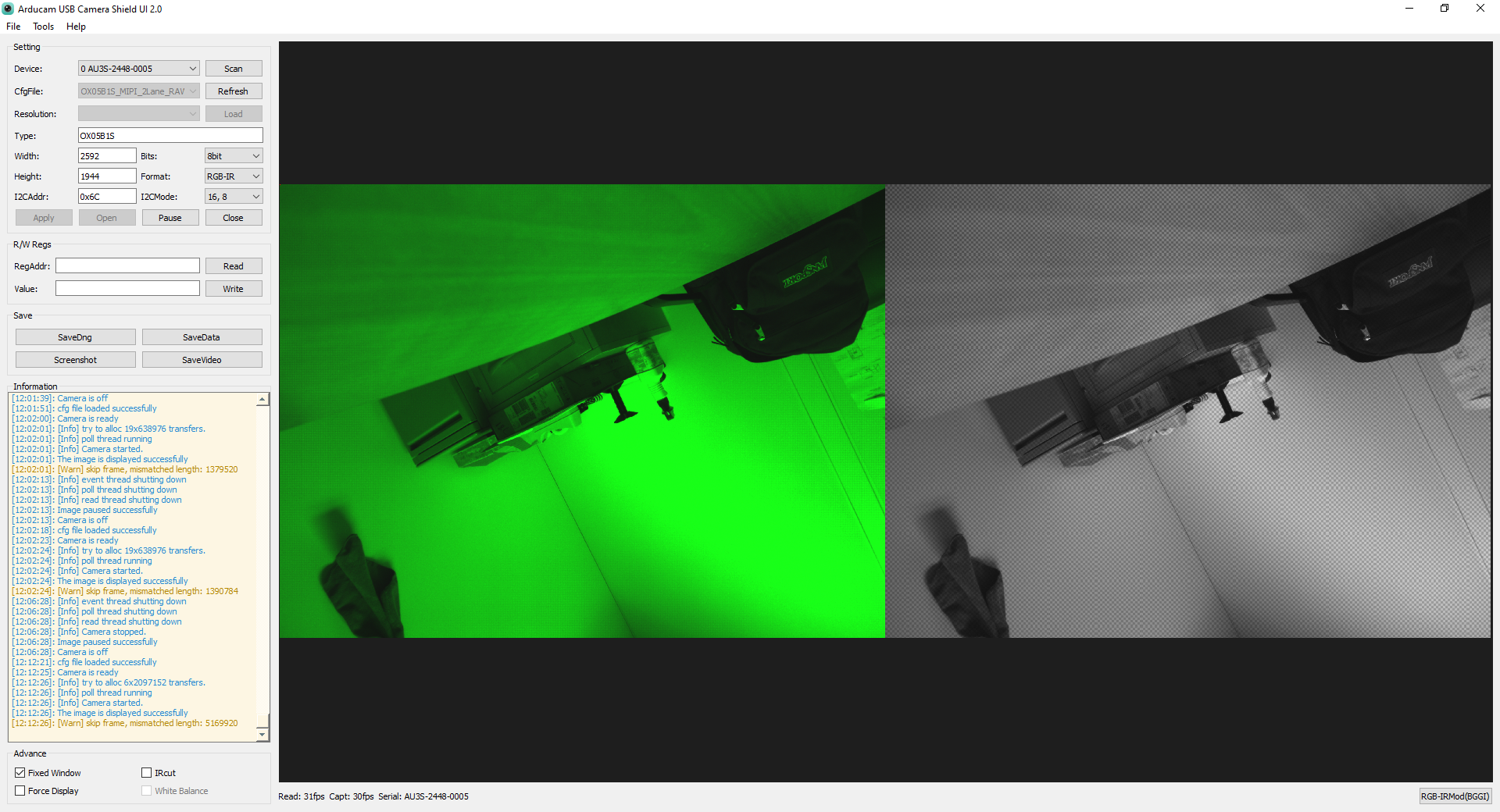
Hi everyone, hoping someone can point me in the right direction here. I’ve got an OX05B1S module hooked up through an Arducam USB Camera Shield UI 2.0, and the preview is showing two weird problems. The normal video feed has a green tint over the whole image, and when I switch to the IR feed I get a checkerboard pattern across the frame.
Thanks for the screenshot, that’s really helpful. That green tint in the normal feed usually points to the GUI getting raw sensor data instead of a properly processed frame. Before I dig deeper, can you tell me which config file you’re currently loading in the USB Camera Shield UI 2.0, and what resolution/fps profile you have selected?
Sure. The config I’m using is OX05B1S_MIPI_2Lane_RAW10_8b_2592x1944_30fps.cfg. I’ve been trying the config files that were provided with the camera, but no luck so far. I’ve also attached the two config packages I have on hand in case that helps:
Thanks, that confirms what I suspected. Those config files are not compatible with the new GUI. The OX05B1S outputs RAW10 data, and when the GUI doesn’t interpret that raw data correctly, it just displays it as-is. That’s exactly why you’re seeing the green tint in the normal video feed - the GUI is receiving the raw data from the camera module and rendering it without proper processing. The checkerboard pattern on the IR feed is the same root cause, it’s just showing up as a different demosaic artifact.
I’ve prepared updated config files that are compatible with the new GUI and sent them to you through private message - please check your inbox. Here’s what to do:
Replace the current config files with the updated ones I sent you.
Load the compatible config file in the Arducam USB Camera Shield UI 2.0 for the OX05B1S.
I’ve also included a reference image in the PM showing the expected output so you can compare.
In short, since the GUI receives raw data from the camera module, using config files that aren’t compatible with the new GUI causes the green tint in the normal feed. Switching to the GUI-compatible config files should clear up both preview issues. Let me know how it looks after you swap them in.