Over-saturated blue images after installing Arducam IMX477 driver on Jetson Orin Nano

Hey everyone, I’m running into a few issues with the Arducam IMX477 motorized AF camera (SKU: B0273) on a Jetson Orin Nano. I have two identical cameras on two separate Orin Nano boards, and I’m seeing the same problems on both.

First issue: after installing the Arducam driver, the captured images look heavily over-saturated, especially in blue-toned areas. When I compare side by side — Arducam driver vs. the native IMX477 driver (configured via jetson-io) — there’s a clear color difference. The native driver produces more natural colors.

Second issue: if I install the Arducam driver and then try to modify the CSI pinout configuration, the camera stream completely breaks. It’s like the two configurations are stepping on each other.

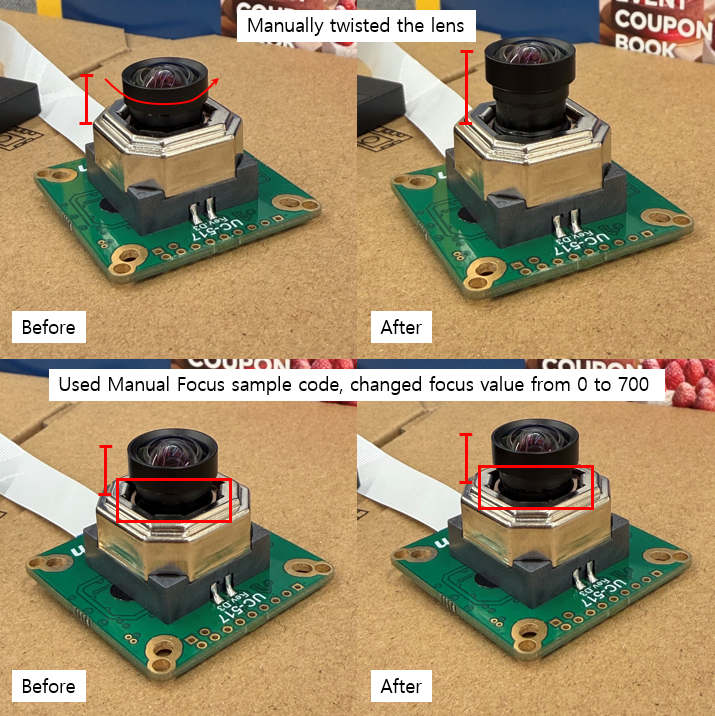
Third: I’m confused about the focus system. The sample code gives a focus value range of 0–1000, but the lens stops physically moving around 700. Pushing beyond that just makes the motor vibrate. Also, the AF motor seems to only gently push the lens base back and forth — it never rotates the lens or extends it noticeably. But the focus ring on the lens rotates smoothly by hand and covers a much larger focus range than what the motor gives me. Is this a dual system where the motor and manual ring are separate? Or is something wrong with my unit?

I followed the setup guides at the Arducam docs site (both the jetson-io configuration and the 12MP IMX477 quick start guide). Both methods detect the camera and autofocus works with the same test code.

Has anyone dealt with the color tuning side of this? I haven’t tried the ISP tuning file yet — are there code examples or guidelines for adjusting exposure, gain, or other settings to dial in the colors? Also, is there a detailed spec sheet for the module itself (registers, pinout) beyond the standard IMX477 sensor datasheet?
Thanks for the detailed report. Let me break this down since you’ve got a few things going on here.

Color difference between drivers:
This is expected. The Arducam driver ships with its own color tuning, while the native IMX477 driver uses NVIDIA’s generic ISP tuning. They produce different color profiles. Neither is “wrong” — they’re just tuned differently. That said, for most projects, the native NVIDIA tuning tends to be more balanced out of the box.

CSI pinout breaking after Arducam driver install:
Yep, this is a known conflict. The Arducam driver and the jetson-io pinout configuration can interfere with each other. You can’t really mix and match them freely.

Recommended path forward — two options:

Path 1 (Arducam Driver): Gets you the full 12MP resolution (4032x3040). The trade-off: whenever NVIDIA releases a new Jetpack version, there’s usually a delay before a compatible Arducam driver is available. You’ll be waiting on driver updates.

Path 2 (Native IMX477 Driver): Works out of the box with any Jetpack version, no extra steps. Trade-off: baseline functionality only — no 12MP mode, and you get NVIDIA’s generic color tuning.

For long-term projects where stability matters, I’d strongly recommend Path 2 — the native driver. Knowing your cameras will keep working after every OS update is usually worth more than the extra resolution.

As for the focus mechanism and the ISP tuning — let me address those in detail once you’ve had a chance to try a few things. For the color issue specifically, start with the ISP tuning steps here: Fix Red Tint with ISP Tuning - Arducam Wiki

Thanks for the response. So I went ahead and tried the ISP tuning file from that exact guide (the IMX477 one), but unfortunately it didn’t resolve the over-saturation and blue-tint issue. The colors still look off compared to the native driver output. Are there official Arducam guidelines for manually adjusting exposure, gain, or other related settings to tune this further? I’d rather not just trial-and-error the ISP parameters if there’s a documented approach.

Also, regarding the focus system — what you’re describing doesn’t match what I’m seeing on my unit. You mentioned the focus is a single motor-controlled system and the lens is glued in place. But on my camera:

  • The lens is NOT glued. I can rotate it smoothly by hand, and it covers a much wider focus range manually than what the motor achieves.
  • The motor only pushes the lens base gently back and forth. It never rotates the lens barrel, and the lens doesn’t extend noticeably.

I also found older Arducam community posts that say things like “This camera uses an M12 lens that can be twisted to get the best focus” and “You can try manually twisting the lens and see the effect.” So now I’m wondering — is my unit assembled incorrectly, or was there a design change at some point?

On the focus value range: good to know that stopping around 700 with vibration beyond that is expected. That clears that up at least.

I’ve attached a photo showing the lens on my unit for reference: image

Okay, let me address these one at a time.

Color / over-saturation still present after ISP tuning:

Make sure you’re actually applying the Jetson native IMX477 tuning file, not the Arducam-provided one. The native NVIDIA ISP tuning for IMX477 generally produces more natural colors. If you followed the guide at the link I shared and it’s still not looking right, double-check that the tuning file is actually being loaded by the pipeline. Sometimes the Argus daemon caches the old tuning — a reboot after replacing the file can help force it to pick up the new one.

As for manual exposure/gain adjustments, you can control those through the V4L2 controls or through the Argus API directly. The exact approach depends on whether you’re using GStreamer, the Argus C++ API, or something like OpenCV. If you let me know which pipeline you’re using, I can point you to the relevant controls.

Focus mechanism — what’s actually happening:

I think there’s some terminology confusion here. The focus adjustment on this camera is a single motor-controlled system. The “focus ring” you’re turning by hand is actually the threaded M12 lens barrel itself. The motor is designed to turn that same threaded barrel — it’s not a separate mechanism.

The lens is supposed to be glued at the factory so users don’t accidentally throw off the calibration by hand-turning it. If yours isn’t glued, that’s unusual, and it means someone may have loosened it or it left the factory without the adhesive being applied. The older community posts you found about “twisting the lens” were referring to a slightly different context — and honestly, those recommendations are outdated. The current design intent is that you should NOT be manually turning the lens.

When the motor operates, it turns the threaded barrel (the part you’re rotating by hand) to move the lens back and forth. You’re not seeing rotation because the movement per step is very fine — it’s a threaded mechanism, so one full rotation translates to a relatively small linear displacement. That’s also why the motor range seems smaller than what you can achieve by hand: when you hand-turn it, you’re spinning it multiple full rotations, whereas the motor is making micro-adjustments within its design range.

Focus range 0–1000:

Yes, the lens physically hits its end stop around 700. Values beyond that just cause the motor to stall and vibrate — this is expected behavior. The 0–1000 range in the sample code is a nominal software range; the actual mechanical travel is limited by the lens assembly.