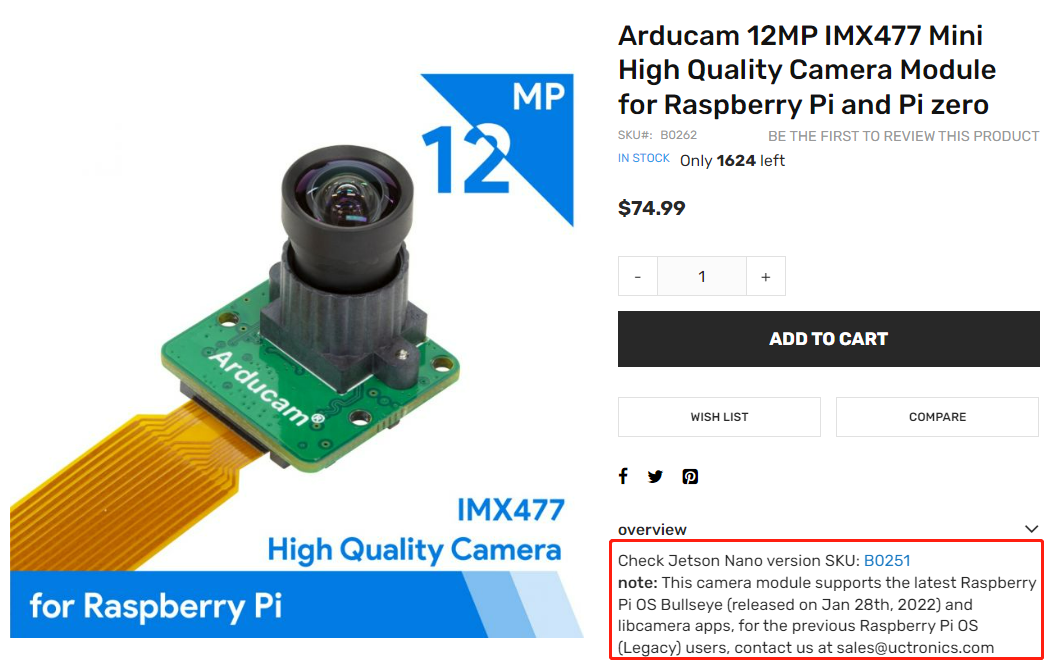
Hi, hoping someone can help with a B0262 IMX477 Mini Camera on a Raspberry Pi Zero 2W.
After upgrading to Raspberry Pi Bullseye (OS Lite, 32-bit) and switching to the new libcamera library to control the camera, the frame capture speed is drastically lower than when we were using the legacy camera stack. On the Pi Zero 2W we haven’t even managed to capture a single image. Running libcamera-jpeg -o test.jpg ends with:
ERROR: *** failed to start camera ***
We’re currently trying to upgrade our systems to control the IMX477 with libcamera, but it’s very difficult to get working and the capture speed is far lower than before.
Environment:
B0262 module (IMX477 Mini Camera)
Raspberry Pi Zero 2W
Raspberry Pi Bullseye OS Lite, 32-bit
New libcamera library
Previously working fine with the legacy camera stack
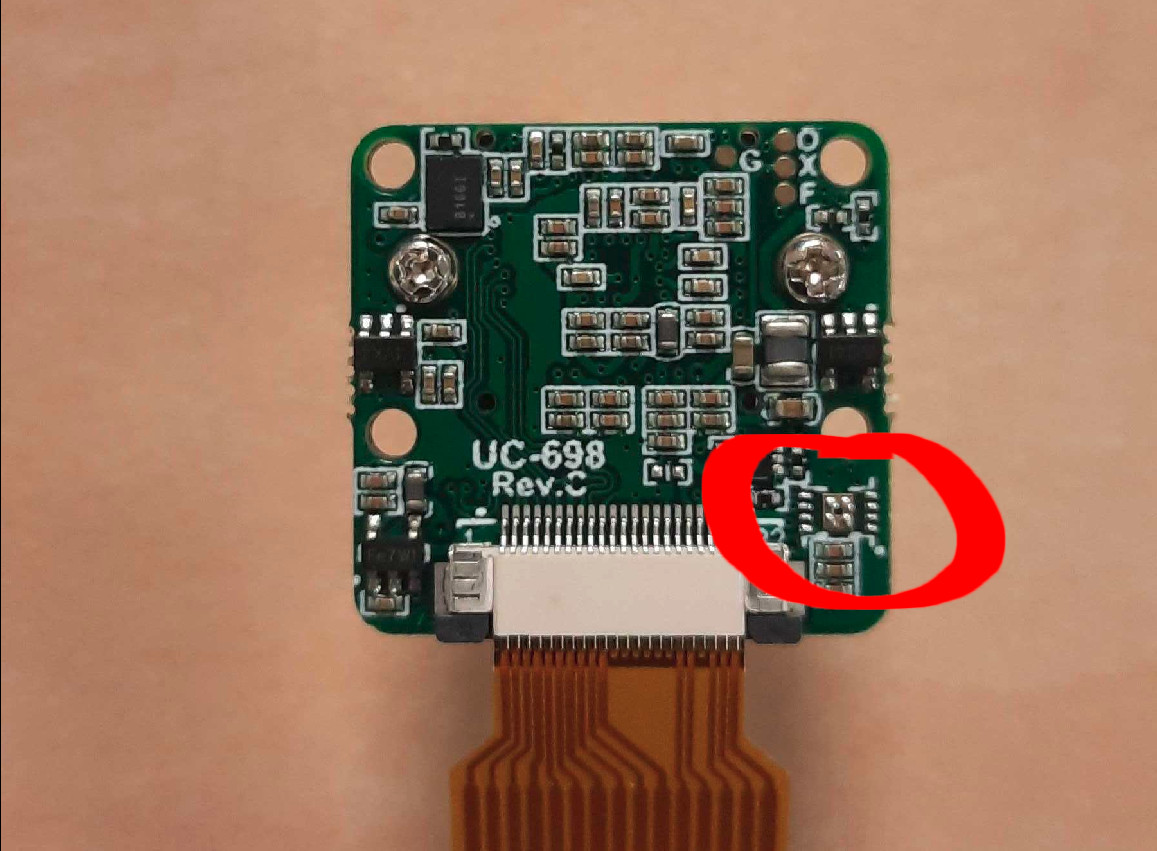
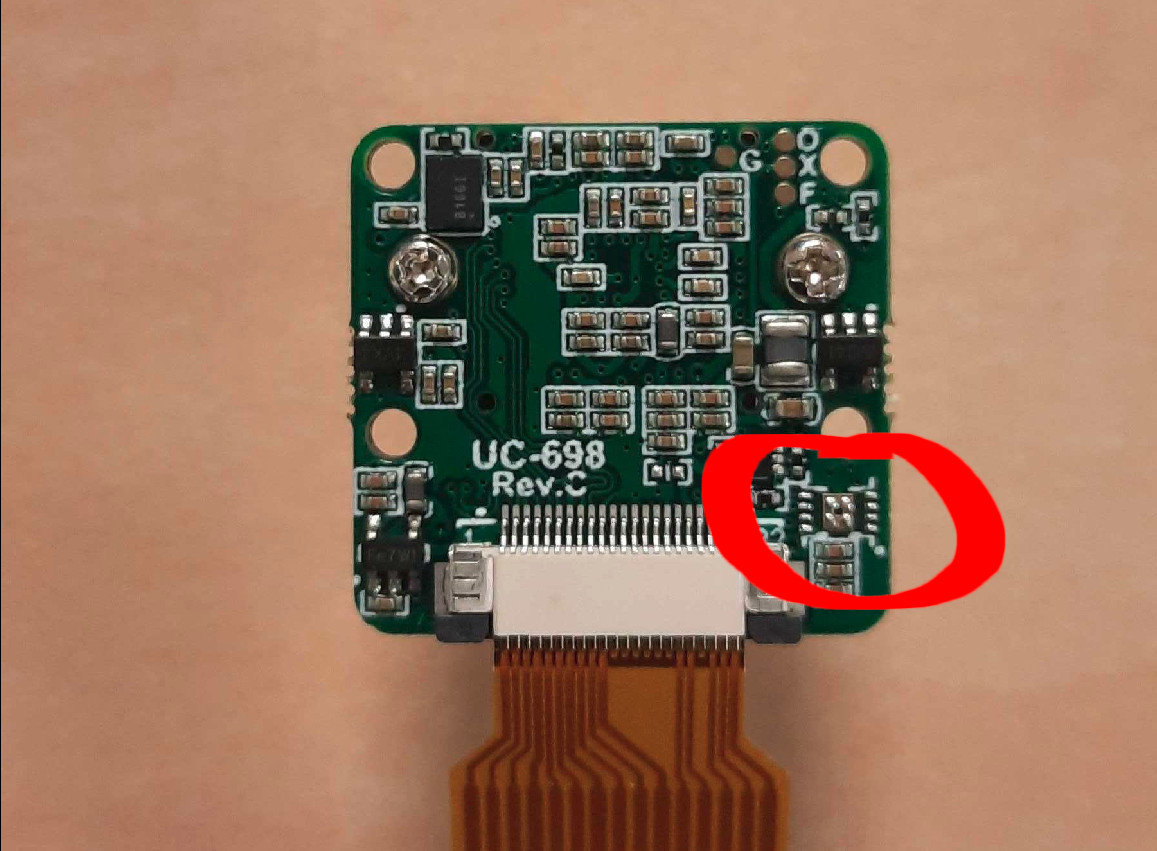
I’ve also circled in red an IC I believe is required for correct operation on the Pi Zero (2) that seems to be missing on the modules we received:
Hi, thanks for the detailed write-up. I work on Arducam support, let me dig into this with you.
First, I can see you’re running the camera on a Pi Zero and that the frame rate isn’t where you’d want it. A common source of this on a Pi Zero with the new libcamera stack is the configuration done via raspi-config. Could you try modifying raspi-config for this frame-rate / similar issue and see if it changes anything? It’s a fairly common fix for the slow-capture symptom.
There’s also a reference doc for the 12MP IMX477 camera you should check against: Redirecting...
Couple of things that would help me narrow this down:
Can you confirm the camera shows up with libcamera-hello --list-cameras?
Could you send a comparison video or command screenshots showing the capture speed is drastically lower than with the legacy stack?
Please share the full output of libcamera-jpeg -o test.jpg.
Also, a bit of background so we’re on the same page: the B0262 module supports the latest Raspberry Pi OS Bullseye only. The old IMX477 version with legacy-stack support has been discontinued due to the global chip shortage, and all IMX477 cameras have been upgraded to the new version supporting libcamera / the latest Bullseye.
If possible, share a screenshot of the IC you think is missing on the Pi Zero as well.
Thanks for the quick reply. We already have the camera detected fine — here’s the libcamera-hello --list-cameras output showing it detected correctly.
But the capture itself fails. Here is the full log from libcamera-jpeg -o test.jpg:
Preview window unavailable
[0:37:41.094632660] [1014]  INFO Camera camera_manager.cpp:293 libcamera v0.0.0+3424-e68e0f1e
[0:37:41.134785040] [1016]  WARN CameraSensorProperties camera_sensor_properties.cpp:141 No static properties available for 'imx477'
[0:37:41.134874884] [1016]  WARN CameraSensorProperties camera_sensor_properties.cpp:143 Please consider updating the camera sensor properties database
[0:37:41.134944207] [1016] ERROR CameraSensor camera_sensor.cpp:551 'imx477 10-001a': Camera sensor does not support test pattern modes.
[0:37:41.187316806] [1016]  INFO RPI raspberrypi.cpp:1317 Registered camera /base/soc/i2c0mux/i2c@1/imx477@1a to Unicam device /dev/media3 and ISP device /dev/media0
[0:37:41.188506078] [1014]  INFO Camera camera.cpp:1028 configuring streams: (0) 2028x1520-YUV420
[0:37:41.189006651] [1016]  INFO RPI raspberrypi.cpp:747 Sensor: /base/soc/i2c0mux/i2c@1/imx477@1a - Selected sensor format: 2028x1520-SBGGR12_1X12 - Selected unicam format: 2028x1520-pBCC
[0:37:41.267546357] [1020]  INFO IPARPI raspberrypi.cpp:631 Request ctrl: Saturation = 1.000000
[0:37:41.267752034] [1020]  INFO IPARPI raspberrypi.cpp:631 Request ctrl: Contrast = 1.000000
[0:37:41.267862815] [1020]  INFO IPARPI raspberrypi.cpp:631 Request ctrl: Brightness = 0.000000
[0:37:41.267963232] [1020]  INFO IPARPI raspberrypi.cpp:631 Request ctrl: AwbMode = 0
[0:37:41.268062242] [1020]  INFO IPARPI raspberrypi.cpp:631 Request ctrl: Sharpness = 1.000000
[0:37:41.268169482] [1020]  INFO IPARPI raspberrypi.cpp:631 Request ctrl: ExposureValue = 0.000000
[0:37:41.268271305] [1020]  INFO IPARPI raspberrypi.cpp:631 Request ctrl: AeExposureMode = 0
[0:37:41.268366982] [1020]  INFO IPARPI raspberrypi.cpp:631 Request ctrl: FrameDurationLimits = [ 33333, 33333 ]
[0:37:41.268478389] [1020]  INFO IPARPI raspberrypi.cpp:631 Request ctrl: AeMeteringMode = 0
[0:37:41.268575212] [1020]  INFO IPARPI raspberrypi.cpp:631 Request ctrl: NoiseReductionMode = 3
[0:37:41.781334265] [1016] ERROR V4L2 v4l2_videodevice.cpp:1794 /dev/video14[15:cap]: Failed to start streaming: No such file or directory
ERROR: *** failed to start camera ***
So it looks like the sensor gets registered and formats are negotiated (2028x1520-SBGGR12_1X12 → unicam 2028x1520-pBCC), but then /dev/video14 fails to start streaming. We’ve tried multiple config.txt/cmdline.txt settings, different IMX477 modules, different flat cables, and different Pi Zeros to rule out hardware.
Thanks, that log is really useful. The key line here is this one:
ERROR V4L2 v4l2_videodevice.cpp:1794 /dev/video14[15:cap]: Failed to start streaming: No such file or directory
The camera is being detected and registered correctly (you can see it binding imx477@1a to the Unicam and ISP devices), and the stream formats are negotiated, so this isn’t an I2C/detection problem — it’s failing at the point where V4L2 tries to start the actual streaming on the video node.
Two questions to help me narrow it down:
Can you share the current contents of /boot/config.txt and /boot/cmdline.txt so I can see exactly what’s set?
Which specific libcamera version is installed (libcamera-hello --version)? The log shows libcamera v0.0.0+3424-e68e0f1e.
Also, please do try the raspi-config change I mentioned earlier and let me know if anything changes at all — even an error difference is useful. And that reference doc is worth checking against your config: Redirecting...
We have already tried this configuration (the raspi-config change). It didn’t resolve the capture failure.
More importantly, there’s a second part to this that’s our real blocker: even where capture works, the frame rate is drastically lower with the new libcamera library on Bullseye than with the legacy camera stack.
Currently we are only able to capture and save 1 jpg frame every 1.3 seconds. With the legacy stack, we were able to do this in 0.8 seconds using the picamera Python API. Is there any way to make this capturing faster? Our camera application highly depends on it.
Details:
IMX477 camera on Raspberry Pi Zero
Raspberry Pi Bullseye OS with the new libcamera library
Legacy stack used the picamera Python API (that’s what we’re comparing against)
Understood, thanks for confirming you already tried the raspi-config route.
Let me set expectations on the legacy-vs-new comparison, because it clears up part of what you’re fighting:
The old IMX477 with legacy camera stack support has been discontinued due to the global chip shortage. All IMX477 cameras now ship as the new version, which supports the latest Raspberry Pi OS Bullseye / libcamera only. So going back to a legacy-supported module isn’t an available path — the B0262 is the current version and it targets the latest Bullseye.
That means the fix has to come from getting the libcamera path working properly rather than reverting to the old stack. A couple of things I’d like you to check:
Since you’re on the 0.8s → 1.3s capture gap: on a Pi Zero the capture time is heavily bound by the ISP and the still-image pipeline. Try libcamera-still with explicit full-res capture options and see if the timing differs from libcamera-jpeg (JPEG encoding on the Zero is a big chunk of that time). Screenshots/timing of both would help me compare.
Please confirm the exact libcamera version and your /boot/config.txt + /boot/cmdline.txt contents as I asked above.
On the capture failure itself, the /dev/video14 “Failed to start streaming: No such file or directory” is the thing I want to chase down. That’s a streaming-start error on the video node, not a sensor detection error.
Files we’ve modified: /boot/config.txt and /boot/cmdline.txt.
On the missing IC question — this is the part I keep coming back to. I’ve circled the component in red here:
I believe this IC is required for correct operation specifically on the Pi Zero (2), and it’s absent on the modules in our order. Could someone confirm whether the current B0262 board design has this component populated? If it’s genuinely required for the Zero and it’s not there, no amount of config tweaking is going to help.
Good question, and thanks for the clear photo. Let me summarize where we stand so it’s not lost in the thread:
The camera is detected correctly via libcamera-hello --list-cameras, and libcamera registers imx477@1a to the Unicam and ISP devices.
However, capture fails with Failed to start streaming: No such file or directory on /dev/video14, ending in ERROR: *** failed to start camera ***.
The warnings during init (No static properties available for 'imx477', “does not support test pattern modes”) are non-fatal and not the cause of the failure.
The frame-capture speed on the new libcamera path (1 jpg / ~1.3s) is drastically lower than the legacy path (1 / ~0.8s via picamera), and the legacy IMX477 variant is discontinued, so there’s no reverting to the old stack.
On the missing IC: I can’t confirm board-population from a photo in the thread alone, so I’ve sent you some private details to follow up on that and the diagnostic capture output. Please check your messages.
For the streaming failure, the next useful step is to validate on the freshest Raspberry Pi OS Bullseye image (the B0262 is supported on the latest Bullseye only) and, if the /dev/video14 error persists there, capture the exact libcamera-hello --list-cameras output plus the full libcamera-jpeg log again so we can compare it against the earlier run. Also worth testing the module on a full-size Pi with the same image to see whether the streaming failure is specific to the Zero 2W.