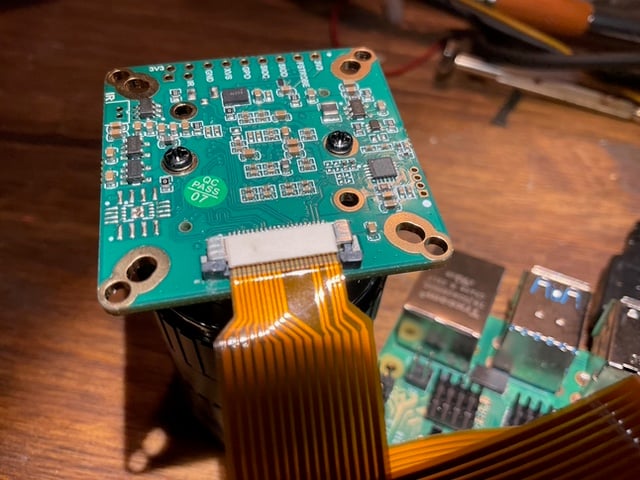
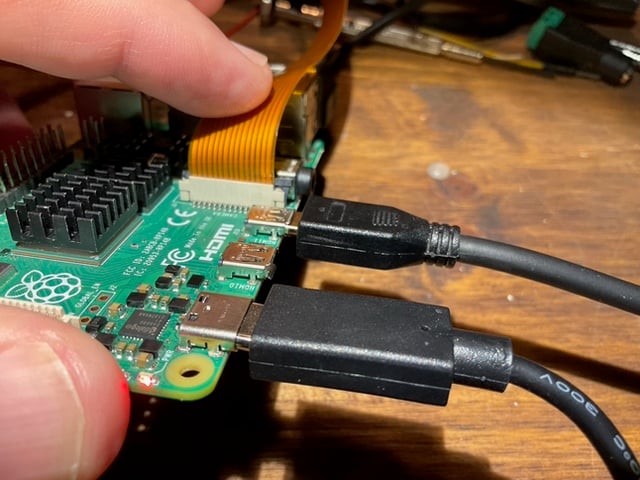
Hi everyone, I’m pulling my hair out trying to get an Arducam UC-517 Rev.D3 (the 12MP IMX477 one) working on my Raspberry Pi 4B. I followed the setup guide at docs.arducam.com for the 12MP IMX477 but I’m stuck at square one.
The camera doesn’t seem to be recognized at all at the kernel level. I’ve reseated the ribbon cable a few times but no luck. Is there something obvious I’m missing?
Thanks for the detailed report. Since dmesg shows zero recognition of the IMX477 sensor, this usually points to one of two things: a physical connection problem, or a device tree overlay configuration issue.
Let’s gather some diagnostic data. Can you do the following:
Post clear photos of the ribbon cable connections — both at the camera board end and at the Raspberry Pi CSI port end. Sometimes a slightly crooked insertion or a cable oriented the wrong way can cause this.
Run our diagnostic tool to generate a full bug report:
For what it’s worth, I’ve double-checked and the behavior is exactly the same as before — rpicam-still --list-cameras still says “No cameras available!” and dmesg shows nothing for imx477 or arducam. Let me know what you find in the report.
Found it. Your bug report shows the issue clearly.
In your /boot/config.txt, you have:
[cm5]
dtoverlay=imx477,cam0
The problem is that [cm5] is a model-specific section filter. Those entries only get loaded when the system detects it’s running on a Compute Module 5. Since you’re on a Raspberry Pi 4B, that overlay line is silently skipped every boot. The camera sensor driver never gets loaded, which is why dmesg is completely empty.
Fix:
Open /boot/config.txt and delete or comment out the dtoverlay=imx477,cam0 line under [cm5].
Add this under the [all] section (or just anywhere outside of model-specific brackets):
dtoverlay=imx477
Using [all] ensures the overlay loads regardless of which Pi model you’re running.
Reboot:
sudo reboot
After that, rpicam-still --list-cameras should detect the camera. Give that a try and let me know how it goes.
That makes total sense — I must have copied that line from somewhere without realizing the [cm5] section mattered. Unfortunately, even after the fix, the camera is still not being recognized.
Here’s what I did:
Commented out dtoverlay=imx477,cam0 under [cm5]
Added dtoverlay=imx477 under [all]
Rebooted
Then ran:
rpicam-still -t 0
Output:
[0:02:14.310104087] [1805]  INFO Camera camera_manager.cpp:330 libcamera v0.5.2+99-bfd68f78
Made X/EGL preview window
ERROR: *** no cameras available ***
So libcamera loads fine, but still no camera detected. I’m starting to wonder if the camera module itself is defective, or if there’s something else going on with the kernel / driver side. Any ideas on what to try next?
That’s frustrating — the overlay fix was definitely necessary but clearly wasn’t the whole story. Since the device tree overlay is now loading correctly but the sensor still isn’t being picked up, the possibilities are narrowing down to:
A physical ribbon cable issue (even though it looks seated correctly in the photos, a damaged cable or a slightly misaligned contact can cause this)
A hardware fault on the camera module itself
Some deeper driver or kernel conflict on your Trixie install that isn’t immediately obvious from the bug report
At this stage it would be best to take a live look at your system. I’ve sent you details via private message for setting up a remote support session — check your inbox here on the forum. Once you’ve got that set up, we can dig into the kernel logs and i2c bus state in real time and figure out if the sensor is even showing up on the I2C bus. If it’s a hardware-level failure, we’ll know pretty quickly.
For anyone following along with a similar issue: once you’ve confirmed your overlay is loading (check with sudo vclog -m or by looking at /proc/device-tree after boot), the next step is usually to scan the I2C bus with i2cdetect -y 10 to see if the sensor responds at its expected address (0x1a for IMX477). If nothing shows up there, it’s almost certainly a physical connection or hardware problem.