Hi everyone, I’m stuck trying to get either of my cameras working with the Arducam USB3.0 Camera Shield Plus (UC-593 Rev.D) on Windows 10 Pro 64.
I followed the ArduCAM_USB_Camera_Shield_Python_Demo with an IMX219 and keep getting:
RuntimeError: failed to open camera
I also tried an OV5647 and it just keeps printing “bad frame received” in a loop.
For the config I looked in ArduCAM_USB_Camera_Shield_Config, but there is no UC-593 Rev.D entry there. Has anyone got this shield working with these sensors?
Thanks for the details. Before anything else, can you confirm where the IMX219 and OV5647 modules came from? The shield is designed around Arducam camera modules, and the config files are tuned for those. If the sensors are from another vendor, the stock config may simply not match and you can see exactly these kinds of open/frame errors.
Which demo did you run for the Python test, and which config file did you point it at? Also, have you tried the USB Test Camera Demo to see if the board enumerates at all?
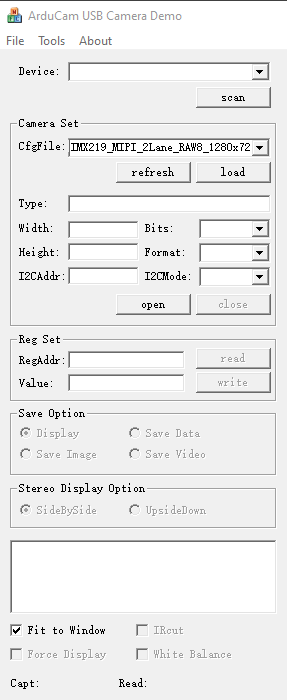
One more thing I noticed: with the IMX219 connected, I open the USB Test Camera Demo, click “Scan” in the Device column, and the camera doesn’t show up at all. The device list stays empty.
Screenshot:
I was using the Python demo from the ArduCAM_USB_Camera_Shield_Python_Demo repo. For config, I couldn’t find UC-593 Rev.D, so I tried the closest thing I could find.
We don’t have a Rev.D-specific entry in the config repo, so the Rev.C config above is the one to try for the IMX219 on channel A.
Also, please verify whether the IMX219 and OV5647 are Arducam modules. Modules from other vendors often use different register settings and may not work with these config files at all.
Thanks for the links. I checked, and both cameras are actually supplied by Waveshare, not Arducam. Is there a config file for Waveshare-manufactured cameras, or should these still work with the IMX219 config you linked?
We don’t maintain config files for Waveshare modules. Waveshare sensors can differ from Arducam ones in register setup, I2C addressing, or the MIPI timing they expect, so there isn’t a guaranteed way to make them work just by swapping configs.
Out of curiosity, after you loaded the Rev.C IMX219 config in the upper computer software, does the device still not appear when you press Scan?
Right, same thing. With the IMX219 connected, I open the USB Test Camera Demo, click “Scan” in the Device column, and the camera still does not display. It never shows up in the list. Is there anything else I can try to make the camera appear?
At this point, the likely cause is the camera module itself. The USB 3.0 Camera Shield (UC-593 Rev.D) is designed and guaranteed around Arducam camera modules. Waveshare modules may look similar and use the same sensor part number, but they can have board-level differences, and we can’t guarantee compatibility with third-party cameras.
So the reliable fix is to use Arducam camera modules with this shield. If the IMX219/OV5647 are Waveshare, I don’t have an additional config or step that will make them show up in the scan. Switching to Arducam modules is the way to go here.