Hi everyone. I’m trying to set up an Arducam IMX519 16MP autofocus camera on a Jetson Nano Developer Kit. Running the installer keeps failing with ‘Cannot find the corresponding deb package’ — it never finds a matching deb for my kernel. I’ve also been digging for the IMX519 driver source for the 4.x kernel (L4T) and can’t find it anywhere public. Is that source private? Hoping someone here has run into this.
Hi, welcome. Let’s narrow this down first. Can you post your environment — JetPack/L4T version, the output of uname -r, and the exact command you’re running from the install script?
Sure, here’s what I’ve got:
- Board: NVIDIA Jetson Nano Developer Kit
- Kernel: 4.9.337-tegra-32.7.4-20230608212426
- JetPack 4.6.1 image from NVIDIA’s site, which ships L4T 32.7.4 (from the get-started page: Get Started With Jetson Nano Developer Kit | NVIDIA Developer)
- sources.list: deb https://repo.download.nvidia.com/jetson/common r32.7 main
I ran: ./install_full.sh -m arducam
The supported-list screenshot from the docs shows my kernel isn’t listed: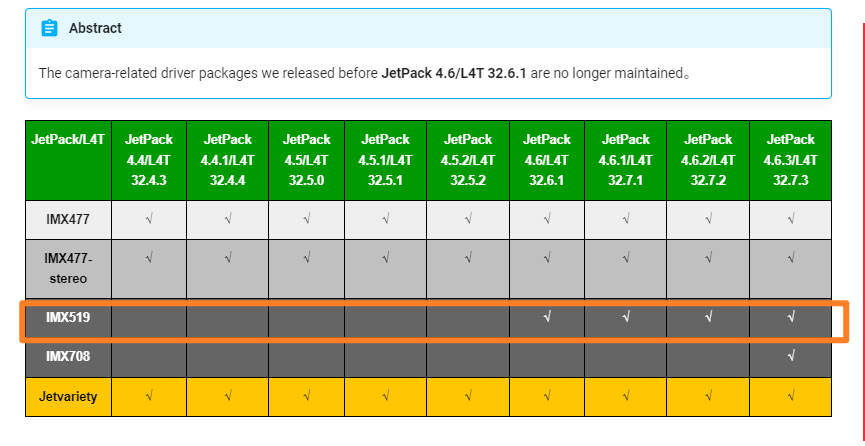
The module flag matters here. For the IMX519 you should run ./install_full.sh -m imx519 rather than -m arducam. Can you run that and paste the full terminal output?
Here’s the output from the arducam run:
pullin@jetson-ap:~$ ./install_full.sh -m arducam
./install_full.sh: line 19: warning: command substitution: ignored null byte in input
NVIDIA Jetson Nano Developer Kit
wget https://github.com/ArduCAM/MIPI_Camera/releases/download/v0.0.3/arducam_links.txt → 302 Found → objects.githubusercontent.com → 200 OK
Saving to: ‘arducam_links.txt’; saved [12077/12077]
Cannot find the corresponding deb package, please send the following information to [email protected]
Kernel version: 4.9.337-tegra-32.7.4-20230608212426
Jetson type: NVIDIA Jetson Nano Developer Kit
I also ran ./install_full.sh -m imx519 and got the same ‘Cannot find the corresponding deb package’ at the end.
Thanks, that log tells us a lot. The script downloads arducam_links.txt and then checks your kernel string against the list of available deb packages. Your kernel (4.9.337-tegra-32.7.4-20230608212426) is not in that list, so it bails out. Root cause: Arducam hasn’t released/made compatible an IMX519 driver for L4T 32.7.4 (the 4.x kernel), so there’s no matching deb.
Workaround: reflash to JetPack 32.7.1 (L4T 32.7.1), which is compatible. Then run ./install_full.sh -m imx519. Here’s the supported list: Introduction to Arducam Jetson Cameras - Arducam Wiki
Thanks. While digging I found an IMX519 driver patch in the 5.x-6.x kernel tree: Making sure you're not a bot! — so there’s mainline work, but nothing I can find for 4.x.
One thing confuses me though: you said the driver isn’t compatible with the 4.x kernel, but JetPack 4.6.3 also ships the 4.9 kernel (JetPack SDK 4.6.3 | NVIDIA Developer). How does that line up? And is the IMX519 driver source for 4.x L4T actually private?
Let me clear that up. If the question is about the IMX519 camera driver on JetPack 4.6.3 specifically, that’s something Arducam can figure out directly. But the IMX519 camera driver source code is not public — it’s private and can only be shared under NDA. That’s why you’re not finding it in public repos or in that patchwork entry.
To request the source: contact [email protected] for the IMX519 camera driver source. You’ll need to sign an NDA before Arducam sends it over.
Got it, that makes sense now. So my options are basically: reflash to JetPack 32.7.1 and use the packaged driver with ./install_full.sh -m imx519, or request the private source through sales with an NDA. I’ll try the 32.7.1 reflash first since that’s the quickest path.
That’s the summary, yes. To recap: L4T 32.7.4 (kernel 4.9.337-tegra-32.7.4) isn’t in the supported list, so the installer can’t find a deb. Reflash to JetPack 32.7.1 (L4T 32.7.1) and run ./install_full.sh -m imx519. If you need the actual 4.x driver source, it’s private — reach out to [email protected] and go through the NDA process.