Hi everyone, I’m trying to get my Arducam IMX519 camera working with a Jetson Orin Nano Super dev kit. When I run the install script for the IMX519 driver, it fails with “Cannot find the corresponding deb package”.
My kernel version is: 5.15.148-tegra-36.4.7-20250918154033
Jetpack version is whatever ships with the Orin Nano Super. Has anyone else hit this? Is there a compatible package for this kernel?
Thanks for reaching out. The issue is that the deb package for your specific kernel version (5.15.148-tegra-36.4.7-20250918154033) isn’t available in our repository yet — it looks like you’re running a kernel build that we don’t have a matching package for.
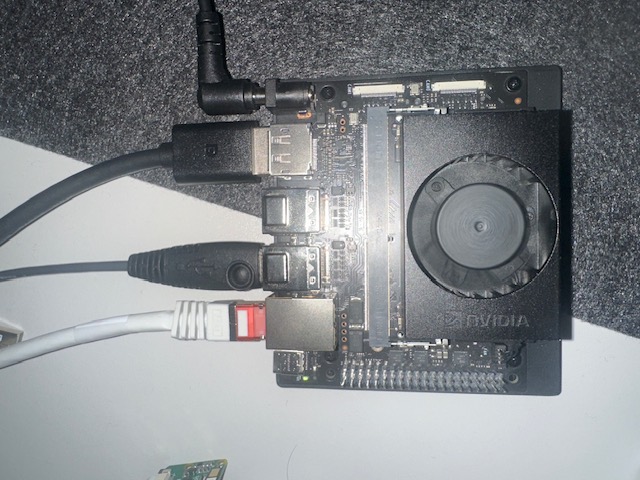
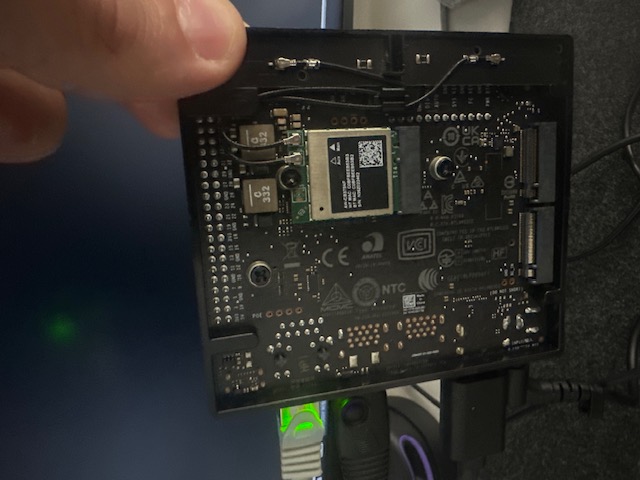
Before I go deeper — could you post some photos of your hardware setup? Top and bottom of the Jetson board would be helpful so I can verify the exact hardware configuration.
Here are the photos of my Jetson Orin Nano — top and bottom views.
In the meantime, I tried flashing Jetpack 6.2 (version 4.4) to see if that would help. Still no luck with either Jetpack version. Any advice on which path to take?
Okay, since you’re now on Jetpack 6.2, let’s skip the deb package approach altogether. There’s a direct install script that works specifically for Jetpack 6.2. Try this:
cd ~
wget https://github.com/ArduCAM/MIPI_Camera/releases/download/v0.0.3/install_full.sh
chmod +x install_full.sh
./install_full.sh -m imx519
This bypasses the deb repo and installs the driver directly. Let me know how it goes.
That NvBufSurfaceFromFd error usually means the capture pipeline couldn’t get a valid frame buffer from the camera, which often points to a sensor communication problem downstream.
But first — you mentioned IMX477 and IMX519 together. Are you running both sensor types on the same setup right now? Also, the v4l2 formats look correct for IMX519 (RG10, correct resolutions), so the driver at least partially loaded.
Let’s take a step back. Can you check if IMX519 shows up in the jetson-io extension header configuration tool? Run jetson-io and look at the camera options under the CSI connector configuration. What options are listed?
So I was previously able to see the camera in jetson-io, but after a few failed attempts and reinstalling, I think the driver got wiped somehow. Now when I check jetson-io, here’s what I see:
Camera IMX219 Dual
Camera IMX219-A
Camera IMX219-A and IMX477-C
Camera IMX219-C
Camera IMX477 Dual
Camera IMX477 Dual 4 lane
Camera IMX477-A
Camera IMX477-A and IMX219-C
Camera IMX477-C
No IMX519 option at all anymore. I’m not sure what happened — the driver seems to have vanished from the device tree options. How do I get it back?
The jetson-io tool not showing IMX519 is unusual. The driver may not be registered in the device tree properly. Let’s check what the kernel sees at boot time.
Run this and paste the output:
dmesg | grep imx519
That’ll tell us whether the driver is loading at all and what happens during probe.
Okay, this is actually helpful. The driver (v2.0.6) IS loading — so it’s not a driver installation problem. The issue is hardware-level: both IMX519 sensors are failing I2C probe with error -121, which is a “Remote I/O error” — meaning the Jetson literally cannot reach the sensors over the I2C bus.
This is almost certainly a physical connection or wiring problem. The sensors aren’t responding electrically.
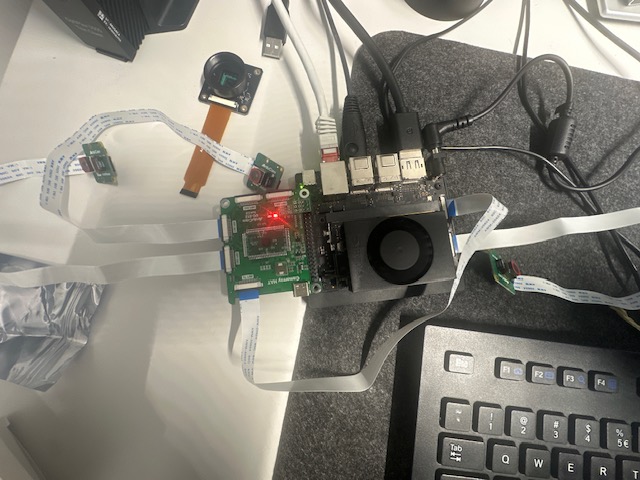
Can you post a photo of your current hardware setup — specifically showing how the cameras are connected to the Jetson and the CamArray HAT? I need to see both the camera side and the board side of the connections.
Thanks for the photo — I can see what’s going on now. There are actually two hardware issues here:
Issue #1: I can see one of your cameras is plugged directly into the Jetson Orin Nano’s CSI port. That camera module cannot work standalone because its onboard clock crystal has been removed — it’s designed to receive its timing signal from the CamArray HAT. The Jetson has no way to communicate with it directly.
Issue #2: The CamArray HAT requires all four camera ports to be populated for the board to power up and initialize properly. From the photo, it looks like only three ports are connected.
Here’s what you need to do:
Disconnect the camera that’s currently plugged directly into the Jetson’s CSI port
Connect that camera to the empty CAM3 or CAM4 port on the CamArray HAT
Make sure all four cameras are connected to the HAT
The bundled cameras in the stereo kit have their clock crystals removed on purpose — they’re meant to work with the HAT, not standalone. And the HAT won’t initialize until all four ports are filled.
Give that a try and let me know what dmesg shows after.
That makes sense, thanks for catching that. Quick question though — what if I want to use only 3 cameras instead of all 4? Is that possible, or does the HAT really need all 4 populated? I’m trying to figure out if I can run 3 or 4 cameras continuously.
I’ll apply the fix you suggested — moving that camera from the Jetson CSI port to the empty port on the HAT — and report back.
Glad the hardware fix worked. To answer your questions:
Autofocus: The standard MIPI_Camera driver install doesn’t include autofocus control for IMX519. You’ll need a separate tool for that. Use the Jetson_IMX519_Focus_Example repository: GitHub - ArduCAM/Jetson_IMX519_Focus_Example · GitHub
On the Jetson Orin Nano/NX, you’ll use the -i 9 or -i 10 flags to specify which I2C bus address to target (since those are the two addresses your IMX519 sensors are on).
IMX477 + IMX519 together: Unfortunately, that’s not possible. There’s no device tree configuration that supports both IMX519 and IMX477 camera modules at the same time — they have incompatible device tree requirements. You’d have to choose one sensor type for the whole array.
Give the focus repo a try and let us know if that sorts out the autofocus.