I just bought an Arducam (BO249) for my Jetson Orin Nano and I’m having trouble getting it to work. I started by following the instructions at the v0.0.2 release page, but it looks like there’s no driver included for my setup. I’m running L4T/JetPack R36.4.4 with kernel version 5.15.148-tegra. I ran through the install scripts from that release but the camera just isn’t detected. Has anyone gotten this working on R36.4.4?
Welcome to the forum! The issue is that you’re using the wrong driver release. Version v0.0.2 doesn’t include a driver build for R36.4.4. You need to use the v0.0.1-orin-nx release instead — that one supports both the Jetson Orin Nano and Jetson Orin NX since they share the same camera driver.
Please download and install from here: Release Jetson Orin NX · ArduCAM/MIPI_Camera · GitHub
Once you run the installation script from that release, let me know what output you get — especially any errors. That’ll help narrow things down.
Okay, I switched over to the v0.0.1-orin-nx release and ran the installer. I also looked through the troubleshooting docs here: Troubleshooting - Arducam Wiki
The driver package it installed was: arducam-nvidia-l4t-kernel-t234-nx-5.15.148-tegra-36.4.4-20250704150251_arm64_imx477.deb
Here’s the full install output:
(Reading database ... 208515 files and directories currently installed.)
Preparing to unpack arducam-nvidia-l4t-kernel-t234-nx-5.15.148-tegra-36.4.4-20250704150251_arm64_imx477.deb ...
Unpacking arducam-nvidia-l4t-kernel (5.15.148-tegra-36.4.4-20250704150251) over (5.15.148-tegra-36.4.4-20250704150251) ...
ls: cannot access 'nv_imx477.ko.bak': No such file or directory
Setting up arducam-nvidia-l4t-kernel (5.15.148-tegra-36.4.4-20250704150251) ...
mv: cannot stat '/boot/arducam/arducam_csi2.ko': No such file or directory
From what I’ve read on the Arducam forums, the mv: cannot stat '/boot/arducam/arducam_csi2.ko' warning can be ignored.
But here’s the problem — the camera still isn’t responding at all. I’ve tried it on both CAM0 and CAM1 CSI ports, and I tested with two different CSI ribbon cables. I’m currently using a fresh ribbon cable on CAM1 as the docs suggest. Nothing works.
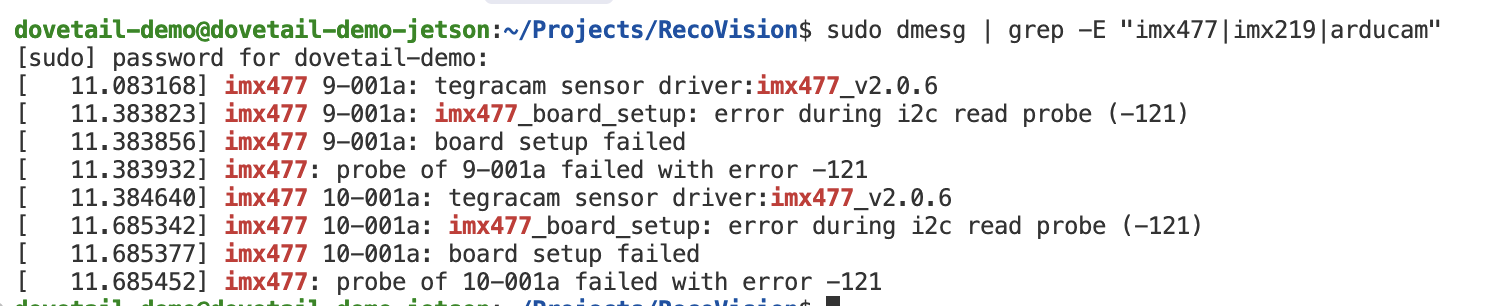
Here’s a screenshot of the driver install:
And this is what the camera output looks like — completely blank, no response:
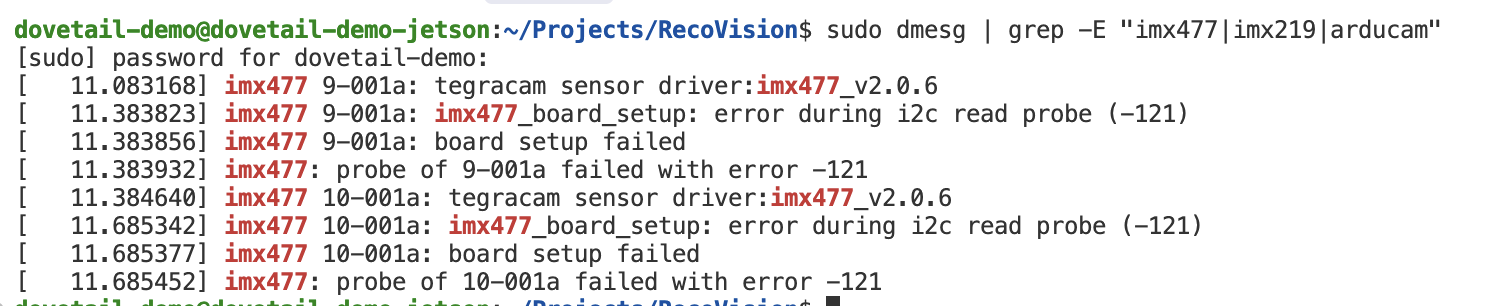
At this point I’m starting to think the camera might be defective.
Thanks for the detailed output and screenshots. Looking at your driver installation, it does appear to have completed successfully — the package was unpacked and set up without any fatal errors. The nv_imx477.ko.bak and arducam_csi2.ko warnings are indeed benign as you noted; the community has confirmed those can be safely ignored.
Since the driver side looks fine but the camera is still not responding, the issue is likely physical. Before we go down the hardware defect route, let’s rule out connection problems first.
Can you double-check the ribbon cable connections on both ends — the camera side and the Jetson carrier board side? Make sure the cable is fully seated and the contacts are oriented correctly. Sometimes these FPC connectors can feel like they’re in when they’re not fully latched.
Could you also take some photos of how you’ve connected everything — both the camera end and the board end — and post them here? That’ll help me verify the physical setup.
Still no luck with the camera. I’ve re-seated the cable a few times and triple-checked both ends.
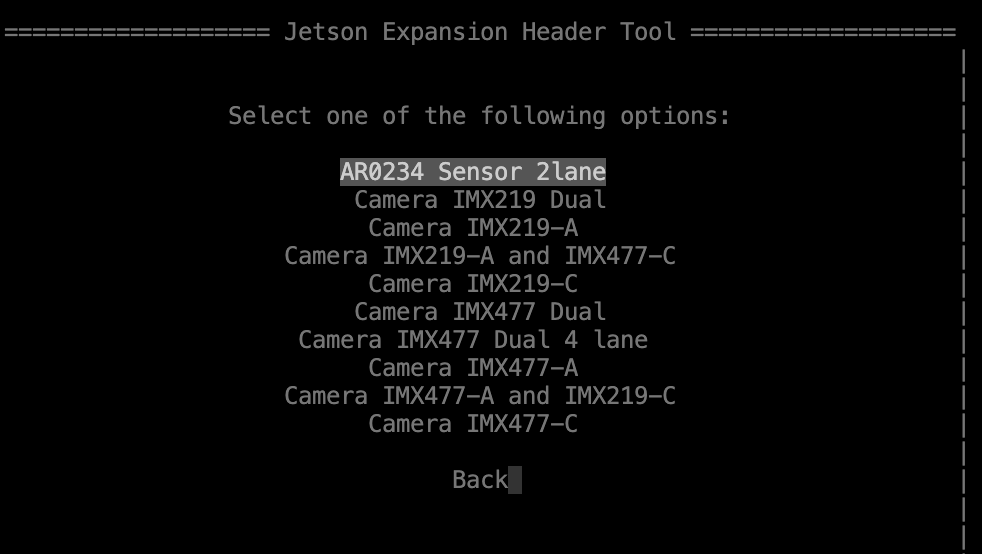
I also came across this Jetson IO configuration documentation: Jetson-io - Arducam Wiki
Is this something I need to do? I noticed that the selectable options on my Jetson IO screen look different from what’s shown in that documentation. Here’s what I see:
And here are the photos of my cable connections as requested:


Let me know if anything looks off with the connections or if there’s something else I should be checking.