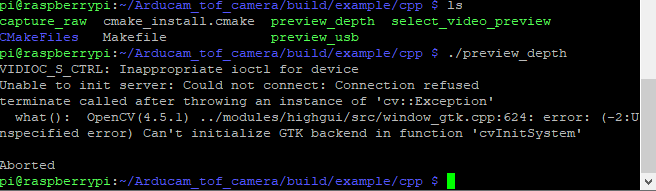
Hi everyone, hoping someone can help me out here. I’ve got an Arducam TOF camera connected to a Raspberry Pi 4 and I’m getting no output at all. Every time I try to run it, I get the same error message. Here’s a screenshot of what I’m seeing:
I’ve gone through the official TOF camera documentation step by step (TOF Camera - Arducam Wiki) and everything seems to install fine, but as soon as I try to get any output it just errors out. Not sure what I’m missing here.
Thanks for the screenshot, that’s helpful. Before we dig into the install itself - how are you accessing the Pi? Are you connected over SSH, or are you physically at the Pi with a monitor and keyboard?
That’s very likely the problem. The TOF camera preview/output needs a local display session to render to. When you’re connected over SSH, the application can’t open a display window on the Pi, so you end up with exactly the kind of error in your screenshot even though the camera itself is probably fine. Can you plug a monitor and keyboard directly into the Pi and run the same steps again? You shouldn’t need to change anything in the install - just log in locally and try it.
Okay, I just tried it with a monitor connected directly to the Pi and now it works. The preview comes up without any errors. So it really was the SSH connection the whole time.
Glad to hear it’s working now. To confirm for anyone else who runs into this: the camera and the install were fine - the issue was that the output can’t be displayed over an SSH session because there’s no local display for it to attach to. Logging in directly with a monitor resolves it. If you need to run headless, that would require a different setup, but for the standard TOF demo the direct monitor login is the way to go.