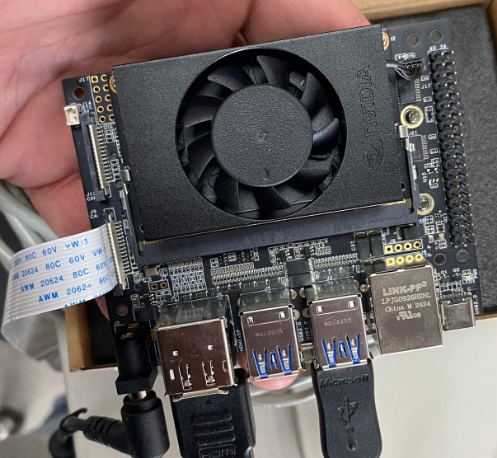
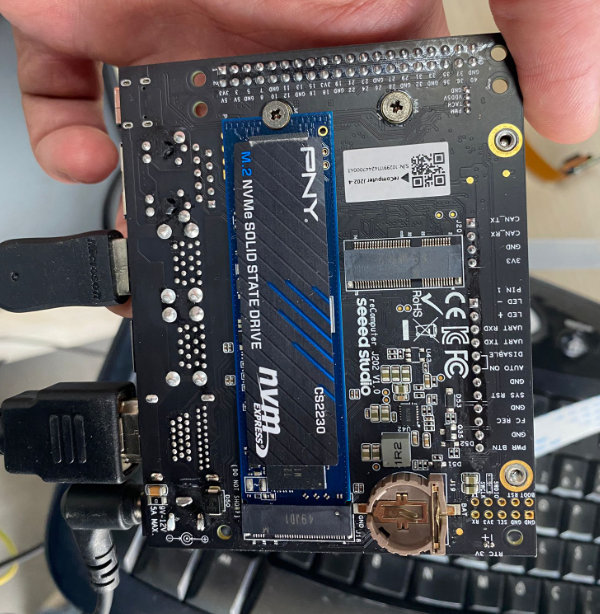
Hey everyone, I’m trying to get an Arducam 16MP IMX519 (Sony IMX519 sensor) working on my NVIDIA Jetson Xavier NX Developer Kit via the CSI connector, but the system just doesn’t see it at all.
Running v4l2-ctl --list-devices shows nothing related to the IMX519. Checked dmesg and there’s absolutely no mention of the sensor being registered during boot or when I connect it.
The camera itself is fine — I tested it on a Raspberry Pi 4 with libcamera and the imx519.dtbo overlay and it works perfectly there. So it’s not a hardware fault with the camera module.
I’m on JetPack 5.1.2 (L4T R35.4.1), Ubuntu 20.04. I’m building a real-time crop analysis system for autonomous farming using OpenCV and TensorFlow, so getting this camera working is pretty critical.
Anyone know what’s going on? Do I need a specific driver for the IMX519 on Jetson?
The IMX519 isn’t plug-and-play on Jetson like it is on Raspberry Pi — you need to install the Arducam driver for it to register with the V4L2 subsystem.
Give this a try. Run the MIPI_Camera install script:
cd ~
wget https://github.com/ArduCAM/MIPI_Camera/releases/download/v0.0.3/install_full.sh
chmod +x install_full.sh
./install_full.sh -m imx519
That should pull down the appropriate driver package for your L4T version and set everything up. Full guide is here: Quick-Start-Guide - Arducam Wiki
Yeah, that’s the issue — the v0.0.3 release of the install script doesn’t have a pre-built .deb package for L4T R35.6.3 with kernel 5.10.216-tegra. That’s why it’s failing to find a match.
Before I go further down the driver compatibility rabbit hole, could you post some photos of your Jetson board — both front and back? I want to verify the exact hardware platform we’re dealing with here. Sometimes what people have doesn’t quite match what they think they have, and that can cause all sorts of problems with these camera drivers.
Thanks for the photos — and I think I’ve found the problem.
Here’s the thing: what you’re using is a third-party carrier board, not an NVIDIA official Jetson Xavier NX Developer Kit carrier board. Looking at the board layout, the CSI connector routing, and the overall PCB design, this isn’t the reference design from NVIDIA.
I’ve marked up what I’m seeing:
This is the root cause of your issue. The Arducam camera drivers and the MIPI_Camera install scripts are developed and tested specifically against NVIDIA’s official development kit carrier boards. Third-party boards often use different CSI pin mappings, different I2C bus assignments, different power delivery for the camera connector, or different device tree configurations — any of which can prevent the camera from being detected.
There’s no amount of driver fiddling that will fix this if the hardware-level CSI/I2C paths don’t match what the driver expects. That’s why it works fine on your Raspberry Pi (standardized CSI pinout there) but is completely invisible on this board.
Your path forward is to get hold of an NVIDIA official Jetson Xavier NX Developer Kit carrier board. Once you have that, the driver installation should work as expected:
cd ~
wget https://github.com/ArduCAM/MIPI_Camera/releases/download/v0.0.3/install_full.sh
chmod +x install_full.sh
./install_full.sh -m imx519
With the official carrier board, the CSI lanes, I2C bus, and power rails will match what the Arducam driver and device tree expect, and the camera should show up in v4l2-ctl --list-devices and dmesg after a reboot.
Out of curiosity, what carrier board is that exactly? Might be useful for others who run into the same situation.