Hey everyone, I’m stuck trying to get my Arducam IMX477 (12MP HQ Camera) working and hoping someone here can point me in the right direction.
I’m running the ardu_cam-nvidia-l4t-kernel package install and it keeps failing with a dtoverlay error. Here’s my setup:
Board: Seeed Studio reComputer J10
Base module: Jetson Nano
JetPack: 4.6.6
OS: Ubuntu 18.04 Bionic
Kernel: 4.9.337-tegra
CUDA: 10.2.300
cuDNN: 8.2.1.32
Here’s what I’m seeing when I try to install the .deb:
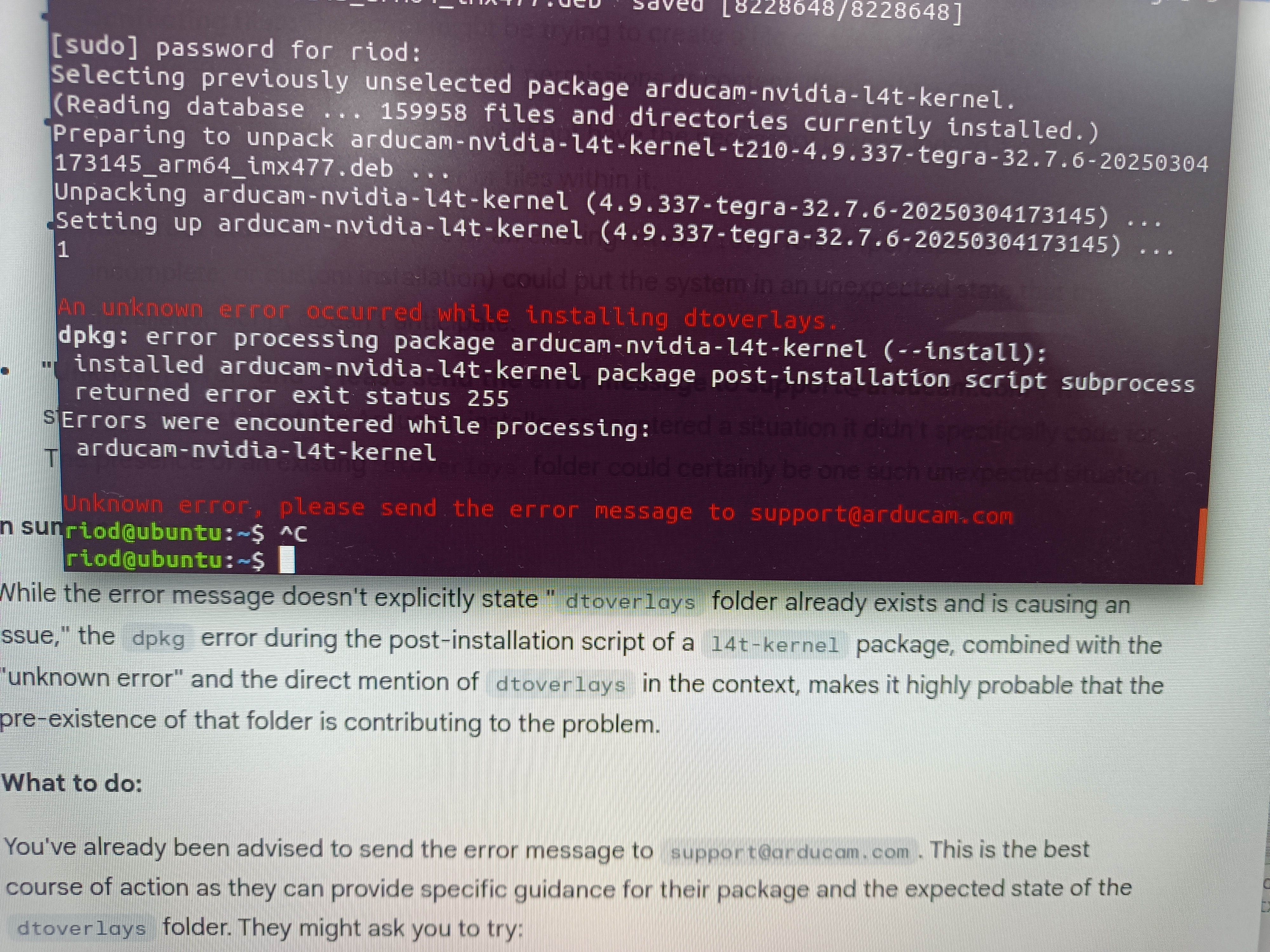
An unknown error occurred while installing dtoverlays.
dpkg: error processing package ardu_cam-nvidia-l4t-kernel (--install):
 installed ardu_cam-nvidia-l4t-kernel package post-installation script subprocess returned error exit status 255
Errors were encountered while processing:
 ardu_cam-nvidia-l4t-kernel
Unknown error, please send the error message to [email protected]
Things I’ve already tried:
Checked disk space (plenty available)
Redownloaded the .deb file multiple times in case of corruption
Still the exact same error every time
Has anyone run into this on a reComputer board? Not sure if I’m missing something obvious or if there’s a compatibility issue.
Thanks for the detailed logs — that actually tells me exactly what’s going on.
The issue here is that you’re using a Seeed Studio reComputer J10, which is a third-party carrier board based on the Jetson Nano module. It’s not the official NVIDIA Jetson Nano Developer Kit.
The Arducam camera driver package (ardu_cam-nvidia-l4t-kernel) relies on the official NVIDIA Jetson carrier board’s device tree layout. When the post-installation script tries to apply the dtoverlay, it’s looking for specific device tree nodes and configurations that exist on the official carrier board — but the reComputer J10 has a custom device tree designed by Seeed Studio, and those expected nodes simply aren’t there. That’s what triggers the “unknown error occurred while installing dtoverlays” message and the exit status 255.
So the driver installation itself isn’t broken — it’s just not compatible with third-party carrier boards that ship with modified device trees.
The best path forward here: if you have access to an official NVIDIA Jetson Nano Developer Kit, try installing the driver on that board with the same camera. That’ll tell you whether the camera itself is functional and whether the driver works correctly on supported hardware. If it doesn’t work on the official kit either, then we can dig deeper into the camera or the driver package.
Short version: the reComputer’s custom device tree is the blocker here, not a problem with the camera or a corrupted package.
Thanks for the quick reply. I grabbed a screenshot of the exact error as it appears during the install — attaching it here so you can see the full terminal output.
Is there any workaround to get the dtoverlay applied on the reComputer, or am I definitely going to need the official dev kit? I don’t have one on hand right now and was hoping to avoid buying another board just for this.
Yeah, that screenshot confirms exactly what I expected — those error lines are textbook behavior when the driver package hits a non-official carrier board’s device tree.
To be direct about it: there isn’t a straightforward workaround here. The dtoverlay mechanism in this driver package is hardcoded to target the device tree structure of the official NVIDIA Jetson Nano Developer Kit carrier board. The reComputer J10’s device tree — the pin mappings, the I2C bus layout, the camera connector routing — is different enough that the overlay simply can’t apply cleanly. Even if you managed to force the package install past that error, the camera wouldn’t initialize properly because the kernel wouldn’t know where to look for it on the bus.
You could theoretically decompile both device trees and manually port the overlay from the official layout to the reComputer’s layout, but that’s pretty deep kernel/dts hacking and there’s no guarantee the reComputer even brought out the same camera signals to the same pins.
The path of least resistance really is to test on an official Jetson Nano Developer Kit. That gives you a clean baseline: if the camera works there, you know the hardware and driver are fine and the reComputer is the only variable. If you don’t have one, maybe borrow from someone in the community or pick up a used one — they’re fairly common.
Once you confirm the camera is good on official hardware, at least you’ll know where you stand. Let us know how it goes.