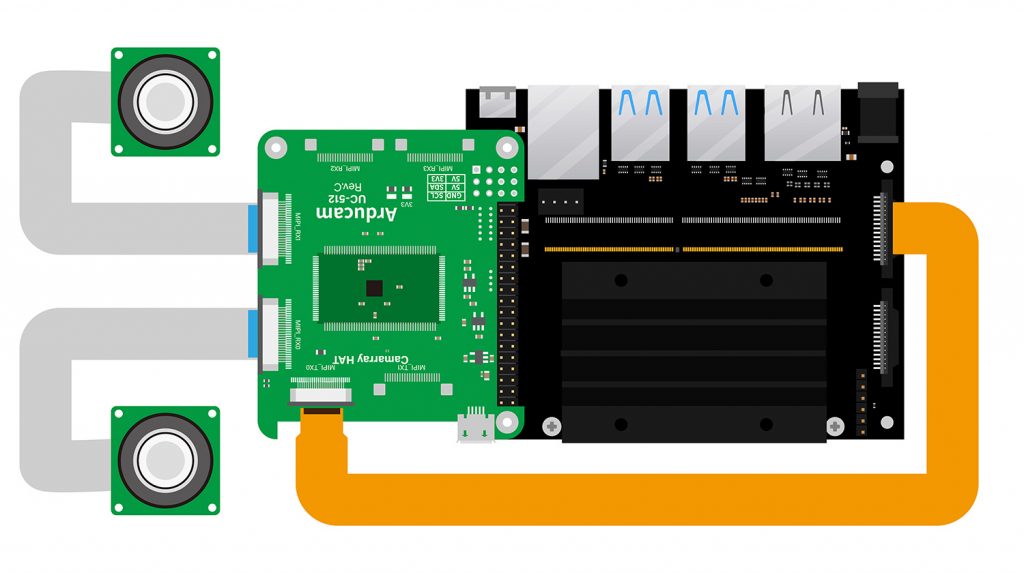
Hi everyone, I’m hoping someone can help me figure this out. I have the Arducam 8MP Synchronized Stereo Camera Bundle Kit for Jetson Nano (B0298N) and it has never worked since I got it. My setup is a Jetson Xavier NX module on a SeeedStudio A203 carrier board, JetPack 5.0.2. The IMX219 drivers are confirmed loaded in the kernel. The Camarray HAT is a UC-512 Rev 1.0D (the red 3.3V LED lights up), and it’s carrying a UC-511 RevA. I bought it from UCTRONICS.
Here’s the weird behaviour I’m seeing:
When I power the Camarray HAT through the USB-C connector, /dev/video0 never appears.
When I power it through GPIO instead, /dev/video0 shows up, but I can’t capture any images.
Thanks for the detailed description. Let’s start with the basics. Can you confirm whether the video device nodes actually appear? Run ls /dev/vi* and paste the result. Also, try a single-camera capture with nvarguscamerasrc on one sensor and share the full terminal output — the error it throws will tell us a lot about what’s failing.
So the node is there when powered via GPIO. Then I set my capture variables:
nvidia@nvidia-desktop:~$ SENSOR_ID=0 # 0 for CAM0 and 1 for CAM1 ports
nvidia@nvidia-desktop:~$ FRAMERATE=30
And ran this:
nvidia@nvidia-desktop:~$ sudo gst-launch-1.0 nvarguscamerasrc sensor-id=$SENSOR_ID ! "video/x-raw(memory:NVMM),width=1920,height=1080,framerate=$FRAMERATE/1" ! nvvidconv ! nvdrmvideosink
[sudo] password for nvidia:
Setting pipeline to PAUSED ...
Pipeline is live and does not need PREROLL ...
Setting pipeline to PLAYING ...
New clock: GstSystemClock
GST_ARGUS: Creating output stream
CONSUMER: Waiting until producer is connected...
GST_ARGUS: Available Sensor modes :
GST_ARGUS: 3280 x 2464 FR = 21.000000 fps Duration = 47619048 ; Analog Gain range min 1.000000, max 10.625000; Exposure Range min 13000, max 683709000;
GST_ARGUS: 3280 x 1848 FR = 28.000001 fps Duration = 35714284 ; Analog Gain range min 1.000000, max 10.625000; Exposure Range min 13000, max 683709000;
GST_ARGUS: 1920 x 1080 FR = 29.999999 fps Duration = 33333334 ; Analog Gain range min 1.000000, max 10.625000; Exposure Range min 13000, max 683709000;
GST_ARGUS: 1640 x 1232 FR = 29.999999 fps Duration = 33333334 ; Analog Gain range min 1.000000, max 10.625000; Exposure Range min 13000, max 683709000;
GST_ARGUS: 1280 x 720 FR = 59.999999 fps Duration = 16666667 ; Analog Gain range min 1.000000, max 10.625000; Exposure Range min 13000, max 683709000;
GST_ARGUS: Running with following settings:
Camera index = 0
Camera mode = 2
Output Stream W = 1920 H = 1080
seconds to Run = 0
Frame Rate = 29.999999
GST_ARGUS: Setup Complete, Starting captures for 0 seconds
GST_ARGUS: Starting repeat capture requests.
CONSUMER: Producer has connected; continuing.
nvbuf_utils: dmabuf_fd -1 mapped entry NOT found
Error generated. /dvs/git/dirty/git-master_linux/multimedia/nvgstreamer/gst-nvarguscamera/gstnvarguscamerasrc.cpp, threadExecute:694 NvBufSurfaceFromFd Failed.
Error generated. /dvs/git/dirty/git-master_linux/multimedia/nvgstreamer/gst-nvarguscamera/gstnvarguscamerasrc.cpp, threadFunction:247 (propagating)
WARNING: from element /GstPipeline:pipeline0/GstNvDrmVideoSink:nvdrmvideosink0: Pipeline construction is invalid, please add queues.
Additional debug info:
gstbasesink.c(1209): gst_base_sink_query_latency (): /GstPipeline:pipeline0/GstNvDrmVideoSink:nvdrmvideosink0:
Not enough buffering available for the processing deadline of 0:00:00.015000000, add enough queues to buffer 0:00:00.015000000 additional data. Shortening processing latency to 0:00:00.000000000.
Got EOS from element "pipeline0".
Execution ended after 0:00:04.013428160
Setting pipeline to NULL ...
GST_ARGUS: Cleaning up
Interesting. The mode enumeration works, which means the sensor at least responds partially. But the NvBufSurfaceFromFd Failed error followed by EOS suggests something is going wrong at the sensor level during capture. Could you check the kernel log for the IMX219 while attempting a capture? Run sudo dmesg | grep imx219 and paste what you get.
Those Error writing mode entries with -11 and -110, plus tegra-i2c 3180000.i2c: failed to clear bus, are I2C communication failures between the Jetson and the IMX219 sensor. The driver loaded and the subdev bound, so this doesn’t look like a driver/software issue — it’s a signal-level problem on the I2C bus. What troubleshooting have you already done, and are you running on the official Xavier NX developer kit or a third-party carrier board?
I’ve already been through section 3.2 of the troubleshooting page. I checked every connection carefully, including verifying that the pinout of my third-party A203 carrier board matches the Xavier NX dev kit. I verified all three ribbon cables and visually inspected them for defects — nothing obviously wrong. I used the camarray connection diagram adapted for the A203 carrier board instead of the dev kit (https://docs.arducam.com/picture/Nvidia-Jetson-Camera/camarray/camarray-5.jpg). The thing is, I don’t have an official development kit available — they’re sold out. I do have some Raspberry Pi boards around. My setup is the Xavier NX module on the SeeedStudio A203 carrier.
Thanks, that context helps. To be honest, the third-party carrier board is the prime suspect here. Arducam products are developed and validated against the official Jetson boards, and those I2C errors point to a hardware/signal incompatibility on the A203 rather than something we can fix in software. The cleanest way to isolate whether the camera itself is fine would be to run it on an official dev kit: if it fails there too, we’d look at the camera; if it works there, the carrier board is the culprit.
I understand, but the official dev kit is sold out, and I actually need a smaller form factor than the dev kit anyway. Besides the Raspberry Pi boards I have, the Xavier NX + A203 is what I need to use. Is there any way to diagnose this Xavier NX + carrier board combination and make it compatible with the camera system, assuming it’s possible hardware-wise? I’d rather not give up on this carrier board if there’s a path forward.
Based on everything you’ve shared, the root cause looks like a compatibility issue between the SeeedStudio A203 carrier board and the camera module. Third-party carrier boards aren’t supported by default, and the I2C failures on the bus back that up. If you specifically need to run this camera on the A203, that would require custom engineering work — the sales team handles those requests at [email protected]. The standard path is to validate on an official board; for a third-party carrier board, customization is the way to get guaranteed compatibility. I know that’s probably not the answer you were hoping for, but that’s where this lands right now.