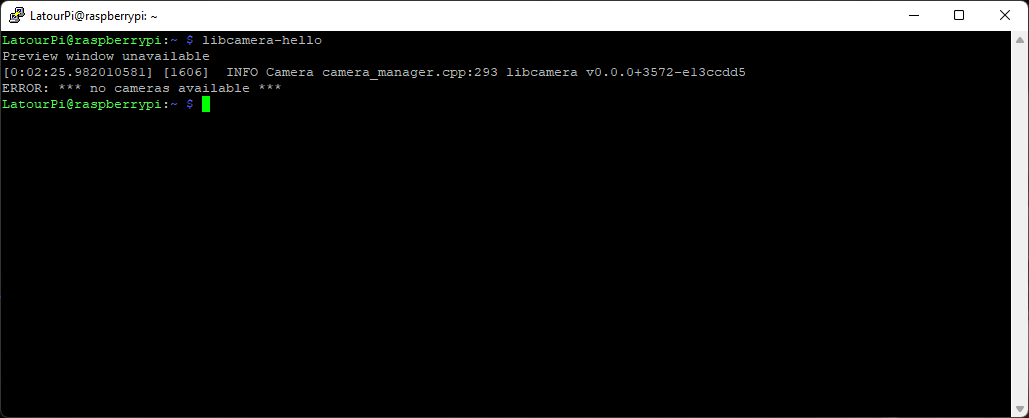
Hi, I recently got an Arducam 64MP camera but I can’t get it to work at all. I followed the setup guide on a fresh/clean install of Bullseye, and the Pi just doesn’t seem to recognize the camera. When I run libcamera-hello I get an error (screenshot attached below).
Environment:
Raspberry Pi
Clean install of Bullseye
Arducam 64MP camera
I’ve tried the original ribbon cable plus two other cables I had on hand, and none of them work. The weird thing is I have an earlier Arducam camera that works perfectly fine on this same Pi. Not really sure what I’m doing wrong here.
Hi, thanks for reaching out. Sorry you’re stuck getting the 64MP camera up and running.
To start narrowing this down we really need a bit more info about your setup, since “Pi doesn’t recognize the camera” can come from a few different places (driver, config, cabling, or the libcamera stack).
Made X/EGL preview window
[0:02:43.243754226] [1630]  INFO Camera camera_manager.cpp:293 libcamera v0.0.0+3572-e13ccdd5
ERROR: *** no cameras available ***
Bug report generated to bug.txt
Looking at your bug.txt, we can see the problem: the driver for the 64MP camera has NOT been installed on this system. That’s why you’re getting:
ERROR: *** no cameras available ***
libcamera itself is fine (v0.0.0+3572-e13ccdd5, libcamera-apps 0.0.7) — it just has no camera sensor to talk to.
We also noticed you have dtoverlay=imx519 present in your config file. That overlay is for a different sensor, so it needs to be dealt with once the correct driver is in place.
A couple of things that might be useful in case anyone else hits this:
I had actually tried installing the driver before, several times, using copy/paste straight from the same linked instructions — it never worked. This morning it went through without the “Repository does not have a release file” warning I was getting before, so maybe that was what resolved it.
The dtoverlay=imx519 line was in config.txt but already commented out. I ended up removing the entire line anyway (even though it was just a comment), and after that everything came up fine.
So: driver installed + removed the dtoverlay=imx519 line from config.txt = camera working. Thanks!
The pre-existing dtoverlay=imx519 entry (from the earlier camera setup) needed to be dealt with manually while installing the correct driver.
The earlier “Repository does not have a release file” warning during driver installation appears to have been a transient repo issue on the customer’s side; once the repo responded normally, the install completed.
If you hit the same no cameras available error on a 64MP camera, first check that the 64MP driver is actually installed and that no leftover dtoverlay=imx519 line is interfering.