Hi, I picked up a 12MP IMX219 fisheye camera but I can’t get it to work at all on my Pi. Here’s what I’m seeing:
My other (donor) cam works fine. I remove it and install the IMX219 fisheye following the directions, and no camera is recognized. I swap back to the standard camera, reboot, and it works fine. So the board is clearly fine. I suspect either a Pi OS issue or a faulty camera.
It’s never worked for me. Can anyone help me figure out if the IMX219 will work with a v2.1 picam board on a Pi 4B?
Sure. It’s a Pi 4B with a v2.1 picam board. I followed the paper instructions that came with the Arducam camera.
I’ve been trying to detect it using the libcamera library apps but nothing shows up. I also tried a suggestion from support earlier but it didn’t help.
Thanks, that helps. Before we go further, let me check what you’ve already tried so we don’t repeat it:
Have you enabled legacy camera support through raspi-config?
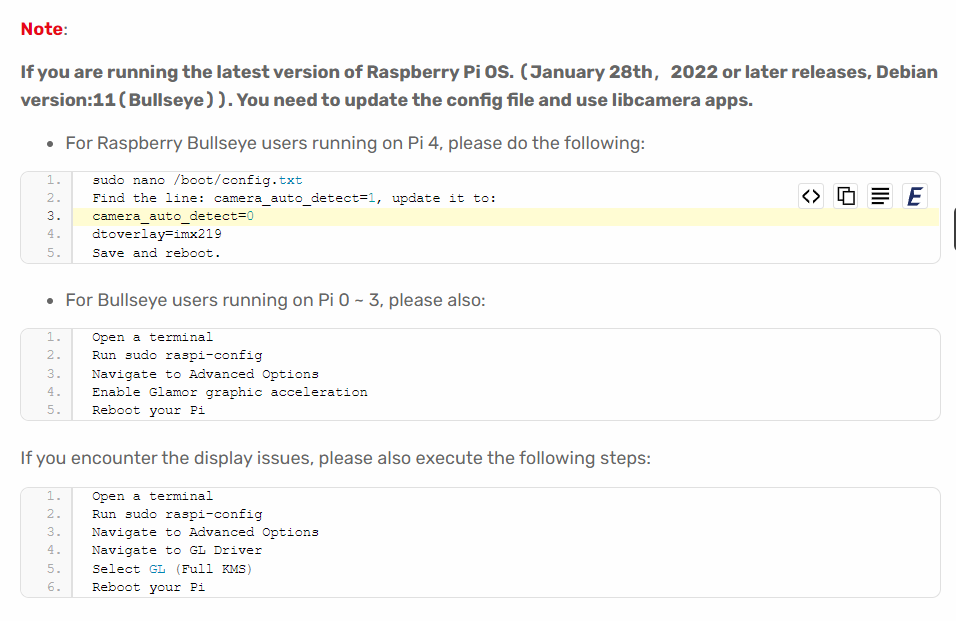
Have you edited the config file per the Arducam documentation?
Also, if you can paste the contents of your config file (or at least the camera-related lines) that would help a lot. And can you share the screenshot of what you’re seeing when you try to detect the camera?
Yes to both. I turned on legacy cam support with raspi-config, and I also referred to and modified the config file per the Arducam documentation link that was provided to me. Still nothing.
It just won’t detect no matter what I do. Here’s the screenshot of what I’ve got:
OK, I think I see where the confusion is coming from. The key thing here is that the new IMX219 camera needs the config file modified in order to be accessed at all. Simply turning on legacy camera support through raspi-config is not enough on its own — that step alone won’t make the camera show up.
So the camera isn’t being detected because the config file hasn’t been changed the way the new IMX219 requires.
Ah, that would explain it — I thought enabling legacy support was the whole fix. I’ll go through the config modification steps at that link and reboot, then report back.
Sounds good. To recap the current state: the new IMX219 fisheye requires modifying the config file before it can be accessed — enabling legacy camera support via raspi-config by itself is not sufficient, which is why the camera was not being recognized. Please apply the config changes from the doc link above and reboot, then let us know whether the camera is detected in the libcamera apps. If it still doesn’t show up after that, post your updated config lines and we’ll dig in further.