Hi, posting here because I’m stuck. I have an OV9782 UVC Webcam Module (SKU: B0385) connected to a Jetson Nano over USB. My goal is to record video of games at 1280x720 in H.264, and I need to capture at 180 degrees and then dewarp the image.
Two things I can’t figure out:
Is it possible to bring the FPS down to 60 for 1280x720 video?
Where is the documentation for autofocus / focus / exposure time?
Also, when I connect the camera to USB the Jetson Nano gives an error that no camera was found. Any pointers on the best practice to record video on Jetson devices with GStreamer would help too.
I installed the Arducam drivers as per the MIPI camera module demonstration link (Redirecting...) and the problem still persists — the camera is on USB and the Jetson still reports that no camera was found.
I do see nodes though, both /dev/video0 and /dev/video2 exist. Which one should I be using?
OK, so the nodes are there. Since this is a UVC camera over USB, the MIPI camera driver install isn’t actually the relevant part — UVC modules are handled by the standard uvcvideo driver.
Please run these so we can see what each node really advertises:
That output tells us which formats (MJPEG, YUYV, etc.) and frame sizes the camera can actually produce, which is the key to picking the right pipeline.
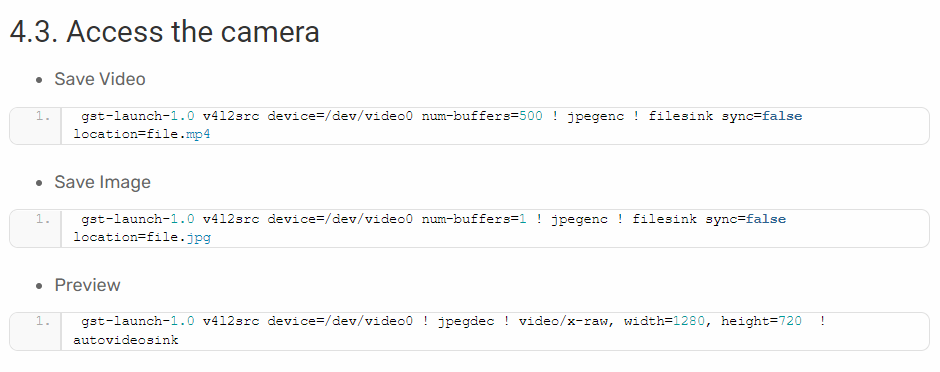
I can record a video with this, but I cannot play it back in any video player — it says the video is corrupted. In VLC I get “invalid codec”. Same result in VLC, Elmedia player and Quick player. Why would the file not be playable?
That’s an important clue. The OV9782 UVC camera doesn’t support H264 output — it only supports certain formats like MJPEG and raw formats. If you ask v4l2src for video/x-h264 from a device that can’t produce it, you end up with a file no player can decode, which is exactly the “invalid codec” / corrupted message you’re seeing.
Tried the MJPEG one with /dev/video0 and it’s not working either. Only the first (H264) command gave what looked like correct results, even though the file won’t play. I tried using MJPG and that isn’t working as well.
I also tried some OpenCV examples from the internet and they throw errors like:
cv2 has no attribute 'CAP_OPENCV_MJPEG'
cv_cap_prop_FOURCC is not defined
I was able to view video through OpenCV, but I don’t think OpenCV is optimal for me since the generated video is usually much larger in size. None of the GStreamer commands worked except that first H264 one, which produces unplayable files.
Thanks, that lines up with the format mismatch. Let’s separate the two problems: (1) viewing the camera works — you did that in OpenCV — and (2) encoding to a playable file is failing because H264 isn’t supported by this camera.
For focus, exposure and resolution, use the v4l2 tools:
Arducam UVC cameras on Linux, command line: Redirecting...
On FPS: at a specific resolution the frame rate is relatively fixed by the hardware, so you can’t just drop it to 60 at 1280x720 without modifying the program. That would be a customization — you can reach out to [email protected] about it.
I’ve been trying to get this working for a while now and still can’t record a simple video, so I’m getting a bit frustrated. To summarize everything I’ve attempted:
GStreamer H264 and MJPEG commands: H264 records but playback fails (corrupted / invalid codec); MJPEG doesn’t work.
OpenCV: I can view video, but the output files are large and I don’t consider it optimal.
MJPG: not working.
Internet OpenCV examples: cv2 attribute errors.
Installed the Arducam drivers from the linked doc: problem persists.
Could you please test the GStreamer command on your side before you update the documentation? I’ve attached screenshots of the errors.
Understood, and thanks for the screenshots. Here’s where we stand:
The OV9782 UVC camera does not support H264 — it only supports MJPEG/video formats. That’s why your H264 file reports “invalid codec”/corrupted in every player, and it’s why the MJPEG path is the one that should actually work.
It’s also possible the wrong video device node was used. Please confirm whether the name “/dev/video0” is the node you set for your request — the ordering can vary between machines.
FPS at a given resolution is relatively fixed by hardware; changing it requires modifying the program.
To move forward, please do this and post the results:
Run the MJPEG pipeline again with the node you confirmed and paste the exact console output.
Run v4l2-ctl --list-formats-ext -d /dev/video0 and paste it.
Confirm your exact operation steps so far, and if an error occurs, send a picture/screenshot of the error message.
Root cause of the unplayable recordings: the OV9782 UVC camera does not support H264. Only its supported formats (e.g. MJPEG via the image/jpeg pipeline) can be used, so the H264 attempt produces files that players report as corrupted / invalid codec.
Workaround: use the MJPEG GStreamer pipeline, and use v4l2-ctl for focus, exposure and resolution:
FPS at 1280x720 is fixed by the hardware; getting 60 FPS there requires a program modification/customization — contact [email protected] for that.
Still open: please confirm the video device node (/dev/video0 vs /dev/video2) and post the v4l2-ctl --list-formats-ext output plus a screenshot of any error message so we can finish verifying.