Hi, hoping someone can help. I have 6 pcs of the old version B0262 (Arducam 12MP IMX477 Mini High Quality Camera Module). They work great on my Raspberry Pi 4 with Buster OS, but they just don’t work on my Raspberry Pi Compute Module CM4. I have tested 3 of the 6 so far and all 3 behave the same way: fine on the Pi 4, failing on the CM4 running the same Buster OS and picamera. What is strange is that the CM4 works perfectly with an IMX477 mini that I bought back in 2021. That is why I think the newly ordered IMX477 units have some kind of compatibility issue with the CM4. When I placed the order I specifically asked for these modules to be compatible with Buster and picamera. What can be done to fix this?
Sorry you are running into this. Let’s narrow it down first. Can you share: 1) the exact OS image and camera software on both boards, 2) the exact command you run when it fails on the CM4 (raspistill or picamera?), and 3) the full error output from the CM4? A screenshot or terminal copy-paste is fine.
Environment: Raspberry Pi 4 (works) - Buster OS. Raspberry Pi Compute Module CM4 (does not work) - same Buster OS and picamera. Software: Buster OS, picamera. Here is the error the CM4 returns: 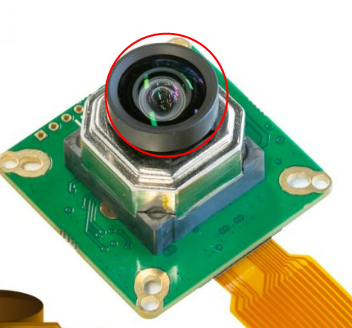
Thanks, that helps. Two more things: can you run uname -a on the CM4 and paste the output? And can you confirm the 2021 IMX477 that works on the CM4 is being driven through the same picamera/raspistill setup on the exact same OS image? If the older module works with the same image and same command, then we are looking at a difference between the modules rather than the software stack.
Yes, same OS image, same picamera code. The 2021 module works on the CM4, the new ones do not. Tested 3 of the 6 new units, all fail on the CM4, all pass on the Pi 4. One more detail that may matter: I have been running an IMX219 and an IMX477 mini together on the CM4 with no problem at all, but those are not autofocus modules.
Good data point. Just a heads up on that - you generally cannot run two different camera sensors on the same carrier board at the same time; each CSI port has to be configured for the specific sensor you want to use. For the failing case, can you tell us exactly what command you use? Plain raspistill test, or picamera from Python? And is this on the old version B0262?
I use picamera from Python, and for standalone tests I use raspistill. The modules are the old version B0262 that were customized to run with Buster and picamera, with the IR filters removed from the lens and lens mount. I was told the old version works with the raspistill command. My whole device is built on picamera and Buster, which is exactly why I asked for compatibility with those instead of libcamera or bullseye. So my question now is what information you need from me to troubleshoot the IMX477 mini compatibility problem.
Also a separate doubt, maybe unrelated: is it OK to mount the 25mm lens (LN016) directly onto the autofocus IMX477 board? The lens webpage says the lens holder height is 13mm. I am worried the M12 mount on the board is not a good match. Picture of the lens mounted on a long M12 mount: 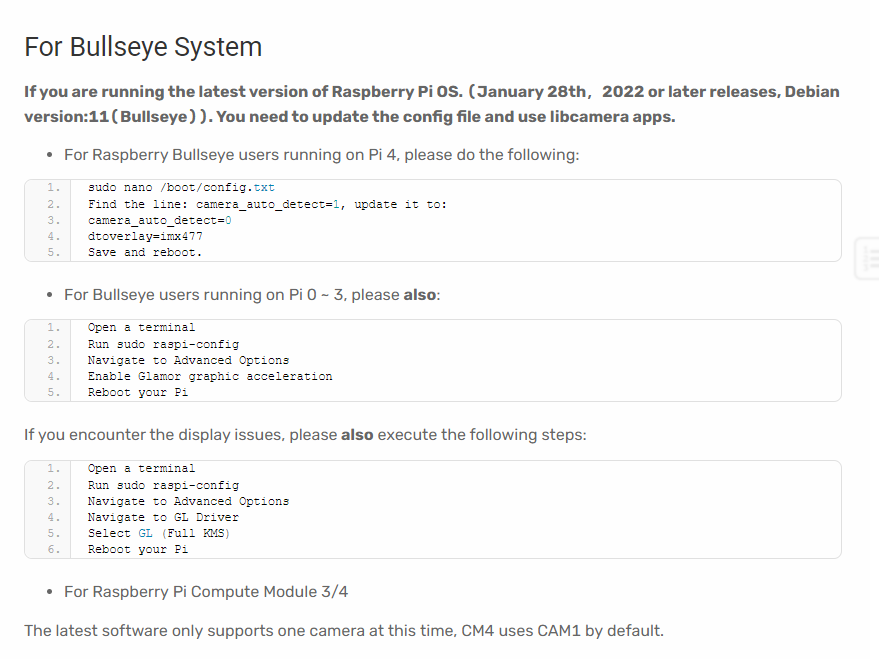 . I plan to buy an autofocus IMX477 locally to test first.
On the lens: if the lens holder height is listed as 13mm, mounting that 25mm lens directly on the standard autofocus board M12 mount will not give you the correct flange distance, so focus may not be reachable. It is usually meant for a different/longer mount. Testing with a locally bought autofocus IMX477 first is a good idea to compare behavior.
On the main issue - important context: raspistill is no longer officially maintained and has been replaced by libcamera. That is likely at the root of the trouble with the older stack on the CM4. So there are two paths.
Path A (recommended): move to libcamera on the latest Bullseye system.
- Burn the latest Bullseye system
- Install libcamera: Redirecting...
- Configure the camera: Redirecting...
- Reboot
- Test, e.g.: libcamera-still -t 0
Path B: if you still want to keep using the raspistill set, we need more info to test on our side:
- uname -a (full output)
- The date of the mirror/image you installed (the installed mirror image date)
I understand libcamera is the recommended route, but my device is being developed on picamera and Buster on purpose - that is the whole reason the modules were customized in the first place. Switching to Bullseye/libcamera is not really an option for the current build. So I need to stay on the raspistill/picamera path for now. I will gather the info you asked for: I will run uname -a and confirm the exact mirror image date I installed. In the meantime, is there anything CM4-specific I should check, given the new modules fail there while the 2021 module works on the same image?
Understood, and that is fair given your stack. To be clear on where we are: the behavior points to a compatibility issue between the newly ordered IMX477 mini (old version B0262) units and the CM4 when used with the legacy picamera/raspistill stack - the same error shows on the CM4 under the same Buster OS and picamera, while your 2021-purchased IMX477 mini works on the same CM4. Since raspistill is deprecated and replaced by libcamera, the officially supported route is to burn the latest Bullseye system and use libcamera (libcamera-still -t 0 as a basic test). If you need to keep the raspistill set, please send us the two items below so we can test the legacy path further:
- uname -a
- the date of the installed mirror image
Once we have those we can dig into the CM4-specific behavior with the new modules.