Hey everyone, I’m trying to get the Arducam 16MP IMX519 working on my Jetson Orin Nano Developer Kit running JetPack 6.0 (L4T 36.3.0, kernel 5.15.136-tegra-36.3.0-20240424200557). I ran the install script from the MIPI_Camera repo and it fails looking for a pre-built .deb that matches my kernel version on the Arducam server. Has anyone else hit this? Is there a workaround?
Thanks for the report. Could you share the full environment details? Specifically the exact JetPack/L4T version, kernel uname output, and which camera module you’re using? That’ll help me check what’s going on with the driver package.
Sure, here’s what I’ve got:
- Hardware: NVIDIA Jetson Orin Nano Developer Kit
- Camera: 16MP IMX519
- JetPack 6.0 (L4T 36.3.0)
- Kernel: 5.15.136-tegra-36.3.0-20240424200557
The install script basically 404s when it tries to pull the kernel driver .deb from the server. Looks like there’s just no build for this exact kernel revision.
Thanks for the details. Yeah, it looks like a pre-built package for that specific kernel build isn’t available on the public repo yet. I’ve gone ahead and built one for you — I’ve sent you the .deb package through private message. Please download it and install with:
sudo dpkg -i arducam-nvidia-l4t-kernel-t234-nx-5.15.136-tegra-36.3.0-20240521112441_arm64_imx519.deb
Then reboot the Jetson. The camera should be detected after restart. Let me know how it goes.
Alright, so I ran the dpkg command but the post-install script bombed out with exit status 255. Here’s the full output:
sudo dpkg -i arducam-nvidia-l4t-kernel-t234-nx-5.15.136-tegra-36.3.0-20240521112441_arm64_imx519.deb
(Reading database ... 201789 files and directories currently installed.)
Preparing to unpack ...
Unpacking arducam-nvidia-l4t-kernel (5.15.136-tegra-36.3.0-20240521112441) over (5.15.136-tegra-36.3.0-20240521112441) ...
ls: cannot access 'nv_imx477.ko.bak': No such file or directory
Setting up arducam-nvidia-l4t-kernel (5.15.136-tegra-36.3.0-20240521112441) ...
ls: cannot access 'nv_imx477.ko': No such file or directory
Traceback (most recent call last):
  File "/opt/arducam/jetson-io/config-by-hardware.py", line 126, in <module>
    main()
  File "/opt/arducam/jetson-io/config-by-hardware.py", line 95, in main
    jetson = board.Board()
  File "/opt/arducam/jetson-io/Jetson/board.py", line 242, in __init__
    self.dtb = _board_get_dtb(self.compat, self.model, dtbdir)
  File "/opt/arducam/jetson-io/Jetson/board.py", line 151, in _board_get_dtb
    raise RuntimeError("No DTB found for %s!" % model)
RuntimeError: No DTB found for NVIDIA Jetson Orin Nano Engineering Reference Developer Kit Super!
An unknown error occurred while installing dtoverlays.
dpkg: error processing package arducam-nvidia-l4t-kernel (--install):
 installed arducam-nvidia-l4t-kernel package post-installation script subprocess returned error exit status 255
Errors were encountered while processing:
 arducam-nvidia-l4t-kernel
Two things that jump out: it’s complaining about missing nv_imx477.ko files, and the board detection script in /opt/arducam/jetson-io/Jetson/board.py is failing because it doesn’t recognize the board string. Seems like my board is reporting as “NVIDIA Jetson Orin Nano Engineering Reference Developer Kit Super” and the script has no DTB entry for that.
Good catch on the traceback — you’re spot on. The post-install script at /opt/arducam/jetson-io/config-by-hardware.py calls board.Board() which internally tries to look up the DTB for your board model. The string "NVIDIA Jetson Orin Nano Engineering Reference Developer Kit Super" isn’t in the DTB whitelist in board.py, so it raises that RuntimeError. The nv_imx477.ko / nv_imx477.ko.bak warnings are secondary — those kernel modules just don’t exist in this build.
This basically confirms the driver was built targeting the standard Orin Nano Developer Kit, not the newer “Super” hardware revision. Can you post a photo of your board so I can verify exactly which hardware variant we’re dealing with?
Here are a couple shots of the board:
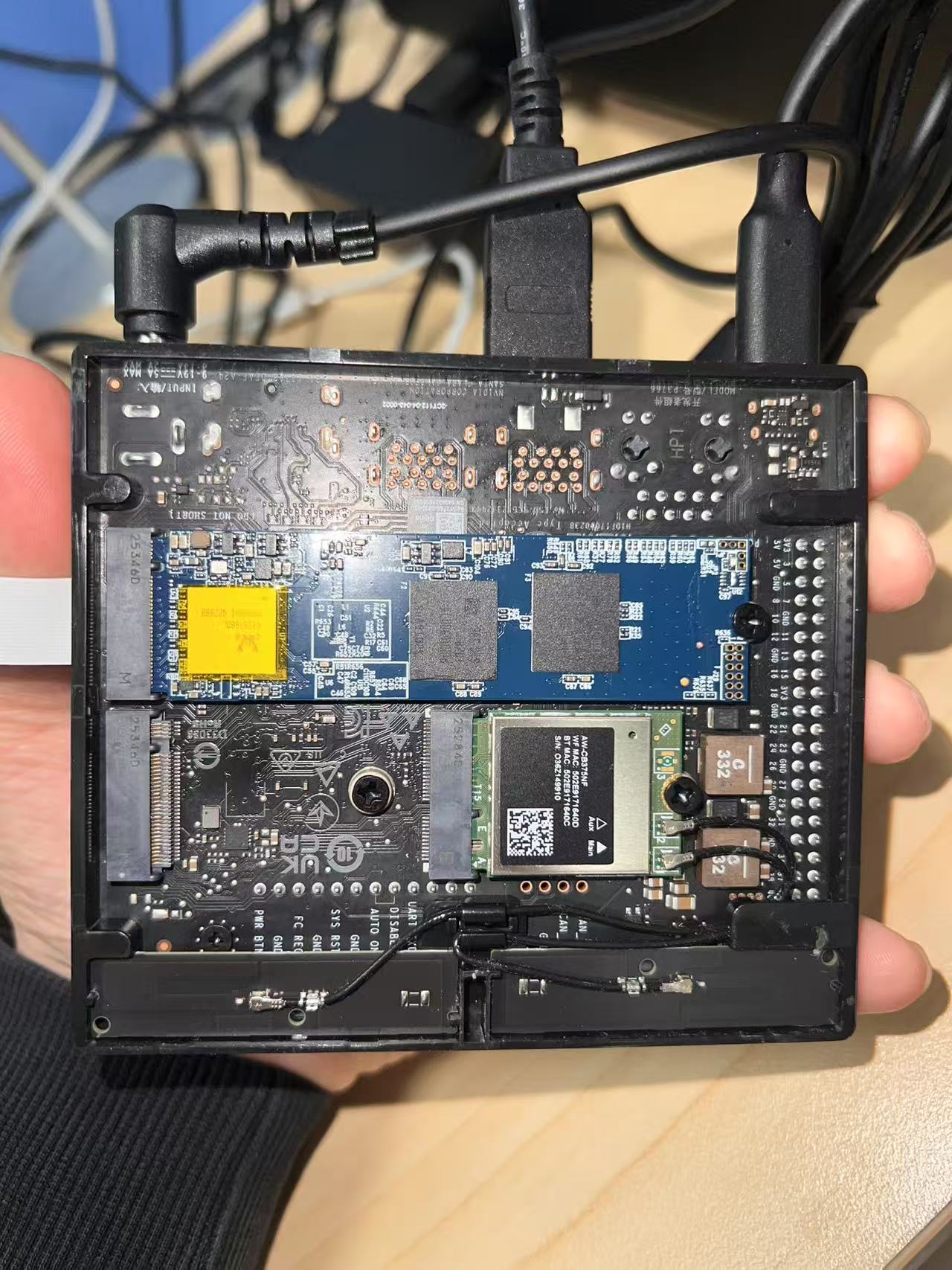
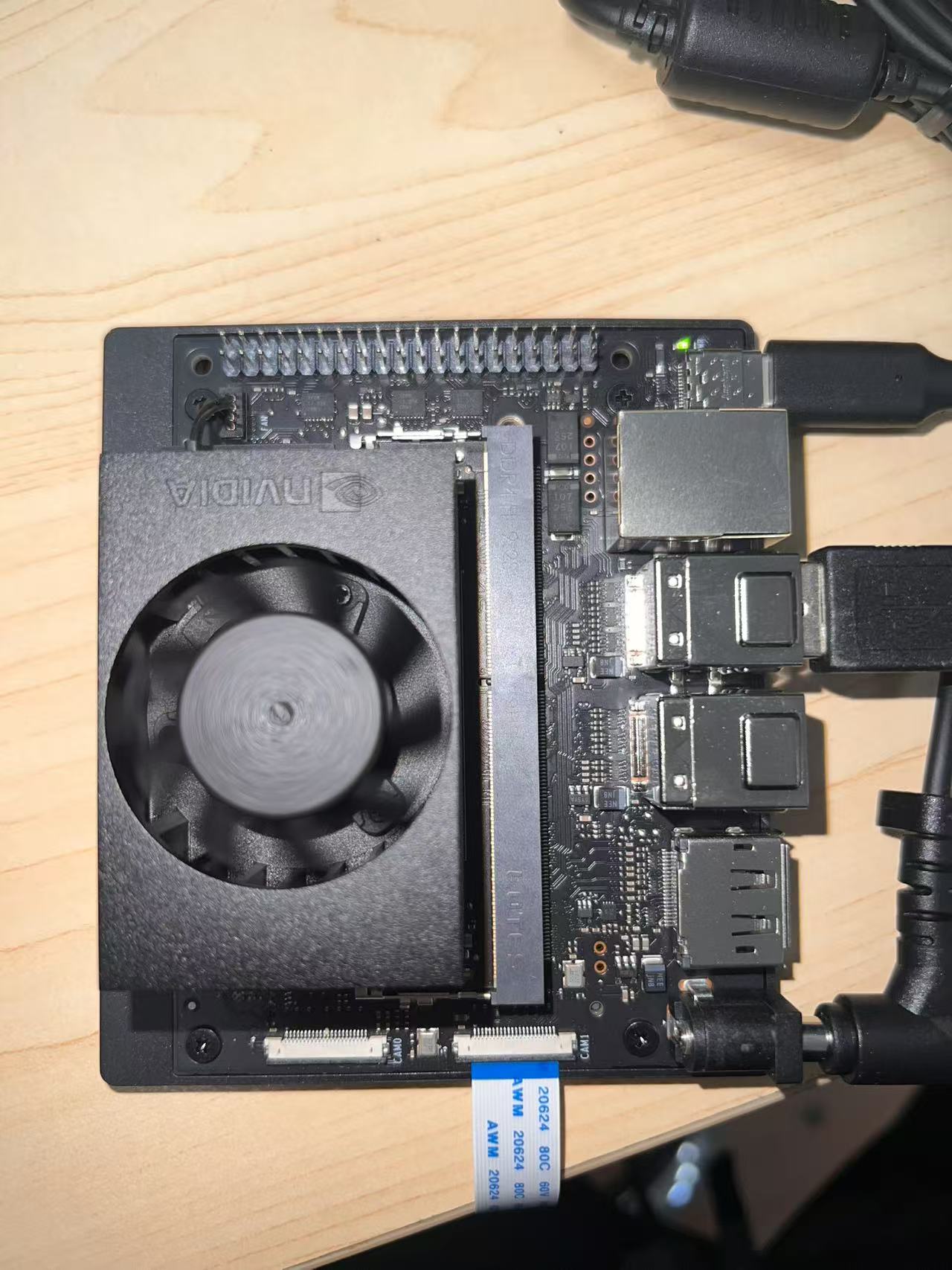
It’s definitely an official NVIDIA module, not a third-party carrier.
Thanks for the photos — confirmed, that’s a genuine NVIDIA Jetson Orin Nano Super. The driver package I sent was built for the standard Orin Nano and its board detection whitelist simply doesn’t include the Super variant.
You’ve got two paths forward:
Option A: I build a new driver package that’s compatible with the Orin Nano Super on your current L4T 36.3.0.
Option B (recommended): Flash your Jetson to L4T 36.4.7, then use the official install script from the MIPI_Camera GitHub releases. Version v0.0.3 of install_full.sh already includes Orin Nano Super support when running on L4T 36.4.7. The older L4T 36.3.0 simply lacks the necessary board definitions in its device tree.
For Option B, the steps would be:
cd ~
wget https://github.com/ArduCAM/MIPI_Camera/releases/download/v0.0.3/install_full.sh
chmod +x install_full.sh
./install_full.sh -m imx519
Flash to 36.4.7 first, then run that. I’d lean toward Option B since it gets you onto a newer L4T that NVIDIA actually supports for the Super hardware.
Quick question — before I go through the reflash, would downgrading to JetPack 5.1.3 be a viable workaround? I have a working SD card image for that version lying around.
No, JetPack 5.1.3 won’t work on the Orin Nano Super at all. Even your current L4T 36.3.0 is technically below what’s needed — the Super variant requires kernel-level support that only landed starting with L4T 36.4.4. The minimum you need is 36.4.4, and I’d strongly recommend going straight to 36.4.7 since that’s what we’ve validated against.
Use NVIDIA SDK Manager to flash the device to L4T 36.4.7. Once that’s done, run the install_full.sh script from my last post and you should be in business. Only 36.4.4+ includes the kernel and DTB support the Super hardware needs.
Okay, I bit the bullet and reflashed to L4T 36.4.7 / JetPack 6.2.1. The Arducam install script ran clean this time — no errors at all during installation. So that part is finally sorted.
But now I’m hitting a new problem. When I try to capture a test stream with gstreamer, the pipeline fails. Here’s the command and output:
gst-launch-1.0 nvarguscamerasrc sensor-id=0 num-buffers=30 ! "video/x-raw(memory:NVMM),width=1920,height=1080,framerate=30/1" ! nvvidconv ! fakesink
Setting pipeline to PAUSED ...
Pipeline is live and does not need PREROLL ...
Pipeline is PREROLLED ...
Setting pipeline to PLAYING ...
New clock: GstSystemClock
GST_ARGUS: Creating output stream
(Argus) Error BadParameter:  (propagating from src/eglstream/FrameConsumerImpl.cpp, function initialize(), line 93)
(Argus) Error BadParameter:  (propagating from src/eglstream/FrameConsumerImpl.cpp, function create(), line 44)
Error generated. /dvs/git/dirty/git-master_linux/multimedia/nvgstreamer/gst-nvarguscamera/gstnvarguscamerasrc.cpp, threadInitialize:318 Failed to create FrameConsumer
Error generated. /dvs/git/dirty/git-master_linux/multimedia/nvgstreamer/gst-nvarguscamera/gstnvarguscamerasrc.cpp, threadFunction:239 (propagating)
Error generated. /dvs/git/dirty/git-master_linux/multimedia/nvgstreamer/gst-nvarguscamera/gstnvarguscamerasrc.cpp, waitRunning:201 Invalid thread state 3
Error generated. /dvs/git/dirty/git-master_linux/multimedia/nvgstreamer/gst-nvarguscamera/gstnvarguscamerasrc.cpp, execute:849 (propagating)
Redistribute latency...
Got EOS from element "pipeline0".
Execution ended after 0:00:00.166181890
Setting pipeline to NULL ...
Freeing pipeline ...
And here’s the dmesg for the IMX519 sensor:
sudo dmesg | grep -i "imx519"
[   10.736621] imx519 9-001a: tegracam sensor driver:imx519_v2.0.6
[   11.038363] tegra-camrtc-capture-vi tegra-capture-vi: subdev imx519 9-001a bound
[   11.039265] imx519 10-001a: tegracam sensor driver:imx519_v2.0.6
[   11.340330] imx519 10-001a: imx519_board_setup: error during i2c read probe (-121)
[   11.340364] imx519 10-001a: board setup failed
[   11.340436] imx519: probe of 10-001a failed with error -121
Looks like one camera channel probes fine but the other fails. Any ideas?
Good news — the driver installation is fully resolved now. The gstreamer FrameConsumer error is actually a cascading failure, not a pipeline config issue.
Looking at your dmesg, the picture is pretty clear:
- I²C bus 9, address 0x1a (
9-001a): Successfully probed, tegracam driver loaded (imx519_v2.0.6), subdev bound to VI. This camera is working. - I²C bus 10, address 0x1a (
10-001a): Probe fails with error -121 (remote I/O error). The kernel can’t even talk to this sensor over I²C.
Error -121 means the device on that I²C address simply isn’t responding. Since nvarguscamerasrc tries to initialize both CSI lanes and one is dead, the FrameConsumer setup falls over.
This is almost certainly a hardware connection issue on the second CSI port. Things to check:
- Is the FPC ribbon cable fully seated on the camera module side and the board side for the second camera?
- Any visible damage to the ribbon cable?
- Are you actually running two cameras, or just one? If only one, which CSI port is it connected to?
I can also take a closer look remotely if that’s easier — I’ve sent you details via private message for setting up an AnyDesk session so we can troubleshoot the hardware side directly. Let me know what you find with the cabling.