Hey everyone, I’m stuck trying to get an Arducam IMX477 camera working on my Jetson Orin Nano Developer Kit. I’m running Jetpack 5.1.4-b17 with L4T 35.6.0 (kernel 5.10.216-tegra-35.6.0-20240828020325).
The camera isn’t being detected at all. When I check dmesg, it looks like the kernel is trying to load the imx219 driver instead of imx477, and it’s failing on both I2C addresses:
Why is it even trying imx219? This is an IMX477 camera. And the i2c error -121 on both addresses seems like it can’t even talk to the sensor. Anyone run into this before?
Quick update - I followed the Arducam Quick Start Guide for the IMX477 camera (Quick-Start-Guide - Arducam Wiki) and tried running their driver installation script. It fails with:
“Cannot find the corresponding deb package, please send the following information to [email protected]”
So it seems like there’s no driver package available for my setup? Not sure where to go from here.
That’s the root of the problem. Your Jetpack version - 5.1.4-b17 with L4T 35.6.0 - isn’t in the supported versions list for the Arducam Jetson camera drivers. There simply isn’t a compiled IMX477 driver deb package for that L4T/kernel version, which is why the install script comes up empty. Since no proper IMX477 driver gets installed, the kernel falls back to looking for an imx219 sensor (which obviously isn’t what’s connected, hence the i2c probe failure with error -121).
What I’d recommend: upgrade your Jetson to Jetpack 6.2 (targeting L4T 36.3.0) and then re-run the Arducam camera setup from the guide. That should get you a matching driver package.
Okay, so I’ve upgraded to Jetpack 6.2 - the system now reports L4T 36.4.3. The IMX477 driver installation seemed to go through this time without errors, which is progress. But the camera is still not being detected.
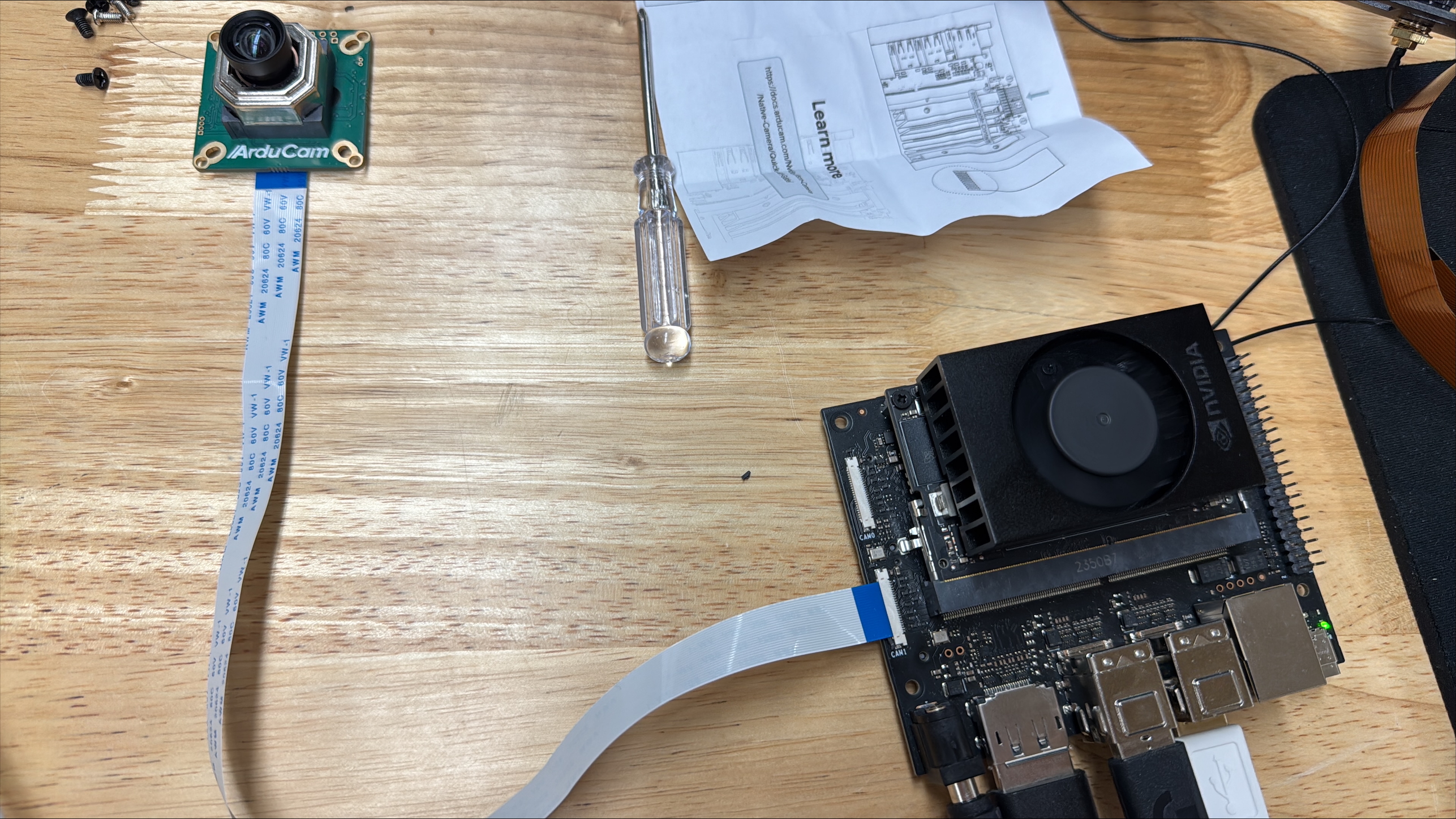
Here’s a photo of my physical connection - the camera is plugged into the connector labeled “cam1” on the board:
And here are screenshots of the relevant outputs:
dmesg | grep imx:
v4l2-ctl --list-formats-ext:
So the software side seems sorted now with Jetpack 6.2, but something still isn’t right. Any ideas?
Thanks for the detailed photos. Looking at your connection photo, I can see something concerning - the CSI connector on your Jetson Orin board itself appears to be physically damaged. It looks like it may have partially detached or come loose from the PCB. That would absolutely prevent proper electrical contact and explain why the camera isn’t being detected even though the driver is now correctly installed on Jetpack 6.2.
To narrow this down, I’d suggest some hardware cross-testing:
Test the camera on another device - If you have access to another Jetson device or a Raspberry Pi, try connecting this Arducam IMX477 to it and see if it’s recognized. That will tell us whether the camera module itself is functional.
Test another camera on this Jetson - If you have a known-working MIPI camera, connect it to the same CSI port on this Orin Nano and check if it gets detected. That will confirm whether the CSI connector on the board is actually functioning.
Given what I’m seeing in the photo, my suspicion is that the physical CSI connector damage is the primary issue at this point - no amount of driver or software fixes will help if there’s no solid electrical connection between the camera and the board. The hardware cross-validation will confirm this for certain.