Hi all, I’m working with the Arducam 1MP*4 Quadrascopic Monochrome Camera Bundle Kit (SKU: B0267) on Jetson. I’m following the docs here: Redirecting...
In the “8.Adjust exposure” section it says the array exposure is mapped to 0~65536. But I can’t figure out how those values actually correspond to a real exposure time. Like if I set 100, or 65536, what shutter time is that in microseconds? Does the value just scale linearly from 0 to some max time? Any pointers would be great, I’m a bit stuck.
The 0~65536 number is not the actual exposure time of the OV9281 sensor. What gets stored in the register is an exposure value in exposure lines, not microseconds, so you have to convert it.
The reason is that the sensor counts exposure in lines. One line takes a certain amount of time, which depends on HTS and pix_clk_hz. So the mapping isn’t directly to time — you compute it like this:
So the value 136 in the register corresponds to ~3000 us of real exposure time on that config. Different hts/pix_clk_hz will give you a different conversion.
What does HTS actually mean here? Earlier my cameras were flickering and someone told me to increase HTS which fixed it, but I never really understood why or what it’s doing. How does HTS affect the camera?
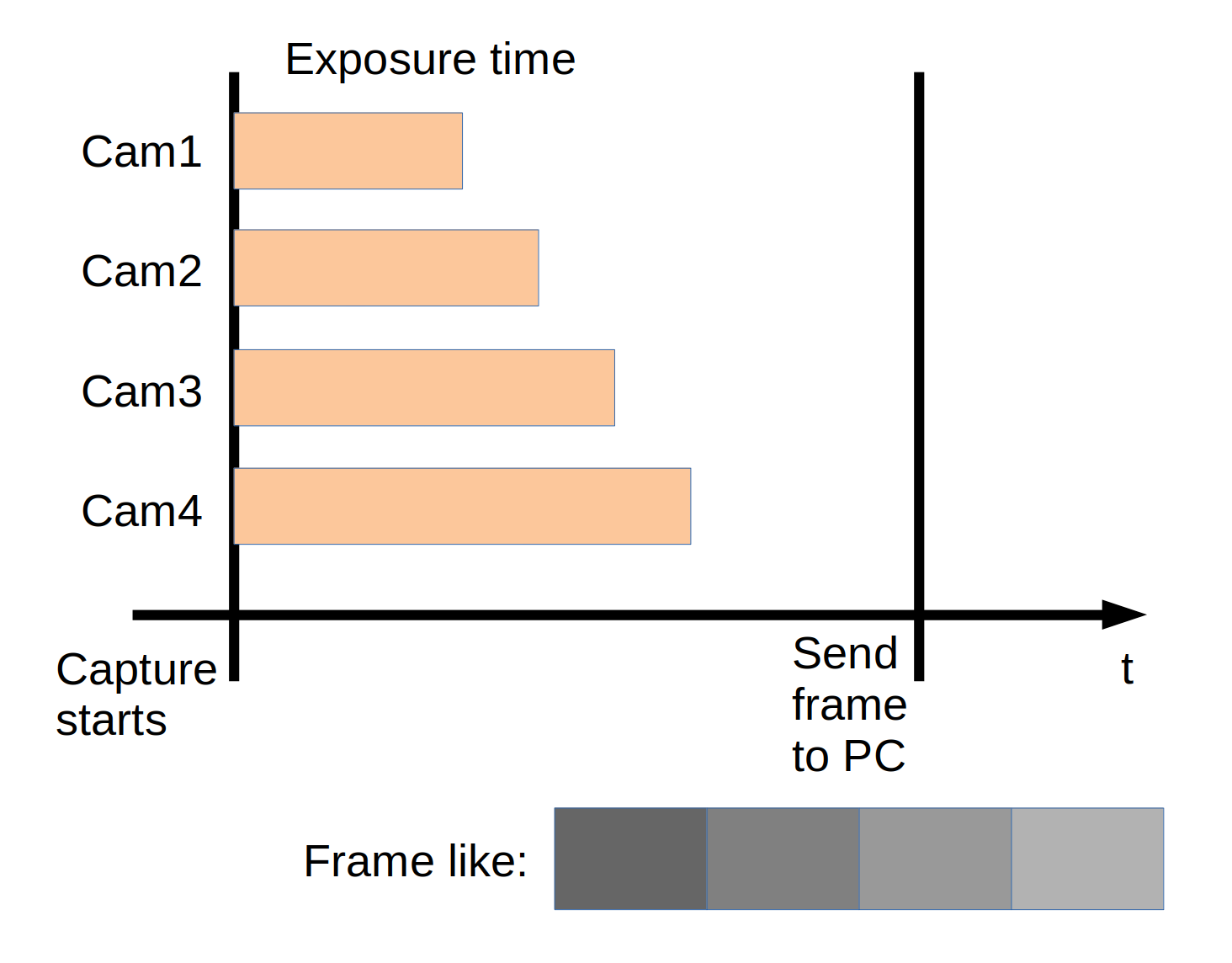
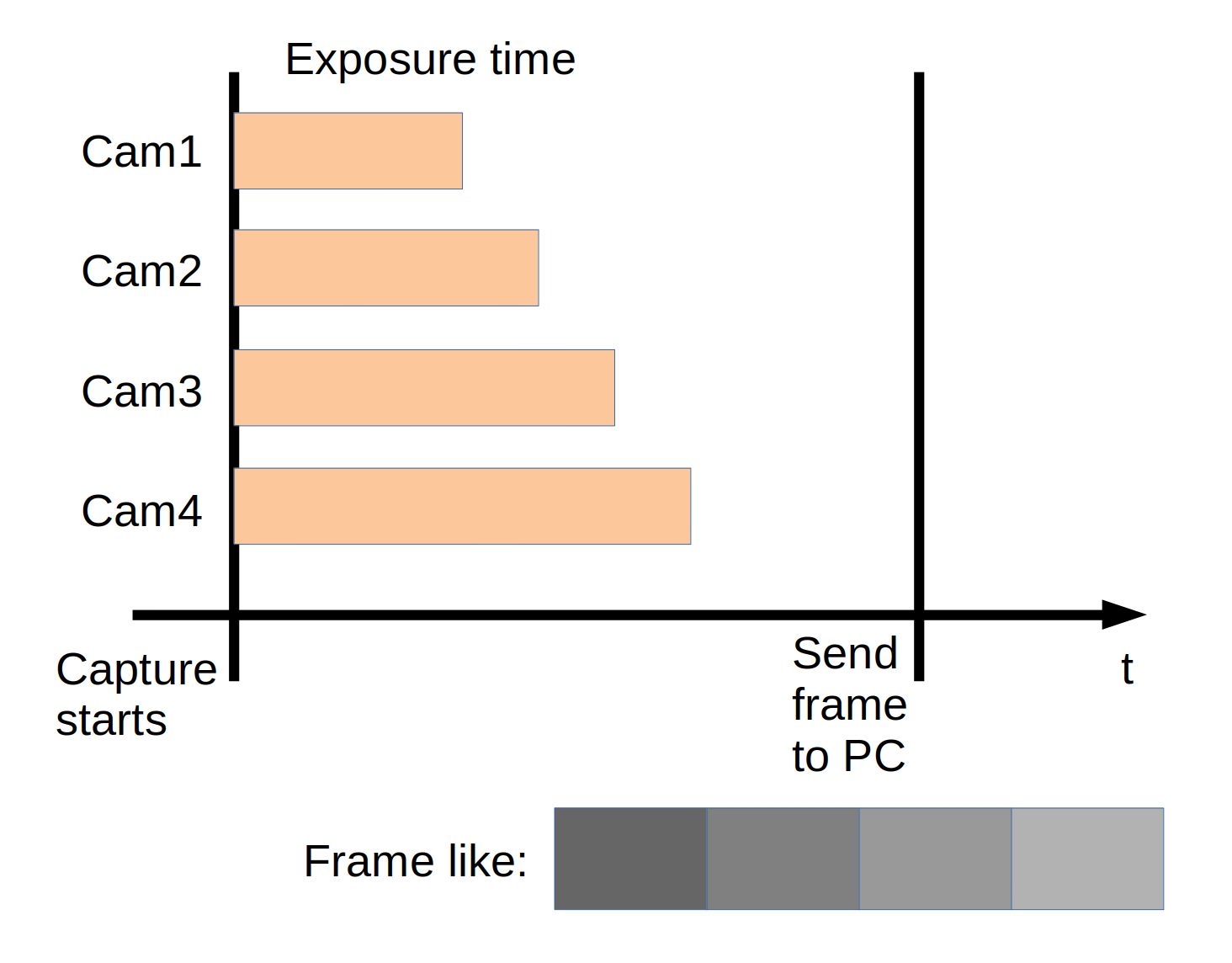
Is it possible to have the 4 cameras capture one frame with different exposure times each? That would be really useful for my project.
The basic unit of exposure is the time of one line, called an exposure line. The exposure time is reflected in the sensor register as a number of exposure lines (the exposure value). The sensor itself only understands exposure lines — not time — which is why we convert.
About HTS: it’s the clock in a row. HTS = 2112 means there are 2112 clocks in one row. pix_clk_hz is the clock frequency. So hts / pix_clk_hz gives you the exposure time of one row/line. Then your required exposure time divided by the time of one line gives the exposure value (number of exposure lines).
So: exposure value = (required exposure time) / (exposure time of one line), where one line = hts / pix_clk_hz.
Example, say you want 3 seconds: exposure time = 3000 (ms). Divide that by the single-line time and you get the number of exposure lines to put in the register.
As for the flickering — increasing HTS lengthens each line period, which is why it affected it. It’s the same HTS that feeds into the conversion above.
Ok, the HTS explanation makes sense now, thanks. But my second question still didn’t get answered — is it actually possible to set a different exposure for each of the 4 cameras within a single shot? That’s the part I really care about. Here’s what I’m trying to do:
I checked this with our hardware engineer to be sure.
Unfortunately, no — you can’t get different exposure times for the 4 cameras within the same frame. The reason is that the camera’s i2c signal and clock are shared, and all the data are synchronized. The HAT is specifically built so that each frame produces a synchronized four-in-one image. Because everything runs off the same shared clock/i2c, you can’t give each of the four sensors its own independent exposure for one captured frame.
So whatever exposure you set applies across the whole synchronized capture.
Got it, thanks for confirming that. I’ll keep my current multi-exposure strategy then (i.e. accepting I can’t get different exposures for the same frame):
One more thing — how do I check the pix_clk_hz value? And is 96000000 just the default for this platform, or does it change depending on config?
For the camera you’re using, pix_clk_hz should be the default value of 96000000.
Here’s the reasoning: when the camera program is built, the registers are modified so that exposure can be changed by adjusting HTS and VTS directly through the command line. In that case the pix_clk_hz is fixed in each sensor — it doesn’t change.
Most of the older products used the approach of changing the resolution and frame rate instead, and with that method the pix_clk_hz does need to be distinguished according to the different configurations. But that’s not what’s happening with exposure control via HTS/VTS here.
So to summarize: for your setup, exposure is adjusted by modifying HTS and VTS through the command line, pix_clk_hz is fixed per sensor at 96000000, and you use the conversion we covered earlier to turn your desired exposure time into the correct exposure register value.