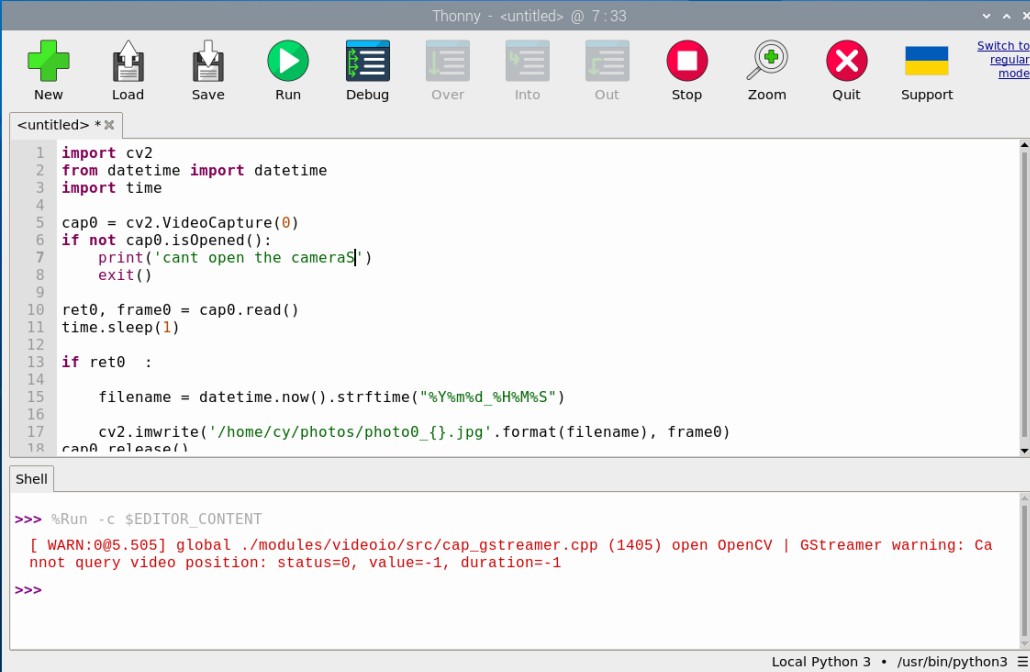
Thanks for sharing the script and the screenshot. Since that message comes from your own cap0.isOpened() check, it means OpenCV was not able to open the device at index 0.
Before we dig into the code, a couple of quick checks:
Can you confirm the camera model — is this the Arducam B0196 UVC camera?
Does the system see the camera at all? Please run lsusb and v4l2-ctl --list-devices and paste the output here if you can.
Thanks for the reply. Yes, the camera is the B0196. I did check lsusb / v4l2-ctl and the device does show up, but I didn’t save the text logs — the only thing I have is the execution screenshot I posted earlier. Even though the system sees the camera, cv2.VideoCapture(0) still gives isOpened() == False.
Got it, thanks for confirming. Looking at your script, the overall flow is fine — VideoCapture(0) → isOpened() → read() → time.sleep(1) → imwrite() — but the very first step is failing. isOpened() returns False, so the script never even reaches read() or imwrite(), and that’s why you see 無法打開相機0 before it exits.
The likely issue is how OpenCV is being told to open the device. On Linux, plain cv2.VideoCapture(0) with the default backend often won’t initialize Arducam UVC cameras correctly, even when the device shows up fine in lsusb / v4l2-ctl. For Arducam UVC cameras on Linux, the recommended approach is to use OpenCV Python with a GStreamer pipeline instead of relying only on cv2.VideoCapture(0).
The idea is to build a GStreamer pipeline string and pass it to cv2.VideoCapture(...), which gives OpenCV the correct source and format parameters for these UVC cameras. Try adapting your capture code to that sample and see if isOpened() returns True. Let us know how it goes.