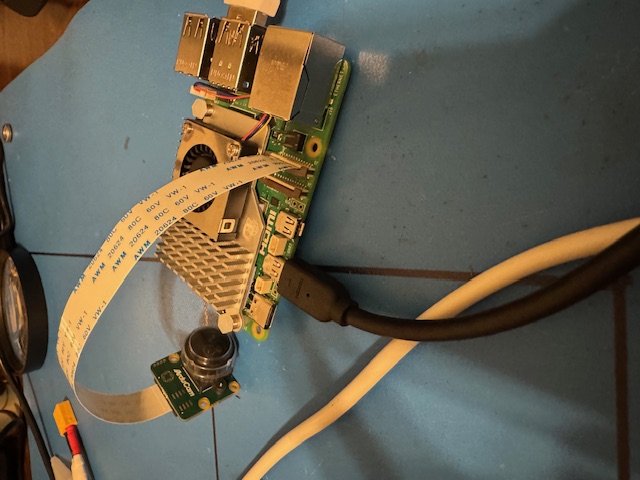
Hey everyone, hoping someone can help me out here. I just got an Arducam B0310 IMX708 camera module and I cannot get it to show up on my Raspberry Pi 5 running Raspbian Bookworm. I’ve also tried it on a CM4 running OpenHD — same result, completely undetected.
Here’s what I’ve done so far:
Added dtoverlay=imx708 to /boot/firmware/config.txt
Physically connected the camera to Cam Port 0 on the Pi 5
Made sure the ribbon cable is seated properly
After booting, the camera just isn’t there. rpicam-hello says no camera found. libcamera-hello same thing. I’m starting to wonder if this thing is DOA. Anyone seen this before?
Welcome to the forum! Before assuming DOA, let’s go through a few checks. The IMX708 should work fine on the Pi 5 with Bookworm, so this is likely a configuration or connection issue.
Can you do the following and report back:
Post the full contents of your /boot/firmware/config.txt (or at least the relevant camera/overlay lines)
Share a clear photo of how the camera ribbon cable is connected to the Pi 5 board — both the CSI port side and the camera module side if possible
Double-check whether camera_auto_detect=1 is present in config.txt (this can sometimes conflict with manual dtoverlay entries)
Also, which exact Cam Port are you using? The Pi 5 has two — labeled CAM0 and CAM1 on the board.
Thanks for the reply. Here’s the photo of the connection:
As you can see it’s in Cam Port 0 (the one closer to the edge of the board).
For config.txt, here’s what I have camera-wise:
camera_auto_detect=0
dtoverlay=imx708
I disabled auto-detect since I’m manually specifying the overlay. I’ve also tried with camera_auto_detect=1 and no dtoverlay line — same result, nothing detected.
I’ve gone ahead and tested this camera on three different Raspberry Pi units now (two Pi 5s and one CM4 with OpenHD) using different camera libraries: rpicam-still, rpicam-vid, libcamera-hello, even picamera2 in Python. None of them see the camera. At this point I’m fairly convinced the module itself is dead.
I understand the frustration, but let’s dig a bit deeper before concluding hardware failure. There’s a diagnostic tool that can give us a clearer picture of what’s happening at the system level.
This will generate an arducam-bug-report.txt file with i2c bus info, dmesg output, v4l2 device enumeration, and overlay status. Please attach that file here.
So I tried running that script but it immediately bombed out — turns out it depends on libcamera-apps which is deprecated on Raspberry Pi 5 Bookworm. Those packages were replaced by the rpicam suite and aren’t available anymore.
I did some digging and found an equivalent diagnostic script from the rpicam project that works on Bookworm. Ran that instead and got a bug report. Output is attached:
In the meantime I’ve also tried literally every possible orientation of the FFC ribbon cable — flipping it at the camera end, flipping it at the Pi end, both flipped, etc. My current orientation (the one in the photo) matches what the Arducam documentation shows, with the contacts oriented correctly as far as I can tell. Still nothing.
Alright, I’ve gone through your bug-report.txt and the connection photo carefully — and I think I’ve found the problem.
Here’s what’s happening:
On the Raspberry Pi 5, the dtoverlay=imx708 overlay is mapped to Cam Port 1 (CAM1), not Cam Port 0. Your camera is physically plugged into Cam Port 0 (CAM0), so the overlay is activating the wrong CSI interface. The system is looking for an IMX708 on CAM1 and finding nothing, while CAM0 — where your camera actually is — has no overlay loaded at all. That’s why it’s invisible to the OS.
The fix: Move the camera ribbon cable from Cam Port 0 to Cam Port 1 on the Pi 5, then reboot.
A couple of extra things to double-check when you reconnect:
Cable orientation matters a lot — make sure the silver contacts on the ribbon cable are facing the silver contacts on both the camera module’s connector and the Pi’s CSI port. It’s easy to get this wrong and a flipped cable is one of the most common causes of a “dead” camera.
After swapping ports and rebooting, run the diagnostic again to verify everything is enumerated correctly. I’ve sent you an updated version of the bug-report tool that works on Bookworm — check your private messages for the link.