Hi, I’m having trouble with an Arducam OV5647 mini camera module B0033 and I’m honestly starting to think I got a faulty unit. I’ve had this thing installed for a while now and it has not worked at all since I put it in. I did the install steps that were suggested and the camera is still not working. Every time I try to test it I just get an error/result back. I’m not really sure what else to try here. Any help would be appreciated.
Hi, thanks for reaching out. Sorry to hear the camera isn’t cooperating. Can you share a bit more about your setup so we can narrow this down? Specifically, which OS/image you’re running and how you’re testing the camera. Also, could you provide us with screenshots of the error to help us analyze the cause of your problem faster? Please attach the screenshots when you reply.
Thanks for getting back to me. I’m on OctoPi. Here’s a screenshot of what I’m getting when trying to test the camera:
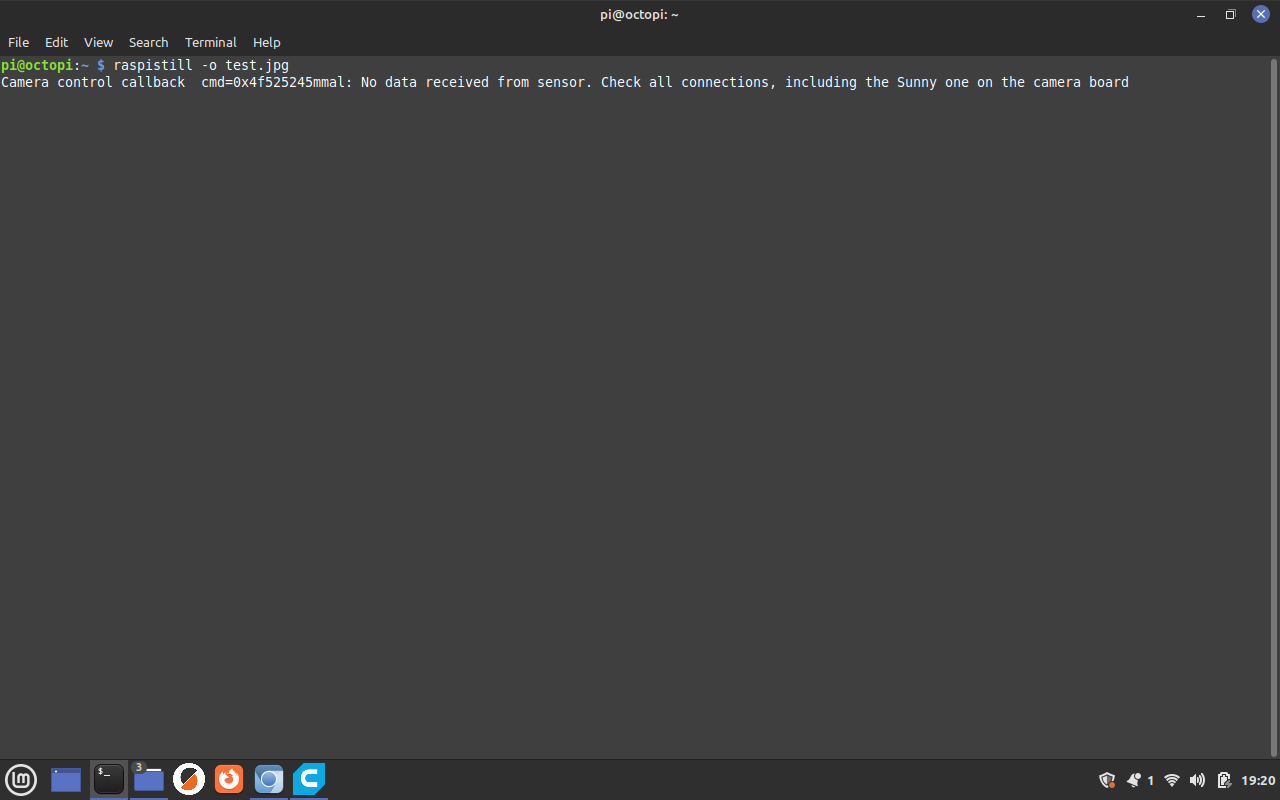
Also, just to be clear, I have double and triple checked the camera connections, so I don’t think it’s a loose ribbon cable or anything like that. The camera has just never worked since install.
Thanks, that helps. Since you’re running OctoPi, it would really help if you could generate a camera bug report so we can see what the system is detecting. Can you run these commands?
First, install the dependencies:
sudo apt install -y qtbase5-dev libqt5core5a libqt5gui5 libqt5widgets5
Then grab and run the bug report tool:
wget -O arducam-camera-bug-report https://github.com/ketai-dhr/arducam-camera-bug-report/releases/download/tools/arducam-camera-bug-report
chmod +x ./arducam-camera-bug-report
./arducam-camera-bug-report
This will output an arducam-bug-report.txt in the current directory. Please send that file back as an attachment so we can review it.
Alright, I did the install of those dependencies (qtbase5-dev, libqt5core5a, libqt5gui5, libqt5widgets5) and then ran the bug report tool. It produced the arducam-bug-report.txt file in the current directory, so I’ve attached it.
But I have to say, the camera is still not working after doing all this. Same as before. I’ve double and triple checked the connections and it just never works. Screenshot of the test error is still the one above. I’m pretty convinced it’s a faulty unit at this point.
Thanks for the report and the screenshot. I looked this over with our support team. One thing that stands out: we have not tried OctoPi on the buster system here, and your raspi-still has also been fully upgraded to libcamera, which is likely affecting how the camera test workflow behaves on your setup.
So I want to make sure we’re testing it the right way before assuming the module is faulty. Can you try the libcamera-still test command to verify the camera:
libcamera-still -t 5000 -n -o test.jpg
That should capture a test.jpg after about 5 seconds and let us know whether the camera itself is being detected.
Okay, I’ll give that a shot. Just to confirm, is there anything else I need to change on my current buster/OctoPi setup, or do I need to do a fresh image? I’d rather not wipe everything if I don’t have to.
Good question. Honestly, we recommend using the bullseye image for this, since the buster/OctoPi combination with the libcamera upgrade is where the compatibility issue is coming from.
One thing that trips people up: the camera you have is a native camera, so you should skip step 3.1 of the guide. Everything else in the steps is the same as written.
You can follow the autofocus camera solution guide for using it on OctoPi here:
https://www.arducam.com/docs/cameras-for-raspberry-pi/raspberry-pi-libcamera-guide/autofocus-camera-solution-using-on-octopi/
Understood. So to recap what I’ll do: switch over to the bullseye image, then run libcamera-still -t 5000 -n -o test.jpg to test, and skip step 3.1 in the guide because it’s a native camera. If that still fails after all this, then I guess we can talk about the module being bad. I’ll report back once I’ve tried it.
That’s exactly right. To summarize where we’ve landed: the symptom is that the camera has never worked on your OctoPi/buster setup, even after installing the dependencies and running the arducam-camera-bug-report. The likely cause here isn’t a dead module but a compatibility issue, since OctoPi on buster hasn’t been tested on our side and your raspi-still has been fully upgraded to libcamera.
The recommended path is to move to the bullseye image and verify the camera with:
libcamera-still -t 5000 -n -o test.jpg
Remember to skip step 3.1 of the guide since your camera is a native camera, and the rest of the steps stay the same:
https://www.arducam.com/docs/cameras-for-raspberry-pi/raspberry-pi-libcamera-guide/autofocus-camera-solution-using-on-octopi/
If it still fails after that, let us know and we’ll dig further.