Hi, I’m pretty new to Jetson stuff and I’m stuck trying to get my Arducam camera working. Hoping someone here can point me in the right direction.
Setup:
Platform: Jetson Xavier NX
Camera: Arducam IMX219 / B0187 (says IMX219-B0187 on the board)
The only camera connected to the CSI connector is this IMX219-B0187, nothing else is attached right now
I’ve used USB cameras before on this Jetson (a ZED camera and a regular webcam) and those were both detected fine
I followed the driver installation instructions here: Redirecting...
I ran uname -a to get the kernel version and tried to match it in the github XavierNX folder, but I could not find this version listed there.
uname -a gave me:
Linux itamar-Dell-G15-5511 5.14.0-1045-oem #51-Ubuntu SMP Mon Jul 4 06:41:22 UTC 2022 x86_64 x86_64 x86_64 GNU/Linux
I ran the CSI connector configuration and attached the output of cat /boot/extlinux/extlinux.conf (screenshot below). I noticed the config sometimes came up with DEFAULT JetsonIO, and sometimes I tried changing it manually to Jetson primary. The ribbon cable is definitely seated properly in the MIPI connector, I checked it a few times.
After restarting the Jetson I ran: gst-launch-1.0 nvarguscamerasrc sensor_id=0 ! nvoverlaysink
And this is what came out:
Encoder null, cannot set bitrate
Opening in BLOCKING MODE
Error generated. /dvs/git/dirty/git-master_linux/multimedia/nvgstreamer/gst-nvarguscamera/gst-nvarguscamerasrc.cpp, execute:645 No cameras available
So the camera just isn’t detected at all. I also captured the dmesg output after the run. Screenshots attached:
Would it be possible to do a scheduled online call to troubleshoot this? I’ve been going in circles for a while now. Thanks!
Thanks for the detailed writeup and the screenshots, that dmesg output actually tells us a lot. Good news is the board is talking to the camera bus, the problem is what’s loaded on it.
Looking at your dmesg, we can see that the drivers for our OTHER cameras have been installed on your system. That means your current setup is NOT configured for the imx219 you have attached. So the CSI connector configuration needs to be switched back to imx219.
Here’s how to do it:
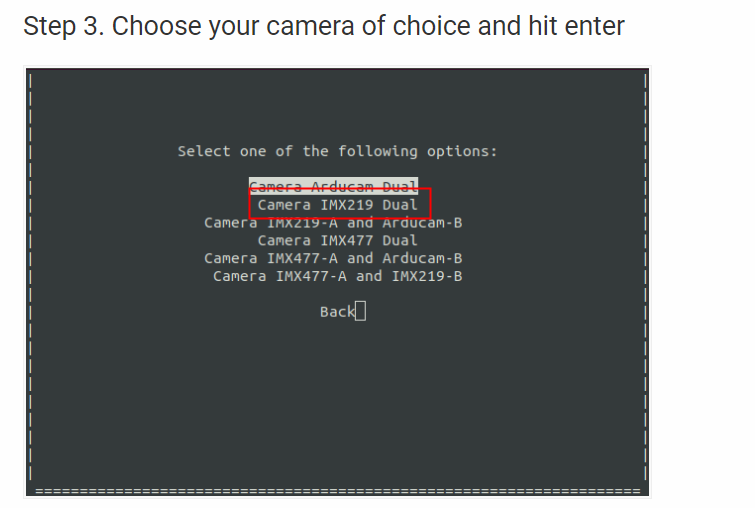
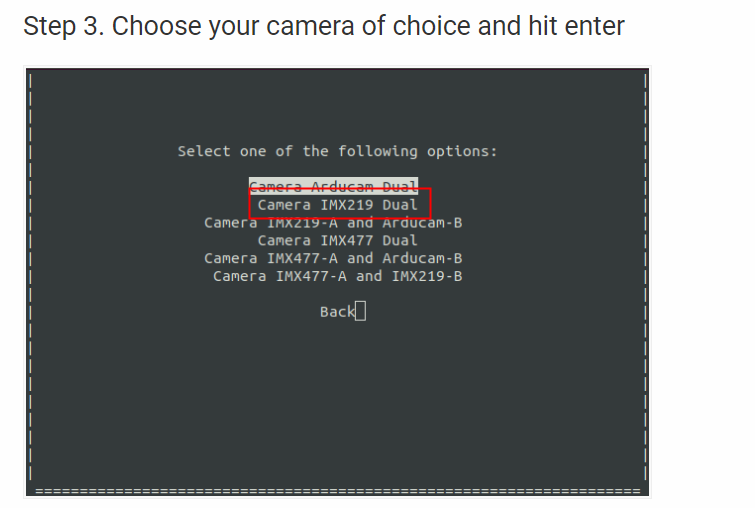
Follow this doc to reconfigure the CSI connector using Jetson-IO and switch back to imx219: Redirecting...
The important bit: in step 3 of that guide you have to pick the SECOND option (I’ve attached a screenshot of what it should look like).
So to recap the root cause: wrong/other camera drivers are installed and active, and you need to switch back to imx219 through the CSI connector config. Give that a shot and let us know what you get after the reboot.
Ah, my bad on one thing — I need to correct something I posted earlier. That uname -a output I pasted was run accidentally from the wrong terminal. I re-ran it from the correct one now.
Correct uname -a:
Linux jetson 4.9.253-tegra #1 SMP PREEMPT Mon Mar 14 02:51:19 UTC 2022 aarch64 aarch64 aarch64 GNU/Linux
So the x86_64 Dell thing before was not the Jetson at all, sorry about that confusion. The actual machine is the Jetson Xavier NX with the B0187 / IMX219 camera on the CSI connector.
Screenshots of the correct output attached:
Is the same CSI/Jetson-IO advice still the right thing to do with this kernel?
No worries about the terminal mix-up, that clears up a lot actually.
To answer your question: your camera is model B0187, and that is another name for the imx219. Because it’s an imx219, you do NOT need to install any driver at all. This is why you couldn’t find it as a separate entry under that name.
So the order of operations here is:
First follow the last instruction and return to imx219 (the Jetson-IO / CSI connector reconfiguration from before, picking the second option in step 3).
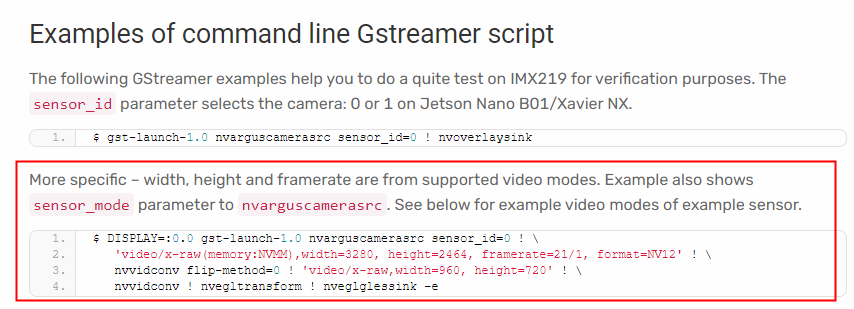
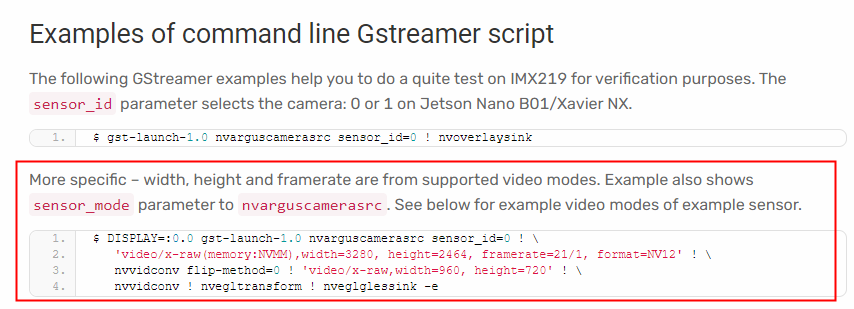
Then follow the usage/capture guide for the imx219 8MP camera here: Redirecting...
If it still won’t run after that, send a screenshot of the error report and we’ll take it from there.
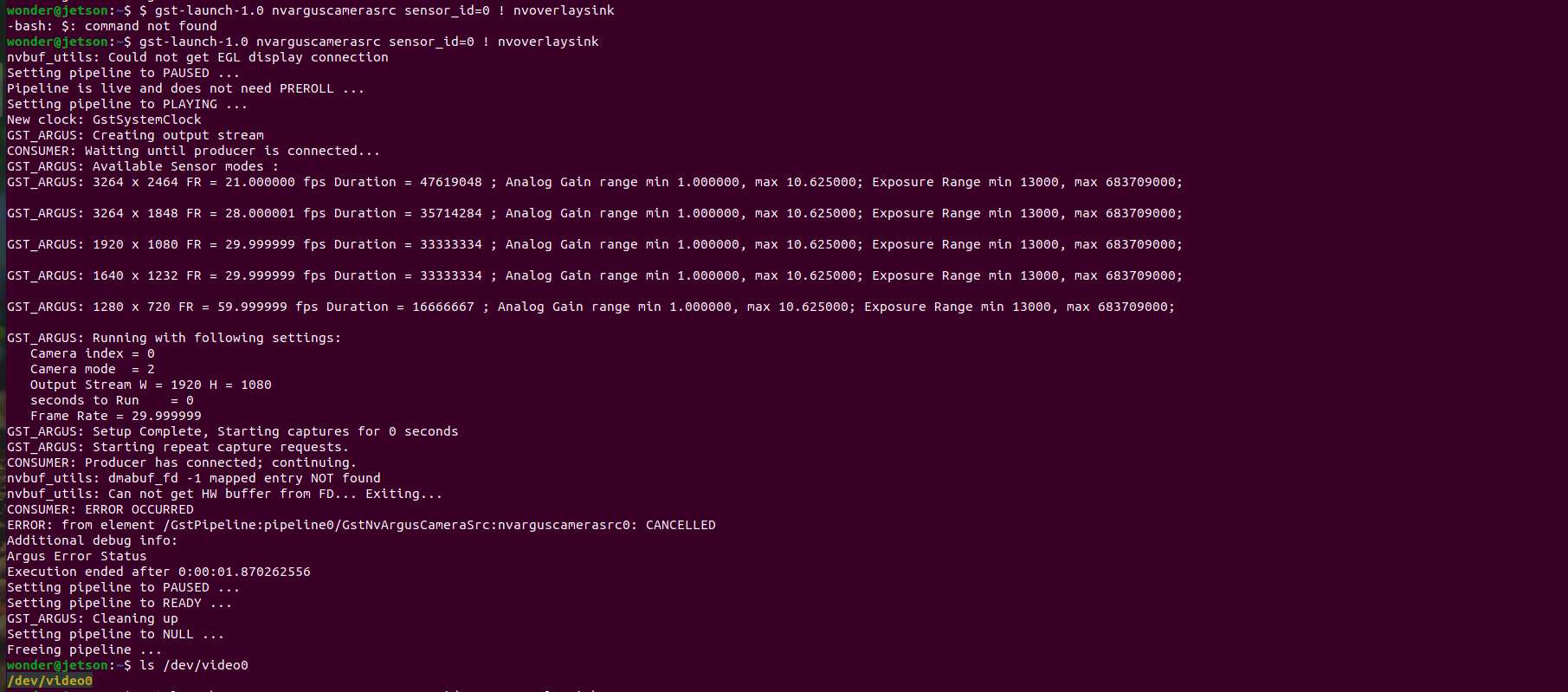
OK, I tried again — sorry, but again, no use. It still doesn’t work.
I did the pin configuration as suggested, then ran the command in the next link you gave me. The result is still the same kind of failure. Screenshot of the output attached:
Camera is still the B0187 / IMX219 on the Jetson Xavier NX. Anything else I can try?
Thanks for sticking with it and for the screenshot. Let me summarize where we are so it’s clear for anyone following this thread:
The camera is a B0187, which is just another name for the imx219, so no driver installation is needed for it.
The original dmesg showed that drivers for our other cameras were installed on the system, which is why it wasn’t configured for the imx219.
The fix path is to switch the CSI connector config back to imx219 via Jetson-IO (choosing the second option in step 3 of that guide), then run the capture command from the imx219 8MP usage doc.
You’ve now done the pin configuration and re-run the command, and it’s still not coming up.
So at this point the issue is not resolved yet. Next thing I’d like to check is the full output after the Jetson-IO change specifically — to confirm the new configuration actually took effect after reboot. Please run cat /boot/extlinux/extlinux.conf again and uname -a, and grab the fresh dmesg right after running the gst-launch command, and post those here (or send them to me directly if the logs are long). That will tell us whether the imx219 configuration is really being loaded or if something is still overriding it.