Configuring ArduCam Motorized Focus Camera with OctoPi
I’m setting up my Arducam motorized focus camera on an OctoPi install and I followed the directions posted on the Arducam website, but I think I must have missed a step somewhere.
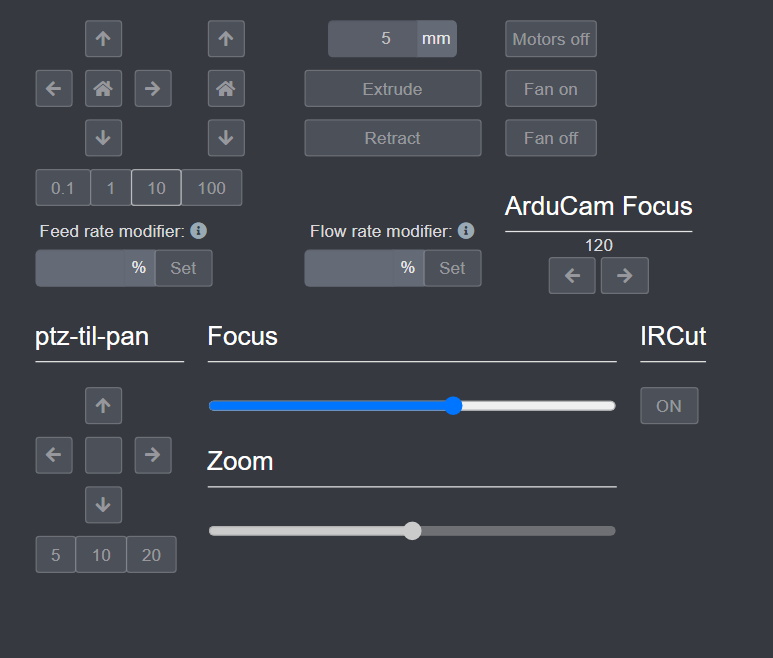
The problem is that I’m seeing BOTH the “ArduCam Focus” controls AND a “ptz-til-pan” section in the control tab at the same time. I only have the motorized focus camera, so I expected just the “ArduCam Focus” controls.
On top of that, the “ArduCam Focus” controls don’t seem to actually do anything. The Focus slider that’s inside the ptz-til-pan section is the one that actually moves the focus.
Is this how it’s supposed to work? What I really want is to get rid of the ptz-til-pan section entirely and have the ArduCam Focus slider work instead. Screenshot of what I’m seeing is attached below.
A couple of quick questions so I can narrow this down:
Which exact Arducam motorized focus camera model are you using?
What plugin(s) are installed, and what versions? Can you paste the list from Settings > Plugin Manager > Installed Plugins?
What version of OctoPrint / which OctoPi image are you on?
Is there any chance a separate PTZ plugin got installed alongside the Arducam one? The ptz-til-pan control set usually points at that.
Also, if you can grab the relevant lines from ~/.octoprint/logs/octoprint.log (especially anything mentioning arducam, camera, or detection at startup) that would help confirm what the plugin thinks is connected.
It’s the Arducam motorized focus camera (the one with the focus motor on the lens).
In Plugin Manager I see the Arducam plugin listed, and that’s the only camera-related one I installed. I don’t remember installing anything with “ptz” in the name.
It’s a standard OctoPi image, fairly recent, OctoPrint 1.9.x. I can get the exact build if it matters.
I don’t see a separate PTZ plugin in the list, which is what’s confusing me. If there’s no PTZ plugin, where are the ptz-til-pan controls coming from?
On the logs, honestly I don’t have any yet. I didn’t capture anything because I wasn’t even sure what to look for. I followed the website directions step by step but clearly something didn’t take.
I did try uninstalling and reinstalling the Arducam plugin once, and I tried editing config.yaml to remove the controls I didn’t want, but after a reboot both sections were back and the ArduCam Focus slider still does nothing.
That actually points in a useful direction. If there’s no separate PTZ plugin installed, the ptz-til-pan controls are coming from the Arducam plugin itself, not from something extra.
The Arducam plugin is built to support both PTZ cameras and motorized focus cameras. It tries to detect the connected camera at startup and then enables whichever controls apply. So seeing both sets of controls is usually the plugin’s auto-detection at work rather than a broken install.
Two things to check next:
In OctoPrint, go to the terminal tab and run lsusb and paste the output. That tells us what the plugin is seeing on the USB bus.
Then check dmesg | grep -i -E "usb|cam" right after a reboot and paste that too.
Also, when you move the Focus slider inside ptz-til-pan, does the image actually change focus in the stream? I want to confirm that slider is really driving the focus motor and not just moving a UI element.
lsusb shows the camera enumerated, and dmesg confirms it shows up when the Pi boots, so the hardware side looks fine. It’s detected, no errors I can see in dmesg.
And yes, when I move the Focus slider under ptz-til-pan, the image actually goes in and out of focus in the stream. So that slider is definitely controlling the real focus motor. The ArduCam Focus slider next to it does nothing at all, no change in the image.
So functionally I can focus the camera, just from the “wrong” control group. My question is really whether I can get the ArduCam Focus controls to be the ones that work, and drop the ptz-til-pan section.
Here’s what’s happening: the plugin watches what’s attached and turns on the matching controls. Because it’s covering both PTZ and motorized-focus hardware, it can end up exposing both control groups, and only the one wired to your actual hardware will move anything. In your case the focus motor is being driven through the slider in the ptz-til-pan group, which is why that one works while the ArduCam Focus slider is inert.
Nothing in your setup is broken. The config.yaml edits you made won’t stick because the plugin re-adds the controls on startup based on its detection.
A few last confirmations before I wrap this up:
Does the camera get detected correctly every reboot, or does it sometimes fail to enumerate?
Are you on the current version of the Arducam plugin?
If the detection is consistent, there isn’t really a fix to apply here.
Detection is consistent every reboot, it always comes up. I’m on the latest plugin version as far as I can tell, I reinstalled it fresh when I was troubleshooting.
So you’re saying there’s nothing to configure and I should just use the slider that works? That’s a little odd from a UI standpoint, but if that’s expected behavior then I’ll live with it. I just wanted to make sure I hadn’t missed a step in the setup instructions or left something half-configured.
The Arducam plugin supports both PTZ and motorized focus cameras, and it auto-detects the connected camera to enable the relevant controls.
That’s why both the “ArduCam Focus” controls and the ptz-til-pan controls can show up at the same time on a motorized focus camera.
It’s the plugin’s automatic detection behavior, not a fault and not an incomplete install.
The slider that actually drives your focus motor is the one in the ptz-til-pan group, so that’s the one to use.
No action is needed on your side: the plugin detects the camera type (PTZ or motorized) and enables the relevant controls on its own. Manually editing config.yaml to force a control group off won’t hold, since it’s re-applied on startup.
If you see the detection start failing (camera not enumerating at boot, controls missing entirely), post back here with a fresh lsusb and dmesg output and we’ll take another look.