Hi, hoping someone can help. I have an Arducam AR1335 camera connected to a Raspberry Pi running the latest RPi OS with the Arducam V4L2 driver. I can’t get a capture out of it at all. The weird part is the system says RGB3 format can be used, but when I actually try it, it comes back saying the format is unsupported. I followed the V4L2 Arducam driver tutorial for the latest RPI OS (kernel 5.4.79 and later): https://www.arducam.com/emergent-v4l2-driver-for-the-lastest-rpi-update/ . I also noticed a line appears when the device boots, and I have a feeling that might be another reason it isn’t working. I’ve attached my Raspberry Pi system info and a screenshot of the line at boot. Any ideas what to check first?
From the picture you attached, the driver actually installed successfully, so that part looks fine — we can rule that out as the cause. Next let’s confirm the camera is being enumerated correctly. Please run:
v4l2-ctl --list-formats-ext
and paste the output here so we can see what the system thinks the camera can do. Also try switching to a different pixel format and resolution and retry, using this command format:
arducamstill -t 0 -pixfmt xxx -w xx -h xx
OK so a bit more context. I’m using the driver from that V4L2 tutorial for the Latest RPI OS (Kernel 5.4.79 and later). When I run ‘arducamstill -t 0’ it just hangs and says ‘select timeout’. I already double-checked that the ribbon cable is connected properly, reseated it and everything. I tried a few different image formats, specifically UVYV and RGB3. UVYV seems to go through, but RGB3 keeps reporting that it’s not supported by the camera. Not sure if that points to anything.
Got it, thanks for the extra detail. Before we dig deeper I want to make sure we have everything we need on our side. Can you provide the following:
- Product size (or the purchasing link)
- The instruction link you referred to
- System log (run
dmesgand send the output) - What attempts you have already tried
With those we can start narrowing down the AR1335 import/format issue.
Here you go:
Problem:
- Camera image format issue: RGB3 format says it is not supported by the camera.
Environment:
- Raspberry Pi with latest RPi update
- Arducam AR1335 camera
- Arducam V4L2 driver
Code:
- arducamstill -t 0
Attempts:
- Used
arducamstill -t 0with different image formats, specifically UVYV and RGB3. - RGB3 format reported as not supported by the camera.
Logs:
- Screenshot of the system log attached: https://cdn.arducam.com/forum/e6a4a97d20b98a8dd0aa8a00f768df9c/2022-05-28-183543_1360x768_scrot.png
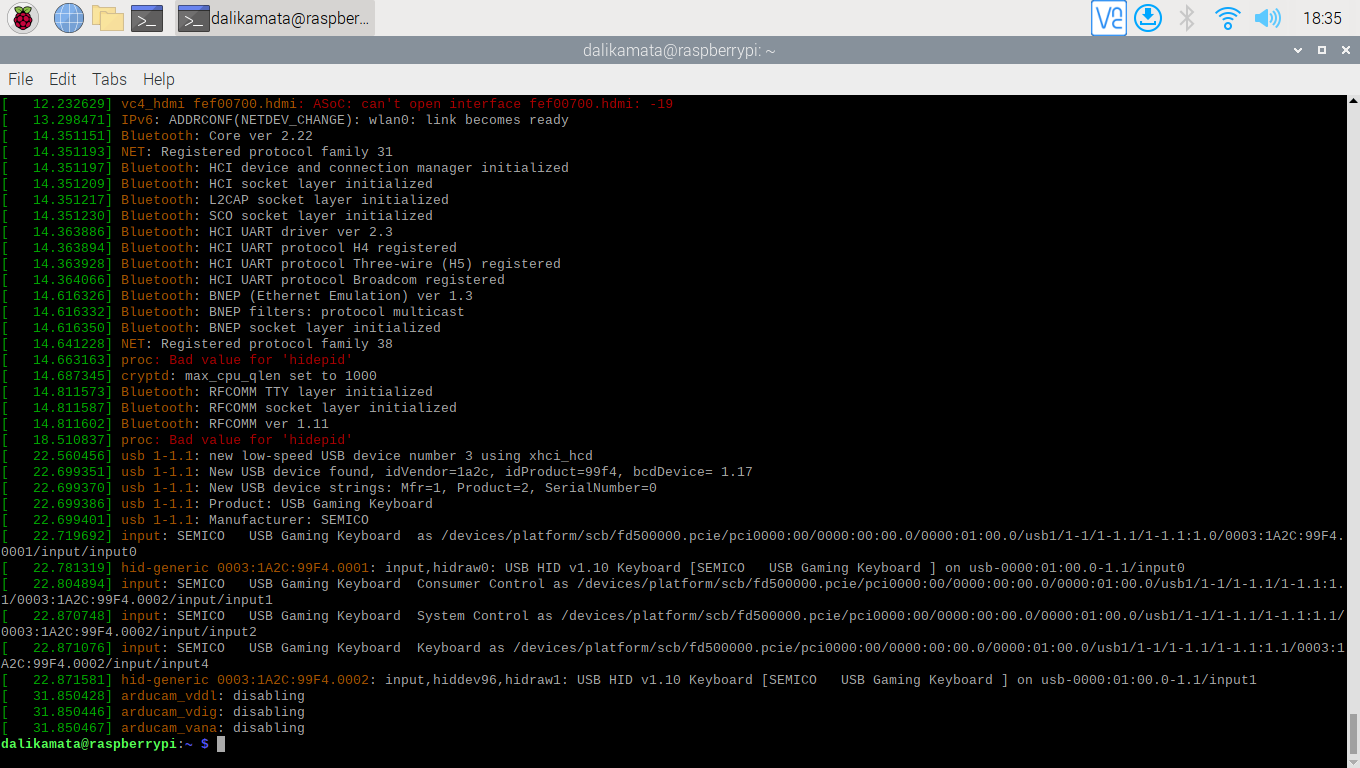
Reference followed:
Perfect, that helps a lot. Quick recap so we stay on the same page:
- Your driver is installed successfully (confirmed from the picture/logs), so the install is not the problem.
- The root cause is still not determined. The AR1335 not working, the RGB3 ‘unsupported format’ message, and the ‘select timeout’ from
arducamstill -t 0are all still open. - Since enumeration is now the key thing to verify, we need your
v4l2-ctl --list-formats-extoutput and the rawdmesgtext (not just the screenshot) to see how the sensor is being probed and whether any errors show at boot. - In the meantime keep trying alternate pixel formats/resolutions using [arducamstill -t 0 -pixfmt xxx -w xx -h xx] and the same tutorial for reference: https://www.arducam.com/emergent-v4l2-driver-for-the-lastest-rpi-update/
Once we have those logs we can tell whether this is a format/sensor configuration issue or something at the hardware/connection level.