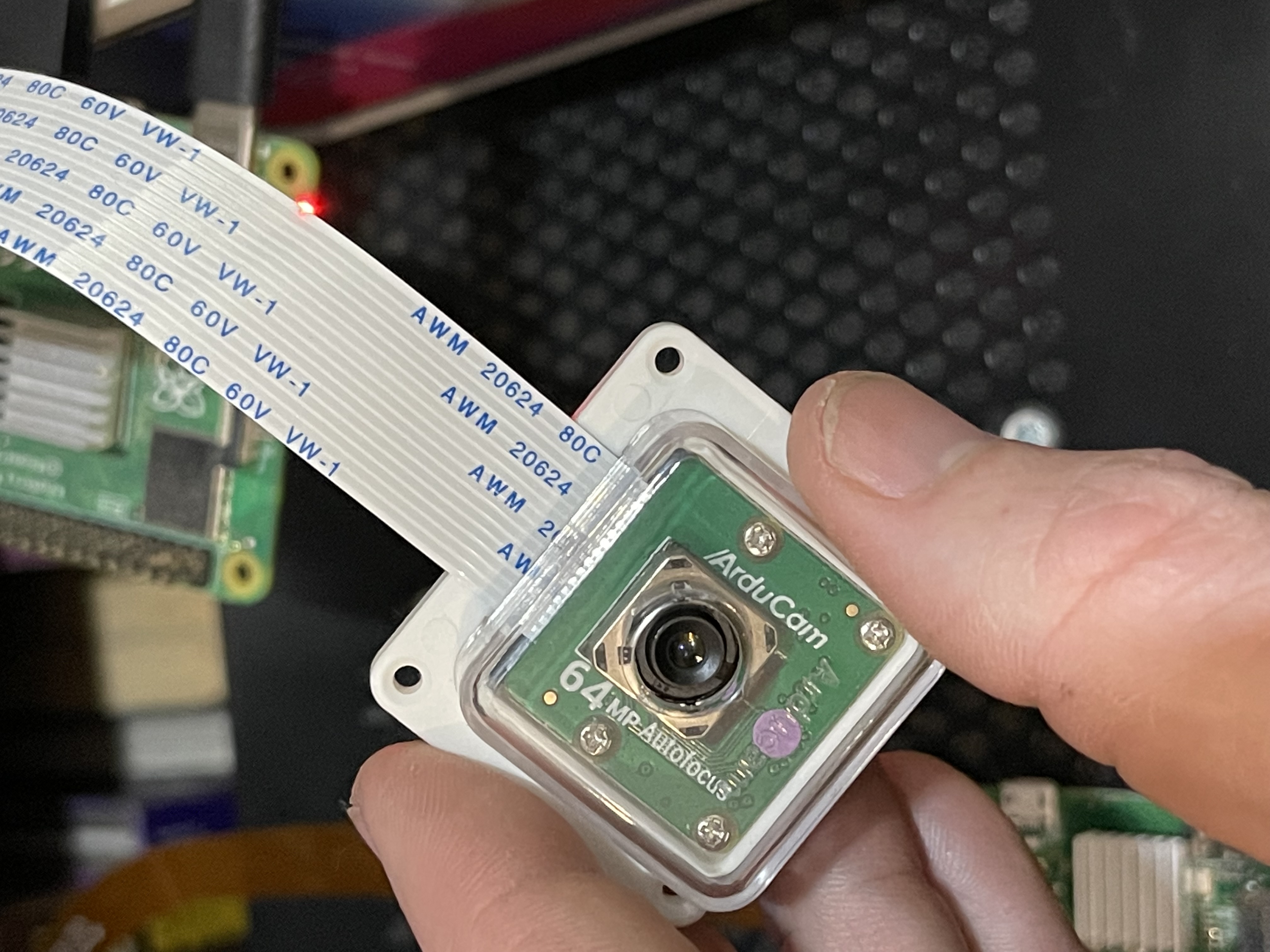
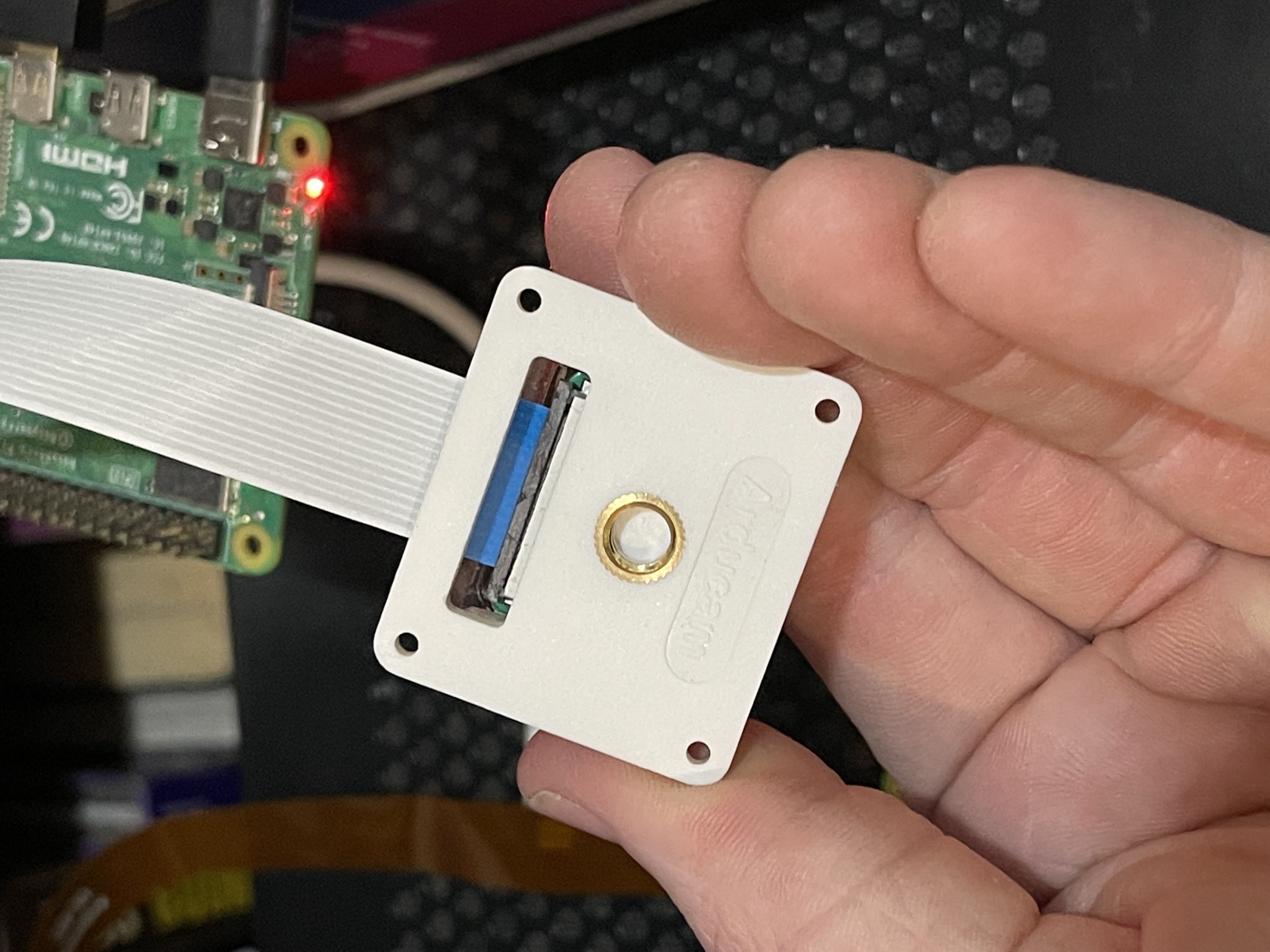
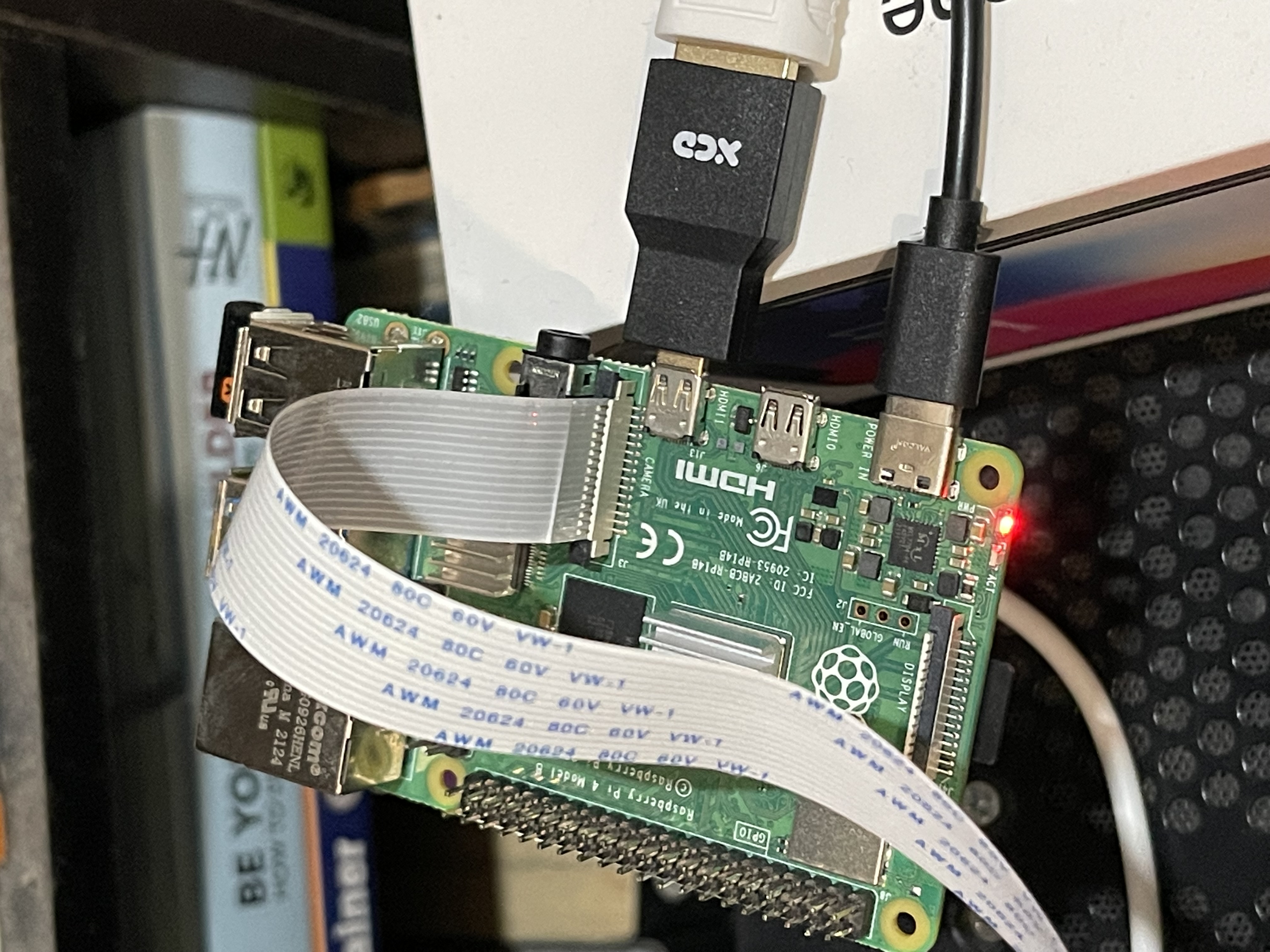
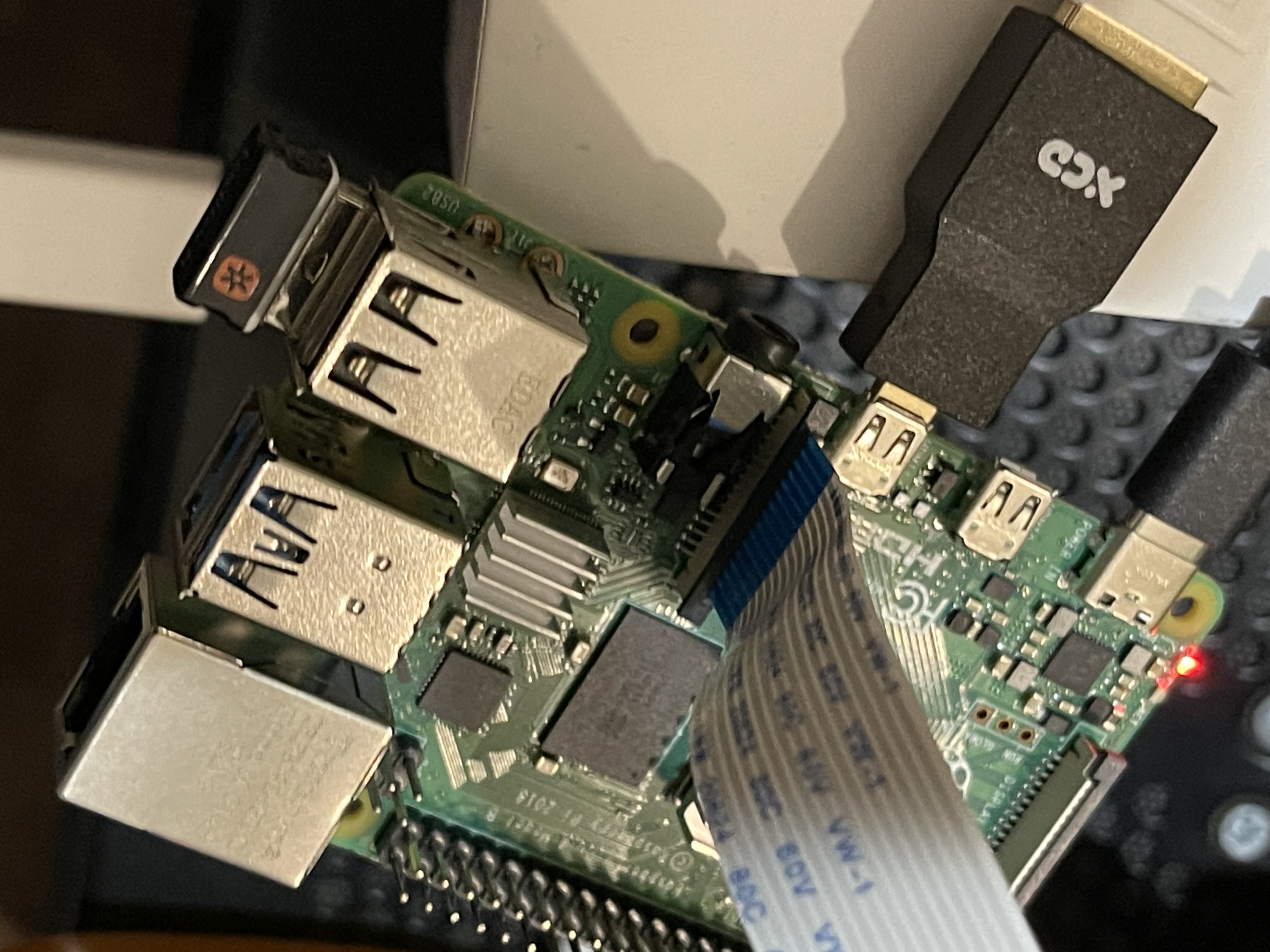
Hi, I’m trying to get an Arducam 64MP ultra-high-res camera working on a Raspberry Pi 4 Model B Rev 1.4 and I can’t get libcamera to see it at all. Following the 64MP Pi camera manual, when I run libcamera it just gives me:
INFO Camera camera_manager.cpp:293 libcamera
ERROR: no cameras available
I’ve tried everything I can think of with the ribbon cable (different combinations of connections to the camera and to the board), tried different versions of Bullseye, tried update/upgrade before install, and tried installing camera software with no update/upgrade. I actually have 4 of these cameras and have tried all of them with the same configurations, and none of them ever worked. Never got one working from the start. Am I missing something or is the instruction incomplete? Any help appreciated.
Hi, thanks for reaching out. Sorry you’re stuck on this.
First thing: I tested the same camera on my reference setup, a Raspberry Pi 4 running Bullseye 5.15.32 ~v7l, and it worked normally here. So this isn’t a broken-everywhere kind of failure, which points more toward either the environment/config on your side or something about the hardware connection.
To pin down the exact cause I need a few more details from you:
System information:
uname -a
cat /etc/os-release
Config file:
cat /boot/config.txt
dmesg (full output if you can)
Pictures of how the camera is physically connected to the board and the ribbon cable routing
Once I have those I can tell a lot more about why libcamera isn’t detecting the sensor.
Errors I’m seeing:
INFO Camera camera_manager.cpp:293 libcamera
ERROR: no cameras available
ERROR: arducam_64mp 10-001a: failed to read chip id 682, with error -5
ERROR: arducam_64mp: probe of 10-001a failed with error -5
And to be clear this never worked once. I never got it to work at all.
System info:
uname -a: Linux raspberrypi 5.15.32-v8+ #1538 SMP PREEMPT Thu Mar 31 19:40:39 BST 2022 aarch64 GNU/Linux
Machine model: Raspberry Pi 4 Model B Rev 1.4
Platform: Raspberry Pi 4
Product series: Raspberry Pi Cameras
Instruction I followed: the arducam_64mp_pi_camera_manual.pdf
Good, that’s already useful. The failed to read chip id 682, with error -5 and probe of 10-001a failed with error -5 lines are the key ones, that means the driver is loading but it can’t talk to the sensor over I2C.
Can you also paste the full contents of /boot/config.txt, and the dmesg output? I want to check the overlay config and see whether anything else is interfering on the I2C bus or the CSI side.
# For more options and information see http://rpf.io/configtxt
dtparam=i2c_arm=on
dtparam=audio=on
start_x=1
display_auto_detect=1
max_framebuffers=2
arm_64bit=1
disable_overscan=1
[cm4]
otg_mode=1
[all]
[pi4]
dtoverlay=vc4-fkms-v3d
arm_boost=1
dtoverlay=vc4-kms-v3d,cma-512
[all]
gpu_mem=128
dtoverlay=arducam_64mp
And dmesg (relevant bits):
[    7.498144] dw9807_vcm: loading out-of-tree module taints kernel.
[    7.599114] arducam_64mp 10-001a: failed to read chip id 682, with error -5
[    7.676351] arducam_64mp: probe of 10-001a failed with error -5
[    5.604007] i2c 10-001a: Fixing up cyclic dependency with fe801000.csi
[    6.093869] brcmfmac mmc1:0001:1: Direct firmware load for brcm/brcmfmac43455-sdio.raspberrypi,4-model-b.bin failed with error -2
[    1.671823] uart-pl011 fe201000.serial: there is not valid maps for state default
[    5.821412] cfg80211: loaded regulatory.db is malformed or signature is missing/invalid
[    1.949962] usb 1-1: New USB device found, idVendor=2109, idProduct=3431, bcdDevice= 4.21
[    9.699391] hwmon hwmon1: Undervoltage detected!
[         ] hwmon hwmon1: Voltage normalised
[   14.289888] systemd-journald[142]: File /var/log/journal/debad9d10caf42fbbbbc166fbe6363a2/user-1000.journal corrupted or uncleanly shut down, renaming and replacing.
[    1.916413] EXT4-fs (mmcblk0p2): INFO: recovery required on readonly filesystem
[   33.759354] cam-dummy-reg: disabling
The undervoltage lines repeat a few times, alternating with “Voltage normalised”.
The driver is definitely being loaded, but I2C communication to the sensor is failing (failed to read chip id 682, with error -5, probe of 10-001a failed with error -5). That’s a communication problem between the Pi and the camera, not a missing driver.
On my reference Pi 4 with Bullseye 5.15.32 ~v7l the same camera comes up fine, so the software side of this is known-good. That makes me suspect something environment/config or connection specific on your side.
A couple of things I noticed in your config that could matter:
You have dtoverlay=vc4-kms-v3d,cma-512 plus start_x=1, which is a legacy/alternate camera stack setting. The 64MP driver expects the libcamera path, not the legacy stack.
The undervoltage messages in dmesg are worth paying attention to as well, low/unstable power can cause I2C to misbehave.
Before I go further, can you double-check and confirm the following so we can narrow it down:
The exact overlay line you have for the 64MP camera (it should just be dtoverlay=arducam_64mp, matching what you pasted).
Your power supply rating for the Pi 4.
Whether the CSI ribbon is fully seated and the contacts face the correct way on both ends (the photos help, but hard to be 100% sure from angle).
The overlay line is exactly dtoverlay=arducam_64mp, yes.
Power supply is the official Raspberry Pi 4 supply (5.1V 3A) so that should be okay, though dmesg does keep complaining about undervoltage. I have tried a couple of different supplies and cables with the same result.
Ribbon cable: I’ve reseated it many times, and on all 4 cameras and multiple combinations. I honestly don’t know if I’m getting the orientation wrong, but I’ve tried both ways and every combination I can think of.
Should I try removing start_x=1 and the vc4-kms-v3d,cma-512 line? Not sure what the manual wants exactly.
Yes, that’s worth a shot. The start_x=1 legacy camera setting can conflict with the libcamera-based 64MP stack. Try this:
Edit /boot/config.txt and make sure the only camera-related line you keep is dtoverlay=arducam_64mp. Remove start_x=1 for now.
Keep dtoverlay=vc4-kms-v3d (the plain KMS one), it’s usually needed for libcamera, but avoid stacking multiple variants.
Reboot, then run dmesg and check whether the failed to read chip id 682, with error -5 line still appears.
If it still fails after that, we’ll want to try it on a clean Bullseye image with nothing else installed, and also double check the ribbon seating. Can you try the config change and report back the dmesg output?
Okay, that rules out the legacy stack conflict. Since the driver loads but I2C reads fail with -5, and all 4 cameras behave identically, this is looking like something that’s consistent across every one of your setups rather than a single faulty unit.
Next things worth checking:
Confirm the ribbon cable is a proper Pi CSI cable and not a different pinout. If you have another known-good Pi camera, test it on the same Pi with the same cable to see if that one shows up. That tells us whether the Pi’s CSI port itself is fine.
Can you paste the output of these commands:
lsmod | grep arducam
dmesg | grep -i i2c
i2cdetect -l
Confirm the Pi is fully powered and the undervoltage messages stop, even temporarily, when you run it.
At this point I haven’t been able to reproduce the failure on my reference Pi 4 (Bullseye 5.15.32 ~v7l, same camera works fine), so to diagnose the exact root cause I still need those extra diagnostic bits. Let’s get those and keep going.
[ 5.604007] i2c 10-001a: Fixing up cyclic dependency with fe801000.csi
i2cdetect -l shows the standard bcm2835 I2C busses. I don’t have another camera to test with right now unfortunately. Undervoltage messages come and go.
So the module is loaded but keeps failing to read the chip id. That matches the errors. Anything else you want me to grab?
Thanks, that confirms what I expected: the arducam_64mp module is loading fine, but the I2C probe of the sensor at address 0x1a fails with -5 (EIO), so libcamera ends up with no cameras available.
Let’s summarize where we are so it’s clear for anyone else reading this thread too:
Symptom: libcamera reports ERROR: no cameras available on a Raspberry Pi 4 Model B Rev 1.4 with the Arducam 64MP ultra-high-res camera.
Driver-side error: arducam_64mp 10-001a: failed to read chip id 682, with error -5 and probe of 10-001a failed with error -5.
The driver loads (arducam_64mp, dw9807_vcm present), so it’s not a missing module.
Config: dtoverlay=arducam_64mp is present in /boot/config.txt; removing legacy start_x=1 made no difference.
Environment: Bullseye on kernel 5.15.32-v8+, aarch64.
Tried: multiple ribbon cable orientations and connections, multiple Bullseye versions, with/without apt update/upgrade before installing, and 4 separate cameras, all with identical behavior and failures.
On my reference Pi 4 with Bullseye 5.15.32 ~v7l, the same camera works normally, so the failure isn’t reproducible on a known-good setup. That points toward something environment/config or connection specific on your side.
I can’t pin down the exact root cause yet without the remaining diagnostic data. So before we go further, please provide:
Full system info (uname -a, cat /etc/os-release) - you gave these, thanks.
cat /boot/config.txt after your edits.
Full dmesg output (not just snippets) so we can look for anything else firing around the CSI/I2C init.
Clear, close-up hardware connection pictures, ideally with the ribbon contacts visible at both ends so we can confirm orientation.
Once I have those I can narrow it down further. If you happen to get access to another known-good Pi camera to test on the same Pi and cable, that would also help isolate whether the Pi’s CSI port/cable is involved.