Arducam 64MP camera not detected on Raspberry Pi 4: libcamera no cameras available

Hi, I can’t get my camera working at all. When I run libcamera it just tells me there are no cameras available. The output I get is:

INFO Camera camera_manager.cpp:293 libcamera
ERROR: no cameras available

I honestly never got it to work, not even once. Any idea what’s going on?

Sorry to hear that. Let’s dig into it. Can you share a bit about your setup so we can see what we’re working with?

  • Which camera model are you using?
  • Which Raspberry Pi board and what does uname -a report?
  • Which OS release (cat /etc/os-release)?
  • What libcamera packages are installed (dpkg -l | grep libcamera)?
  • Which setup guide did you follow?

Once I have those I can point you in the right direction.

Sure, here’s everything.

Camera: Arducam 64MP Ultra High-Res Camera for Raspberry Pi (https://www.arducam.com/64mp-ultra-high-res-camera-raspberry-pi/)
Board: Raspberry Pi 4 (Machine model: Raspberry Pi 4 Model B Rev 1.4)
Guide followed: https://www.arducam.com/downloads/arducam_64mp_pi_camera_manual.pdf

libcamera packages:

pi@raspberrypi:~ $ dpkg -l | grep libcamera
ii  libcamera-apps   0.0.7   arm64   libcamera-apps
ii  libcamera-dev    0.0.7   arm64   libcamera

uname -a:

Linux raspberrypi 5.15.32-v8+ #1538 SMP PREEMPT Thu Mar 31 19:40:39 BST 2022 aarch64 GNU/Linux

cat /etc/os-release:

PRETTY_NAME="Debian GNU/Linux 11 (bullseye)"
NAME="Debian GNU/Linux"
VERSION_ID="11"
VERSION="11 (bullseye)"
VERSION_CODENAME=bullseye
ID=debian
HOME_URL="https://www.debian.org/"
SUPPORT_URL="https://www.debian.org/support"
BUG_REPORT_URL="https://bugs.debian.org/"

Thanks, that helps a lot. Next I’d like to see your boot configuration and the kernel log so we can check whether the camera is even being detected on the I2C bus.

Please share:

  1. The camera-related lines from /boot/config.txt
  2. The relevant camera/voltage lines from dmesg
  3. Your kernel command line (cat /proc/cmdline)

Here’s my /boot/config.txt:

dtparam=i2c_arm=on
start_x=1
display_auto_detect=1
max_framebuffers=2
arm_64bit=1
disable_overscan=1
[cm4]
otg_mode=1
[pi4]
dtoverlay=vc4-fkms-v3d
arm_boost=1
dtoverlay=vc4-kms-v3d,cma-512
[all]
gpu_mem=128
dtoverlay=arducam_64mp

And here’s the dmesg output (camera + voltage lines):

[    7.498144] dw9807_vcm: loading out-of-tree module taints kernel.
[    7.599114] arducam_64mp 10-001a: failed to read chip id 682, with error -5
[    7.676351] arducam_64mp: probe of 10-001a failed with error -5
[    7.594007] i2c 10-001a: Fixing up cyclic dependency with fe801000.csi
[    5.579209] i2c i2c-22: Added multiplexed i2c bus 0
[    5.647842] i2c i2c-22: Added multiplexed i2c bus 10
[   33.759354] cam-dummy-reg: disabling
[    9.699391] hwmon hwmon1: Undervoltage detected!
[   19.775378] hwmon hwmon1: Voltage normalised
[   21.791400] hwmon hwmon1: Undervoltage detected!
[   25.823394] hwmon hwmon1: Voltage normalised
[  545.955737] hwmon hwmon1: Undervoltage detected!
[  552.003792] hwmon hwmon1: Voltage normalised
[  616.516479] hwmon hwmon1: Undervoltage detected!
[  620.548491] hwmon hwmon1: Voltage normalised
[  674.981051] hwmon hwmon1: Undervoltage detected!
[  681.030584] hwmon hwmon1: Voltage normalised
[  820.134469] hwmon hwmon1: Undervoltage detected!
[  826.182494] hwmon hwmon1: Voltage normalised
[  834.246570] hwmon hwmon1: Undervoltage detected!
[  840.294623] hwmon hwmon1: Voltage normalised

Kernel command line:

coherent_pool=1M 8250.nr_uarts=0 snd_bcm2835.enable_compat_alsa=0 snd_bcm2835.enable_hdmi=1 video=HDMI-A-1:3840x2160M@30 smsc95xx.macaddr=E4:5F:01:67:E4:71 vc_mem.mem_base=0x3ec00000 vc_mem.mem_size=0x40000000 console=ttyS0,115200 console=tty1 root=PARTUUID=0235b48b-02 rootfstype=ext4 fsck.repair=yes rootwait

Let me also mention what I’ve already tried, so you don’t make me repeat it:

  • Every possible combination of connecting the ribbon cable (camera side and board side)
  • Different versions of bullseye
  • update/upgrade before installing the camera software
  • Installing the camera software with no update/upgrade first
  • I have 4 of these cameras and tried all of them with the above configurations

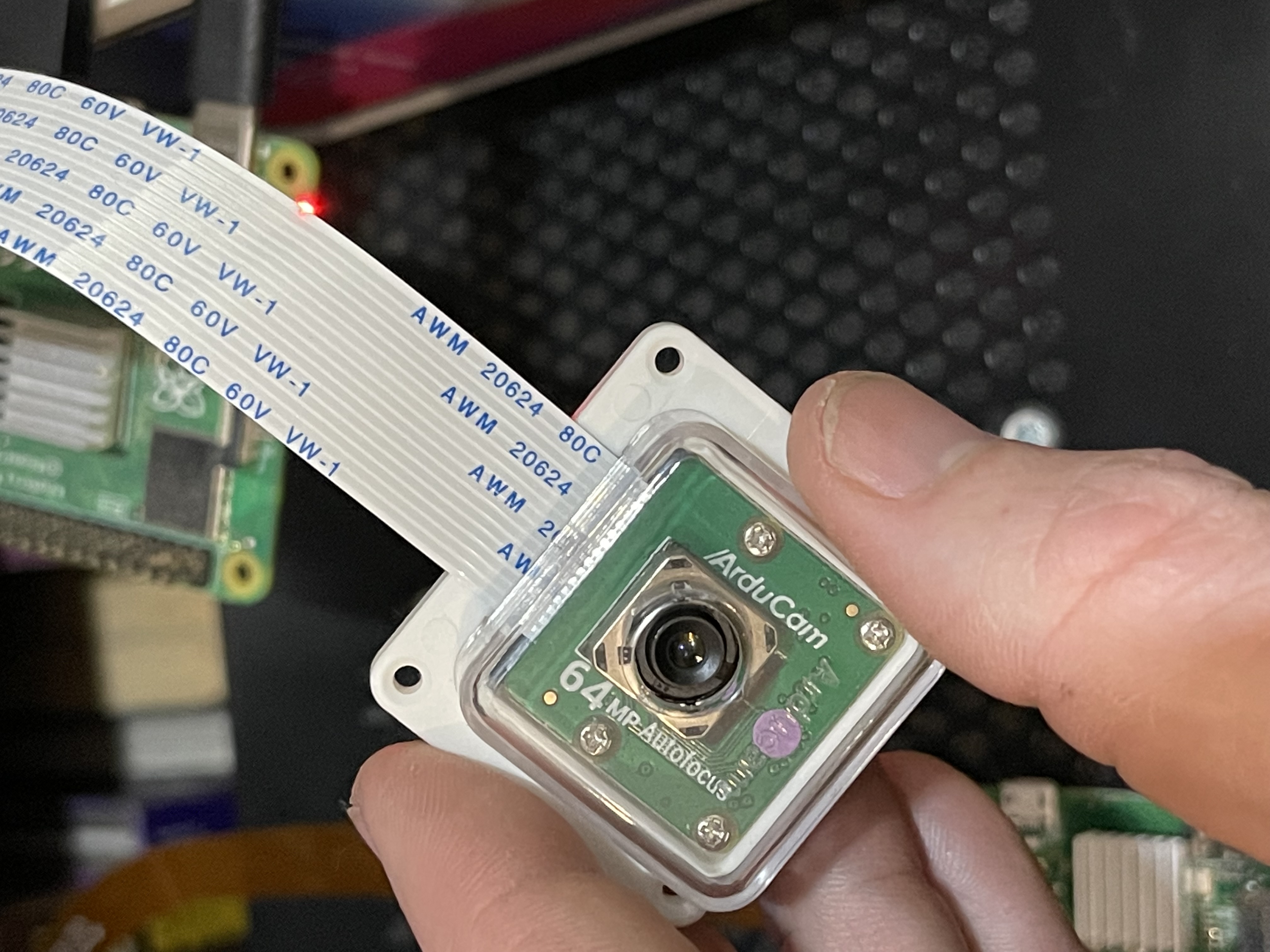
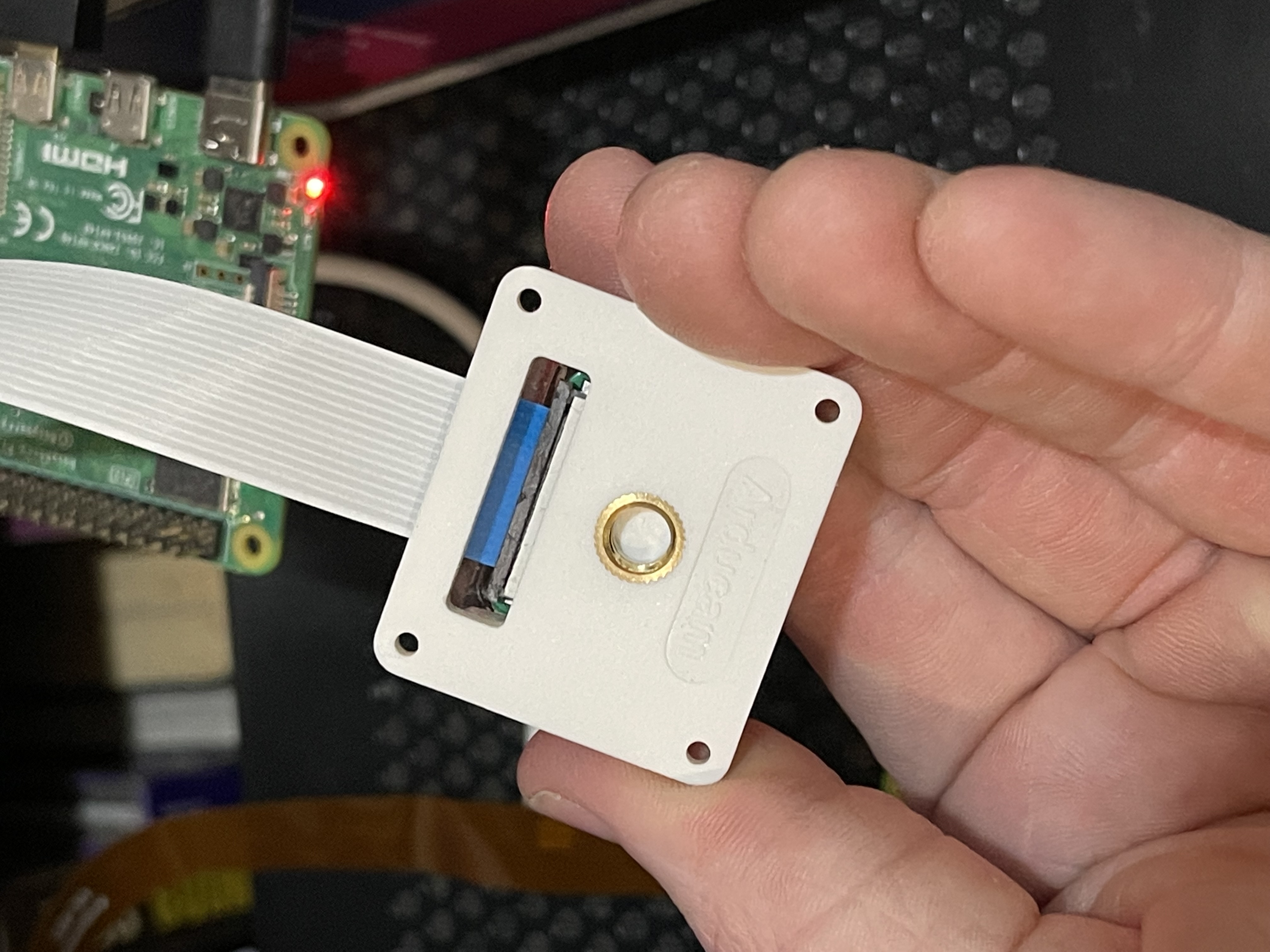
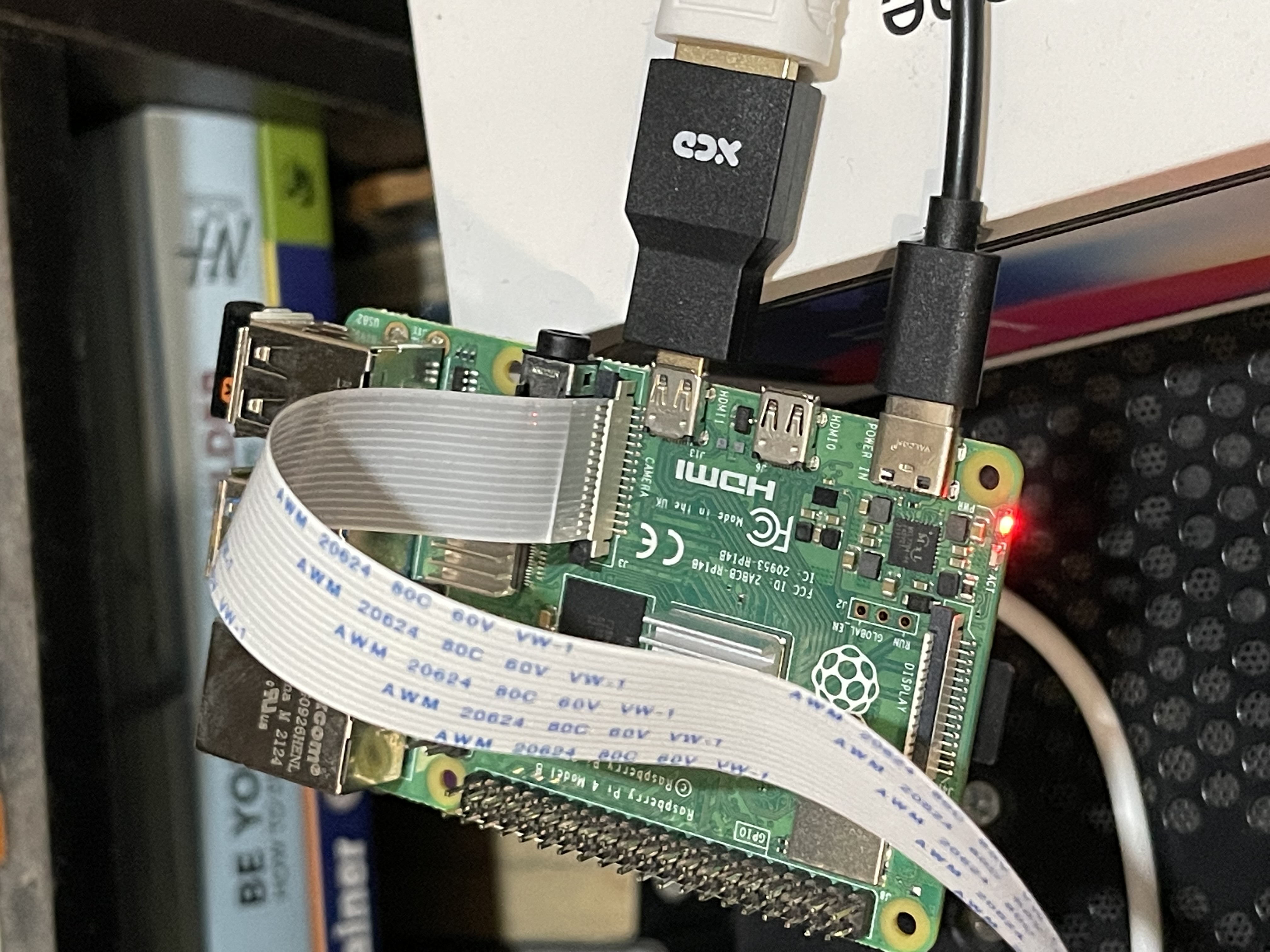
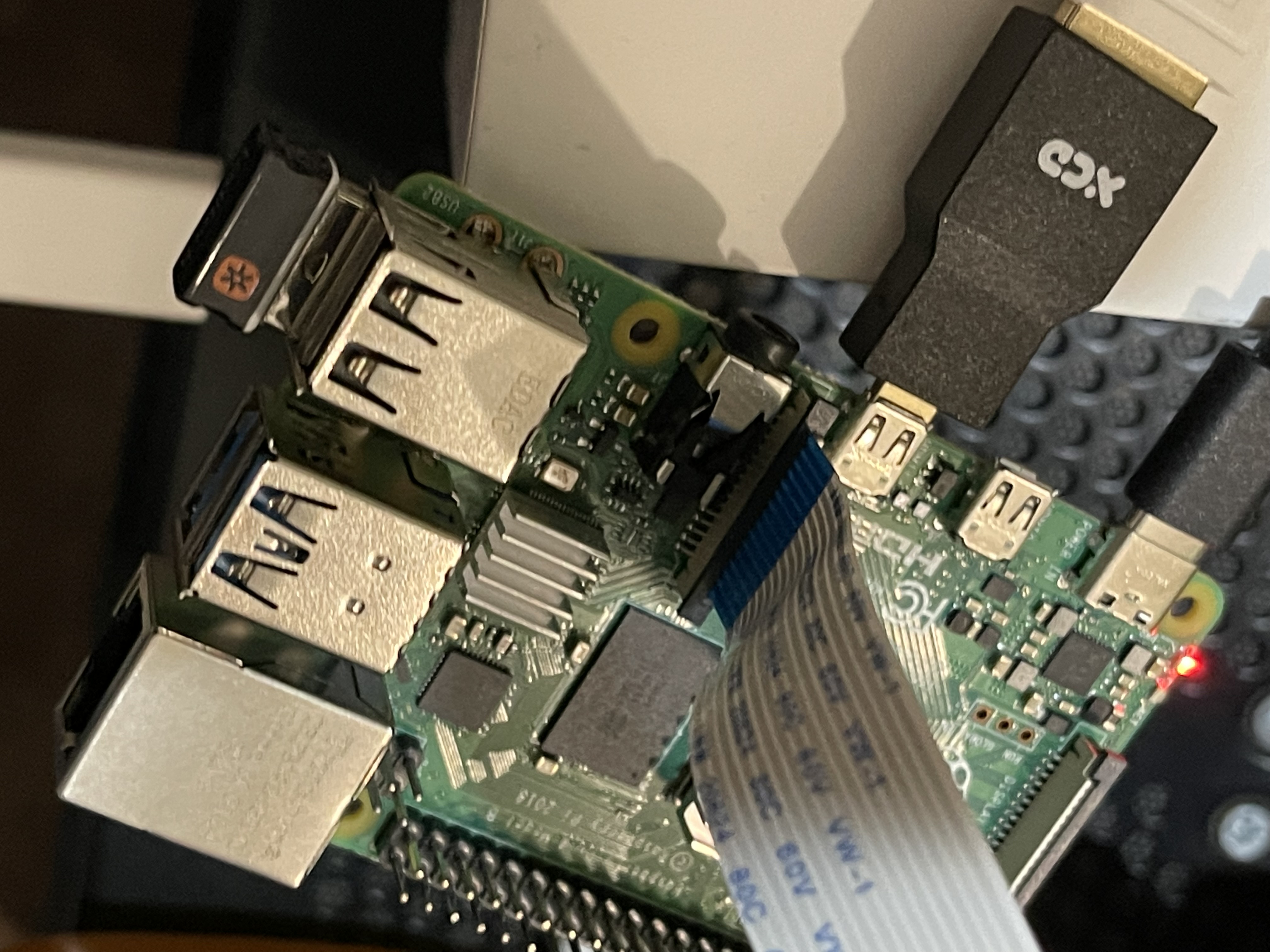
That’s a lot of detail, thanks - and props for being thorough with the swaps. Can you also post clear photos of how the camera is currently connected, both at the camera end and the Pi end? And if you’ve generated any bug report file, attach that too. I want to confirm the physical connection before we go further.

Here are the photos of the connections:

Photo 9-6-2022, 1 43 53 pm.jpg
Photo 9-6-2022, 1 43 55 pm.jpg
Photo 9-6-2022, 1 43 59 pm.jpg
Photo 9-6-2022, 1 44 02 pm.jpg

And a bug report file I captured:
bug.txt

Thanks - this is all really helpful.

Good news first: looking at your photos, the hardware connection is fine. There’s nothing wrong with how the ribbon cable is seated on either end. And reviewing your system info and config file, I don’t see any extra problems either - dtoverlay=arducam_64mp is present, kernel is 5.15.32-v8+, and you’re on Debian 11 (bullseye), which all looks correct.

The part that stands out is this from dmesg:

arducam_64mp 10-001a: failed to read chip id 682, with error -5
arducam_64mp: probe of 10-001a failed with error -5

That means the driver couldn’t read the sensor’s chip ID over I2C during probe. Since we’ve ruled out wiring, the fault is most likely in the software/firmware side - the libcamera packages or the camera stack - rather than the physical connection.

To pin down the exact cause, I need two more pieces of data from you:

  1. Libcamera package status:
dpkg -l | grep libcamera
  1. A fresh diagnostic bug report. Run this and it’ll generate a bug.txt on your Pi:
camera-bug-report -t 5 -o bug.txt -c "libcamera-still -t 1000 -o test.jpg"

Please send back the bug.txt file together with the output of the libcamera check.

Just to confirm - I won’t have to redo the whole ribbon cable setup right? I’ve done that combination search like ten times already.

(Sending over the libcamera output and the new bug.txt as soon as I run those two commands.)

No need to touch the ribbon cable at all - we already confirmed that side is good, so hold off on re-seating anything.

I’ll also send you a private message with a couple of extra diagnostic pointers so we don’t clutter the thread. Please check your messages when you get a chance. For now, the two commands in my last post are the important ones.

Got your message, thanks. Here’s the libcamera package output:

pi@raspberrypi:~ $ dpkg -l | grep libcamera
ii  libcamera-apps   0.0.7   arm64   libcamera-apps
ii  libcamera-dev    0.0.7   arm64   libcamera

And I’ve attached the new bug.txt from the camera-bug-report command. Let me know what you find.

Thanks - that’s everything I need for now. Quick recap of where we stand so far:

  • Hardware connection is verified as fine (photos confirm it, and you’ve swapped cables/cameras extensively).
  • Your system info and config are correct, so nothing obvious is misconfigured there.
  • The key clue is the dmesg error arducam_64mp 10-001a: failed to read chip id 682, with error -5, which means the driver couldn’t read the sensor chip ID over I2C and the probe failed. That points at the camera stack / libcamera packages rather than the wiring.
  • Your installed libcamera packages are at version 0.0.7 (libcamera-apps and libcamera-dev).

I’m going through the bug report now to work out the exact cause and the right fix. I’ll follow up as soon as I have a conclusion - and if anything else comes up, I’ll post it here and update you privately if needed.